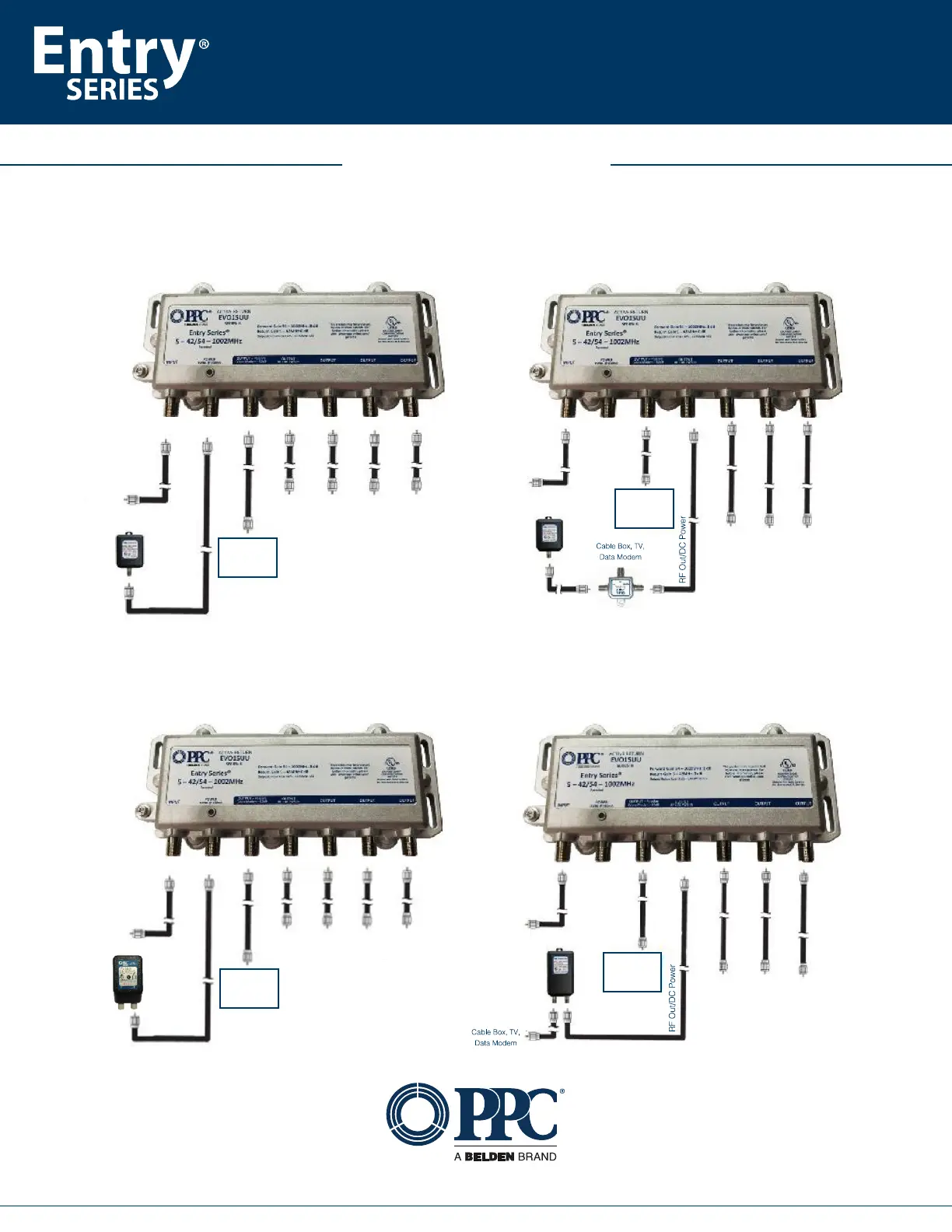
Powering using the single port PPC-PS15450 power supply
Installation
Guide
This product may be protected by one or more patents. For further information, please visit: www.ppc-online.com/patents
6176 E. Molloy Rd. East Syracuse, NY 13057 U.S.A. | customerservice@ppc-online.com
• 1-800-800-6652 • +1 315-431-7200
Powering using the dual port PPC-PS15450PI power supply with a built-in power inserter
Cable Box, TV, Data Modem
Voice Modem
or
eMTA/MTA
Voice Modem
or
eMTA/MTA
From
Tap
Cable Box, TV,
Data Modem
From
Tap
Voice Modem
or
eMTA/MTA
Cable Box, TV, Data Modem
From
Tap
From
Tap
Voice Modem
or
eMTA/MTA
Cable Box, TV,
Data Modem
Connect the power supply’s “To
Amplifier” port to the “Power” port
on the amplifier.
The unused port on the power
supply does not need to be
terminated.
Direct powering Indirectly powering via a power inserter
Direct powering Indirectly powering via a power inserter
Installation Examples:


 To Previous Page