EasyManua.ls Logo

Belkin Conserve - User Manual

Belkin Conserve
2 pages
Print Icon
To Next Page IconTo Next Page
Loading...
Conserve
Advanced Surge Protector with Energy-Saving Remote Switch
2. Operation
The Conserve energy-saving surge protector is already preset to work
with the wireless remote switch. Only adjust the channel setting if:
• YouhavemorethanoneConservesurgeprotectorand
want to control each one independently.
• YouwanttocontrolmorethanoneConservesurge
protector using the same wireless remote switch.
• Youthinkthereisinterferenceonthepresetchannel
and you want to try other channels.
Syncing your Conserve Surge Protector and Wireless Remote Switch
To change the channel setting, use a small screwdriver to shift the keys on the
surge protector and the wireless remote switch. Make sure the keys on the
wireless remote switch and the surge protector have the same configuration
(up to eight possible settings). For ultimate convenience, control multiple
Conserve surge protectors with a single remote switch. Adjust the channel
setting on each Conserve unit to match the setting on the remote switch
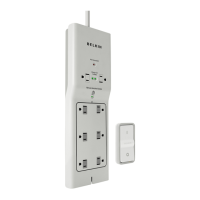
Manual Override Switch and
Indicator Light
Two (2) Always On Outlets
Grounded Indicator Light
Sliding Safety Covers
Six (6) Remote
Switched Outlets
Coaxial Connectors (1 in, 1 out)
Cable Management System
(Clip not shown)
Always On
Indicator Light
Detachable Wireless Remote
Switch with Wall-Mount
Channel Selector
(Back of Remote)
1. Introduction
Thank you for purchasing the Conserve energy-saving surge protector from Belkin.
Many devices today are never truly off but instead continue to consume electricity
while in a standby mode. Standby mode or “phantom power” is wasted energy and
it adds up quickly. Conserve makes it easy to reduce your electricity consumption by
completely turning off the power to electronic devices when they are not in use.
To find out more about how you can save energy, go to www.belkin.com/conserve.
Please be sure to read through this User Guide carefully to ensure
proper installation and setup of the Conserve surge protector.
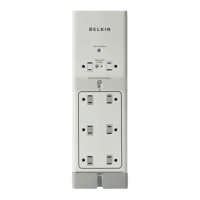
Channel Selector
(Back of Surge Protector)
Question and Answer IconNeed help?

Do you have a question about the Belkin Conserve and is the answer not in the manual?

Overview

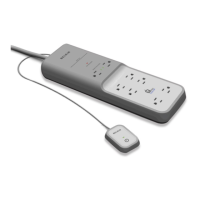
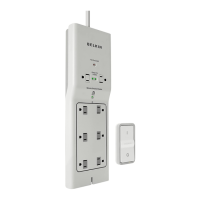
The Belkin Conserve is an advanced surge protector designed to reduce electricity consumption by completely turning off power to electronic devices when they are not in use, thereby combating "phantom power" or standby energy waste. This energy-saving device comes with a detachable wireless remote switch for convenient control.

Function Description

The primary function of the Belkin Conserve is to provide surge protection for electronic devices while also offering energy-saving capabilities. It features eight outlets in total: two "Always On Outlets" and six "Remote Switched Outlets." The "Always On Outlets" are continuously powered when the surge protector is plugged in and are intended for devices that require constant power. The "Remote Switched Outlets" are controlled wirelessly by the included remote switch, allowing users to easily cut power to connected devices when they are not in use, thus eliminating standby power consumption.

The device also includes coaxial connectors (1 in, 1 out) for protecting connected audio/video equipment from surges. A cable management system (clip not shown) is integrated to help route and organize cables, contributing to a tidier setup.

Important Technical Specifications

While specific electrical ratings like joule rating, clamping voltage, and maximum current are not detailed in the provided manual, the device is described as an "Advanced Surge Protector," implying it meets industry standards for surge protection.

  • Outlets: 8 total outlets (2 Always On, 6 Remote Switched).
  • Wireless Control: Operates via a detachable wireless remote switch.
  • Remote Battery: Uses an A23 (12V) alkaline battery (included).
  • Wireless Range: Up to 20 meters (actual range may vary due to interference, building materials like masonry or metal walls, and other location-specific conditions).
  • Channel Settings: Features up to eight possible channel settings for the wireless remote switch and surge protector, allowing for independent control of multiple units or control of multiple units with a single remote.
  • Coaxial Protection: Includes 1 in, 1 out coaxial connectors.
  • Mounting: The surge protector has two mounting holes for optional wall or baseboard attachment. The remote switch includes a wall-mount bracket with options for adhesive tape or screws.
  • Environmental: Designed for indoor use and dry locations only. Not suitable for use with aquariums or other water-related products.

Usage Features

  • Energy Saving: Directly addresses "phantom power" by allowing users to completely cut power to devices when not in use, reducing electricity consumption and saving money.
  • Wireless Remote Control: The detachable wireless remote switch provides convenient control over the six "Remote Switched Outlets." A green LED on the remote illuminates when pressed, indicating signal transmission and good battery status.
  • Easy Setup: The surge protector is pre-set to work with its wireless remote switch, minimizing initial setup effort.
  • Customizable Control: Users can adjust channel settings on both the surge protector and the remote switch to:
    • Control multiple Conserve surge protectors independently.
    • Control multiple Conserve surge protectors using a single wireless remote switch.
    • Address potential interference by trying different channels.
    • Channel adjustment is done using a small screwdriver to shift keys on both the surge protector and the remote.
  • Flexible Remote Placement: The wireless remote switch can be mounted on a wall using the included bracket (adhesive tape or screws) or kept conveniently on a table or by a bed.
  • Always On Outlets: Two dedicated outlets ensure essential devices (e.g., routers, modems, security systems) remain powered even when the remote-controlled outlets are off.
  • Manual Override: The surge protector includes a manual override switch and indicator light, offering an alternative way to control the remote-switched outlets directly on the unit.
  • Safety Covers: Sliding safety covers are present on the outlets to prevent accidental contact.
  • Cable Management: A detachable cable management system helps keep connected cables organized and tidy.

Maintenance Features

  • Battery Replacement: The wireless remote switch uses an A23 (12V) alkaline battery. The manual provides instructions for replacing the battery: remove the battery security tab before first use, and replace the battery when the green LED on the remote no longer illuminates when pressed. To replace, remove the battery cover from the back of the remote.
  • Cleaning: To reduce the risk of electrical shock, the unit should be unplugged and allowed to cool before cleaning. Specific cleaning agents or methods are not detailed, but general electrical device cleaning practices would apply (e.g., dry cloth).
  • Proper Connection: The Belkin Conserve's power cord must be plugged directly into an AC power source to ensure proper surge protection. It should not be "daisy-chained" with other products or used with extension cords.
  • Channel Adjustment: If interference is suspected or if multiple units need to be managed, the channel settings can be easily adjusted using a small screwdriver.

The Belkin Conserve aims to be a user-friendly solution for both surge protection and energy conservation, offering flexibility in control and placement while emphasizing safety and ease of use.

Belkin Conserve Specifications

General IconGeneral
BrandBelkin
ModelConserve
CategorySurge Protector
LanguageEnglish

Related product manuals