Need help?
Do you have a question about the Bellhowell BH1025HD and is the answer not in the manual?
Covers manual's purpose, copyright, FCC, RF, and CE warnings.
Details camera, battery, and USB adapter handling safety.
Identifies and labels the physical components of the device.
Labels and identifies the various buttons on the device.
Details the specific function of each button for device operation.
Guides on how to insert the memory card into the device.
Instructions for charging the battery and turning the device on/off.
How to switch between modes and use the digital zoom.
Details the icons and displays specific to Photo Mode.
Details the icons and displays specific to Video Mode.
Instructions for adjusting eye piece distance and focusing.
How to adjust eyepieces for users who wear glasses.
Guidelines for cleaning and maintaining the binoculars.
Provides quick tips for operating camera modes and zoom.
Step-by-step guide for taking photos.
Step-by-step guide for recording videos.
How to access and navigate the device's main settings menu.
How to set photo resolution and configure the self timer.
How to set video resolution and loop recording duration.
How to adjust the frame rate for video playback speed.
Adjusts screen brightness, screen saver, and auto power off.
Settings for language, volume, and memory card formatting.
How to set date/time and restore factory default settings.
How to view the camera's firmware version.
How to play back captured photos and videos.
How to delete photos and videos from the memory card.
Instructions for connecting the device to a computer for data transfer.
Lists detailed technical specifications of the product.
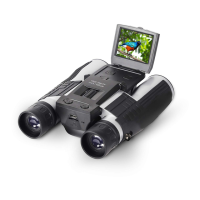
The Bell+Howell BH1025HD Digital Camera Binoculars are a versatile optical and imaging device designed for users to observe distant subjects and capture photos and videos. This manual provides comprehensive instructions for its operation, maintenance, and safety.
The BH1025HD combines the functionality of traditional binoculars with a digital camera, allowing users to not only view magnified scenes but also record them. It features an integrated LCD screen for framing shots and reviewing captured media. The device supports various photo resolutions and video recording qualities, catering to different user needs for image detail and file size. A digital zoom function enhances the ability to bring distant subjects closer in both viewing and recording modes.
The binoculars operate across three primary modes: Photo Mode, Video Mode, and Playback Mode. In Photo Mode, users can capture still images with options for resolution, self-timer, and photo burst. Video Mode enables recording of moving footage, offering settings for video resolution, loop recording duration, and frame rate. Playback Mode is dedicated to reviewing and managing captured photos and videos directly on the device.
For connectivity, the BH1025HD includes a USB port, allowing users to connect it to a computer for downloading media files. It also features a microphone for audio recording during videos and a speaker for playback. The device is powered by a rechargeable lithium-ion battery, with charging facilitated via an included AC adapter and USB cable.
Operating the BH1025HD involves a straightforward button interface. The Power button, when pressed and held for 3 seconds, turns the device on or off. The Mode button cycles through Photo, Video, and Playback modes, indicated by an icon on the LCD screen. The Menu button provides access to all settings and submenus, allowing users to customize various parameters.
The Left | Zoom In and Right | Zoom Out buttons serve multiple purposes. In Photo or Video modes, pressing and holding these buttons controls the digital zoom. In menu navigation, they are used to scroll through options. In Playback Mode, they allow users to scroll through the media gallery. The Photo | OK button is central to capturing media and confirming selections. In Photo Mode, a tap captures a photo. In Video Mode, a tap starts and stops recording. In menus, it acts as an "OK" button to confirm settings.
Adjusting the binoculars for optimal viewing is crucial. Users can adjust the eyepiece distance by grasping the barrels and moving them closer or further apart until a single, clear circle is seen. Focusing is achieved by closing one eye and rotating the central Focus Knob until the view is clear, then repeating the process with the other eye and adjusting the right eyepiece. For glasses wearers, rubber flaps around the eyepieces can be folded down to bring the glasses closer to the lenses.
The device offers several customizable settings through its menu system. Photo resolution can be set from 3MP up to 48MP, impacting image quality and file size. A self-timer function allows for delays of 2, 5, or 10 seconds before a photo is taken. Photo Burst mode captures 3 consecutive pictures automatically. Video resolution options include 2.5K UHD, 1080P FHD, and 720P. Loop recording can be set for durations from 1 to 10 minutes, creating seamless video clips. The video frame rate can be adjusted for normal, slow, or fast playback.
Other useful settings include a Time Stamp function to imprint date and time on recorded media (which cannot be removed once applied), Screen Brightness adjustment for the LCD, and a Screen Saver to conserve power by turning off the screen after a set period. An Auto Power Off feature automatically turns off the camera after a period of inactivity. The interface language and volume level can also be customized. For data management, the Format Memory Card option allows users to erase all data on the inserted memory card (a permanent action). The Restore Default Setting option resets all menu settings to factory defaults without affecting stored media.
In Playback Mode, users can cycle through captured photos and videos using the Left and Right buttons. While viewing an image, the Left and Right buttons can be used to zoom in and out, and to pan around a zoomed image. The Photo button plays videos. Media can be deleted individually or all at once via the 'Delete' submenu.
Proper care and maintenance are essential for the longevity and optimal performance of the BH1025HD. The manual provides clear guidelines:
 General
| Magnification | 10x |
|---|---|
| Objective Lens Diameter | 25mm |
| Waterproof | Yes |
| Exit Pupil | 2.5mm |
| Eye Relief | 10mm |
| Fogproof | Yes |

 To Next Page