
 Need help?
Do you have a question about the Beltronics Professional Series and is the answer not in the manual?
Step-by-step guide to entering and navigating program settings.
Introduction to the 6 user-selectable customization options.
Summary of the programming process and available categories.
In-depth explanation of each programmable feature.
Adjusting X-band sensitivity in City mode.
Explanations of various radar and laser alert patterns.
Addresses issues like no alert, low sensitivity, and display problems.
Steps for obtaining service and repair for the device.
Details of the manufacturer's warranty coverage and exclusions.
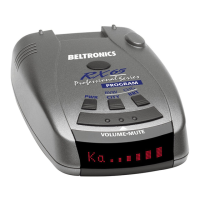
The Beltronics Pro200 is an advanced radar, laser, and safety detector designed to provide comprehensive protection and customizable features for drivers. Its primary function is to detect various radar and laser signals, alerting the user to potential threats on the road.
The Pro200 offers full X, K, SuperWide Ka, and Safety Warning System (SWS) radar detection capabilities. It also provides front and rear laser detection. At its core, the device utilizes a varactor-tuned (VTO) microwave receiver and digital signal processing (DSP) to achieve superior range and effectively reduce false alarms. When a signal is detected, the Pro200 provides both audible and visual band alerts, ensuring the driver is informed of the threat type and strength.
A key feature is the new AutoScan mode, which intelligently reduces unwanted false alarms by continuously analyzing incoming signals and filtering out non-police radar. This mode is recommended for most driving conditions, offering long-range warning with minimal false alerts. For urban areas where X-band intrusion alarms and door openers are common, the user can switch to City mode, which lowers X-band sensitivity to reduce nuisance alerts while maintaining full sensitivity on other bands. A conventional Highway mode is also available for maximum sensitivity.
The device is also capable of detecting and decoding Safety Warning System (SWS) messages. These messages, transmitted on a modified K-band radar signal, provide alerts about highway construction, road hazards, and travel information, enhancing overall road safety. The Pro200's proprietary Traffic Signal Rejection (TSR) software further refines its performance by intelligently sorting, ranking, and rejecting excessive alerts from erroneous X and K-band sources, such as traffic flow monitoring systems, ensuring that only genuine threats trigger alerts.
The Pro200 is designed for ease of use with several customizable features. The ultra-bright text display provides clear and easy-to-read information from any angle, showing the selected sensitivity mode (Highway, AutoScan, or City) as its power-on indication. During an alert, the display indicates the radar band and a precise bar graph of signal strength.
One of the most significant usage features is the Pro200's programming mode, which allows users to customize up to six features to suit their preferences. These programmable options include:
To enter programming mode, users press and hold both the CITY and BRT buttons for two seconds. The RVW button is used to review current settings, and the CHG button is used to change settings. The device confirms programming completion with a "Complete" message and a series of beeps. For quick reset to factory default settings, users can press and hold the CITY and BRT buttons while turning the power on.
The Pro200 also includes a Volume/Mute button. Pressing and holding this button adjusts the alert volume, while a brief press silences the audio for a specific alert, automatically resetting for the next encounter. The BRT button adjusts display brightness, offering maximum, medium, minimum, and dark mode settings. In dark mode, the display provides a very inconspicuous power-on indication and does not show visual alerts during detection, relying solely on audible alerts.
The Pro200 is designed for reliable operation with minimal maintenance. For optimal performance, it is important to ensure the device is mounted level and high on the front windshield, providing a clear view of the road ahead and behind, and away from windshield wipers, other solid objects, and heavily tinted areas that might obstruct the radar antenna or laser lens.
The QuickMount bracket facilitates unobtrusive and hassle-free mounting. To ensure the suction cups adhere firmly, both the windshield and suction cups should be kept clean. The QuickMount button allows for easy adjustment of the Pro200's position on the windshield and quick removal of the device from the mount.
For power connection, the small end of the power cord plugs into the side jack of the detector, and the large end plugs into the vehicle's lighter socket. The Pro200 operates on 12 volts DC negative ground only. Users should ensure their lighter socket is clean and properly connected. Optional SmartCord or Direct-wire power cords are available for alternative power solutions.
In case of any issues, a troubleshooting section in the manual provides solutions for common problems, such as persistent false alerts, perceived insensitivity, or display malfunctions. If the device requires service, Beltronics offers a service procedure that includes checking the troubleshooting guide, calling customer service for phone support, and if necessary, sending the device to the factory for repair. Beltronics also provides an optional extended service plan for continued protection.
 General
| Type | Radar Detector |
|---|---|
| Power Supply | 12V DC |
| Frequency | X, K, Ka |
| Display | LED |
| Mounting | Windshield or dash |

 To Next Page