7
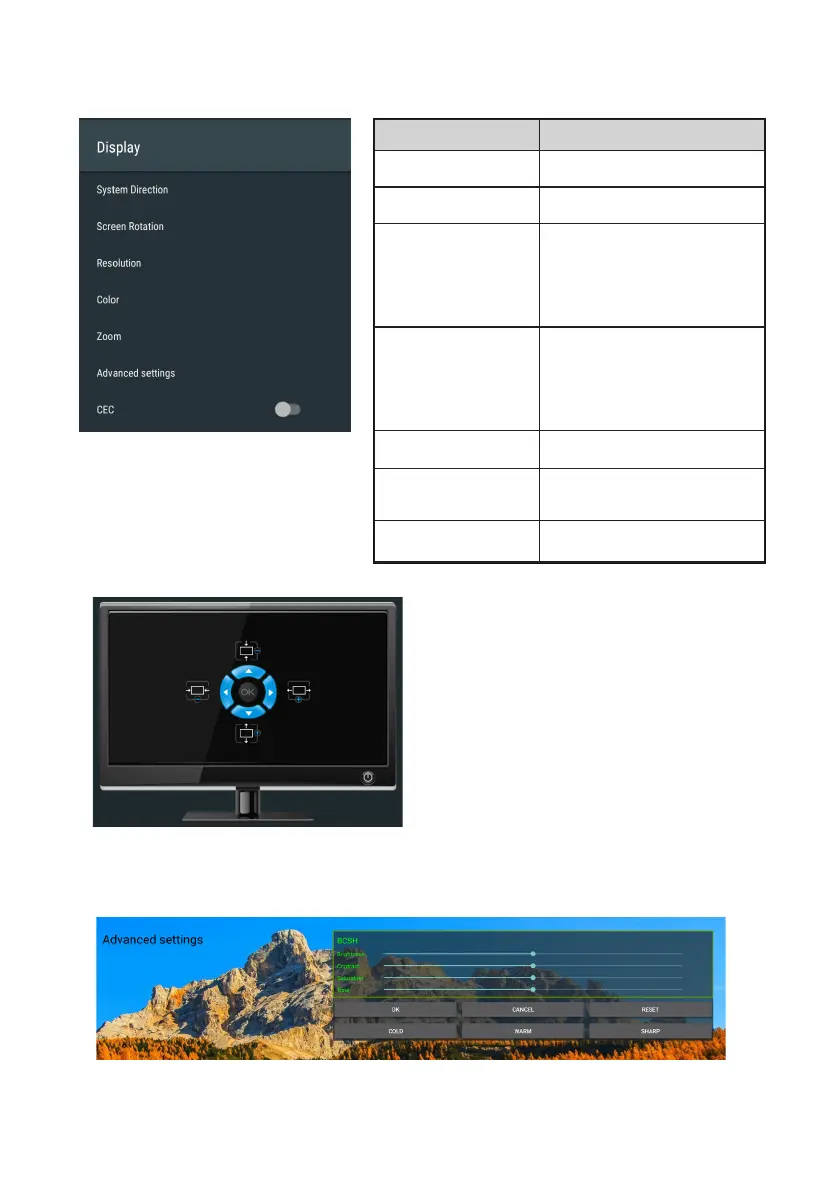
Display
Menu Description
System Direction
Sets system
orientation(0/90/180/270).
Screen Rotation
Sets system
orientation(0/90/180/270).
Resolution
Adjusts the resolution of the display(3
840×2160p25.00/3840×2160p24.0
0/1920×1080p60.00/1920×1080i60
.00/1920×1080p30.00/1920×1080
p24.00/1920×720p60.00/1920×48
0p59.94).
Color
Adjusts the saturation of the
display(Auto/RGB-8bit/RGB-10bit/
YCBCR444-8bit/YCBCR444-
10bit/YCBCR422-8bit/
YCBCR422-10bit/YCBCR420-
8bit/YCBCR420-10bit).
Zoom
Sets the zoom level.
Advanced settings
Adjusts the Brightness/Contrast/
Saturation/Tone of the display.
CEC
Consumer Electronics Control.
Zoom
Advanced settings


 To Next Page