EN
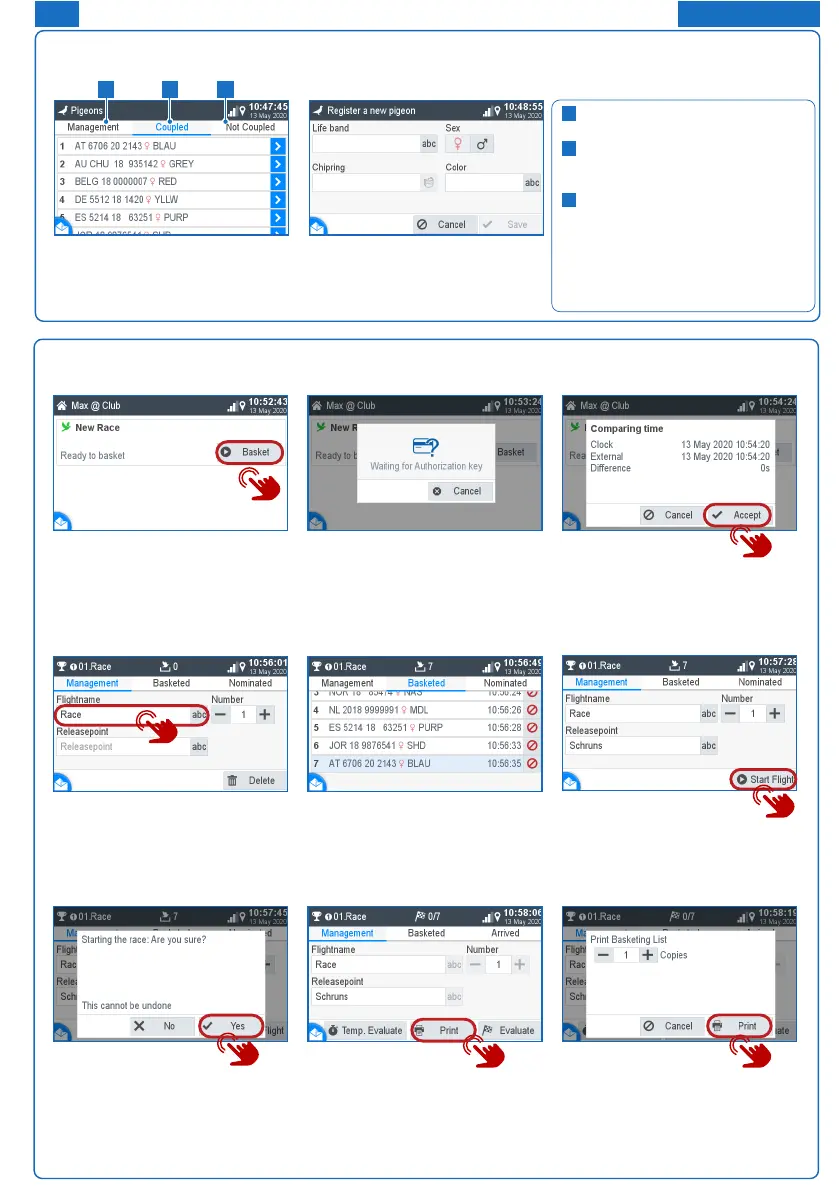
Basketing without a season map
Start basketing:
With the button Basketing you can
start the basketing.
Wait for authorization:
Please hold the authorization card
supplied with the BENZING
ClubSystem antenna.
Time comparison:
1. Check the time for plausibility.
2. The time comparison must be
conrmed with the „Accept“ button.
Management:
1. Enter your ight name
2. Consecutive race number
3. Optionally, you can use one
release location
Basketed:
Now pigeons can be held over the
BENZING ClubSystem antenna.
These are shown here. With
pigeons can be basketed out.
Start the race:
With the button you can start the
race and and at the same time the
basketing ends.
Start the race:
Conrm with Yes to start the race.
Evaluation/Printing:
1. Temporary evaluation:
See the next chapter
2. Printing:
Press the button Print to print
the basketing list.
3. Evaluate: see next chapter
Print basketing list:
1. Determine the number of prints
2. Start printing
Pigeon Management
Register pigeon:
Ring number: The life ring number
is entered here.
Sex: Gender selection.
Chip ring: The assigned chip ring is
displayed here.
Colour: Enter the color of the
pigeon here.
1
2
3
Management:
Register new pigeons
Coupled:
Display of registered pigeons
assigned to a chip ring.
Not coupled:
Display registered pigeons that
are not assigned to a chip ring.
The home button takes you back to
the home start screen.
1
2
3
FOR CLUB


 To Next Page