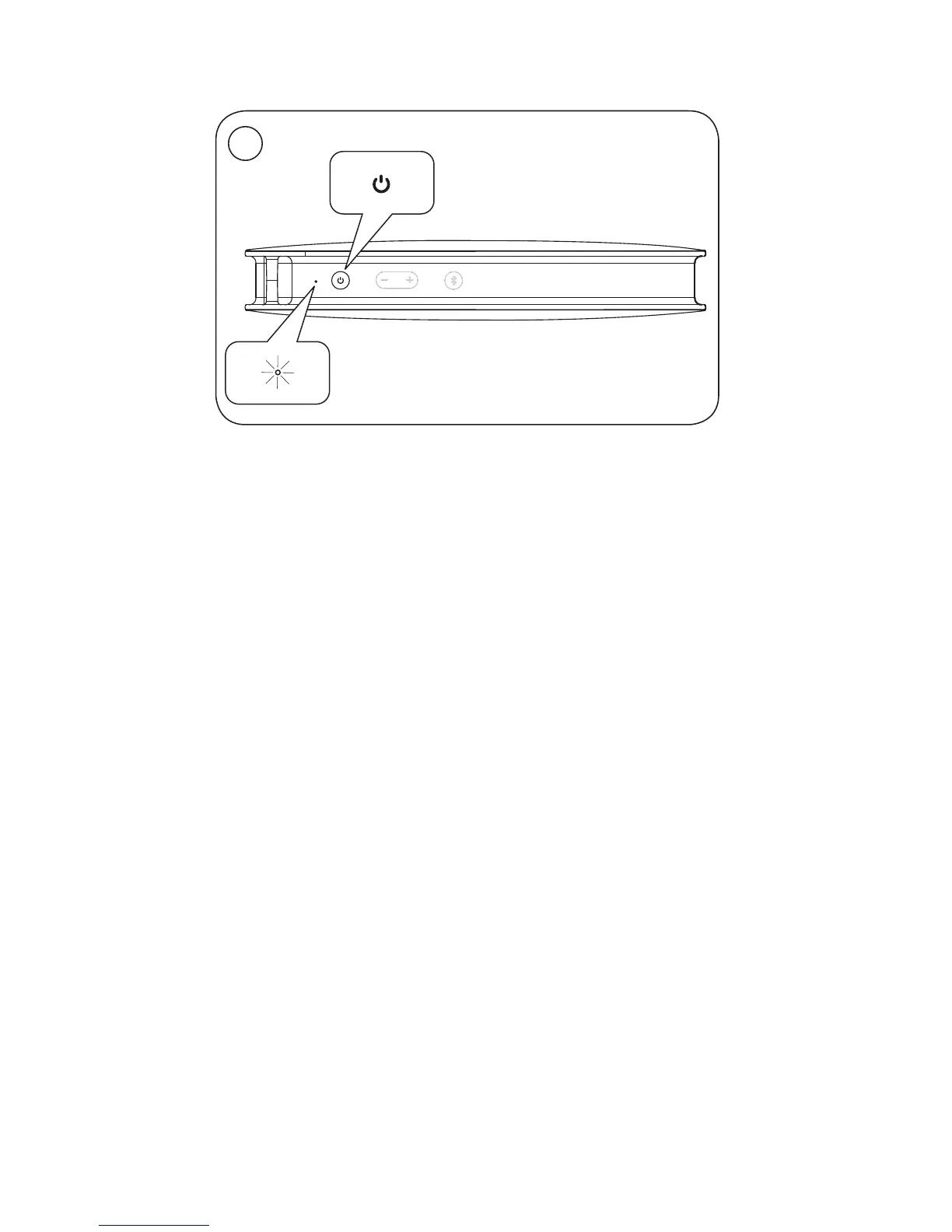
EN Press the power button to switch BeoPlayA2 on.
The product indicator turns solid white.
For first-time setup continue to step 3.
DA Tryk på tændknappen for at tænde BeoPlayA2
Produktindikatoren lyser hvidt.
Fortsæt til trin 3 ifm. førstegangsopsætning.
DE Drücken Sie die Power-Taste, um BeoPlayA2 einzuschalten.
Die Geräteanzeige leuchtet durchgehend weiß.
Bei Erstinbetriebnahme weiter mit Schritt 3.
ES Pulse el botón de encendido para encender BeoPlayA2.
El indicador del equipo se iluminará en color blanco.
Si está configurando el equipo por primera vez, pase al
paso 3.
FR Appuyez sur le bouton d’alimentation pour allumer le
BeoPlayA2. L’indicateur d’état s’allume en blanc de façon
permanente.
S’il s’agit de la première installation, passez à l’étape3.
IT Premere il pulsante di accensione/spegnimento per
accendere il BeoPlayA2. La spia di prodotto si illumina
costantemente in bianco.
Per la prima configurazione, passare al passo 3.
JA 電源ボタンを押してBeoPlayA2を起動します。製品インジケ
ータが白色に点灯します。
初期設定の場合は、手順3に飛びます。
Bluetooth
®
pairing …
4
1


 To Next Page