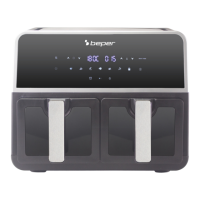
9 Liter Double Basket Air Fryer Use Instructions
17
Production descriptions - Fig. A
1. Main unit
2. Digital control panel
3. Left and right cooking baskets
4. Power cord
5. Right air outlet
6. Left air outlet
7. Cooking basket
8. Removable tray
9. Handle
Digital control panel - Fig. B
1. Power button (On/Off)
2. Start/pause button
3. Delay start timer
4. Preset program menu (a-g)
5. Left basket’s control button
6. Preheat button
7. Timer increase button
8. Timer decrease button
9. Digital display
10. Temperature increase button
11. Temperature decrease button
12. SMART FINISH
13. Right basket’s control button
Preset Program Menu Fig. C
a - vegetables, b - sh, c – shrimps, d - ribs, e - chicken wings, f - pizza, g – chips
Usage
Plug the appliance into an adequate power supply.
To switch on the appliance, press . To switch it off, press and hold . for 3 seconds.
When the appliance is switched on, the digital control display will light up, with 3 icons blinking as
a default: , SMART FINISH and .
● To use only one of the two cooking baskets
Press or and proceed to selecting one of the preset programs from a to g as shown on the
control panel and press . Before and during the operation, cooking time could be adjusted from
1 to 60 minutes by pressing or and the temperature could be adjusted from 80°C to 200°C
by pressing or . A quick touch at or will increase or decrease time by 1 minute, and at
or will increase or decrease temperature by 5°C, while a long press on those buttons will
help set the desired time and temperature more quickly.


 To Next Page
 Loading...