6T8000-02A1
Attention!
• Electrical equipment must be installed and
fi tted by qualifi ed electricians only.
• Failure to observe the instructions may cause
damage to the device and result in fi re or other
hazards.
• This device is not suitable for disconnection of
the mains power supply.
• The DALI control voltage is a functional extra-low
voltage (FELV). During the installation,
ensure there is a safe separation between KNX
and DALI.
1 Keyboard for manual control
2 Push Button and LED indicator for addressing
3 KNX Connection
4 Display of Dali numbers
5 Connection to the network
6 Dali connection.
Control
Control Elements
7571 00 15
all
4 Display of the DALI numbers
- 4
a
DALI Groups
- 4
b
Individual participants
7 Key
: manual control
8 LED
on : Manual mode permanently enabled
9
Key : Turn on or adjust the light intensity
brighter
A LED on : Individual participant or DALI group
enabled : light intensity 1…100%
Z
Key : Turn off or adjust the light intensity
darker
E LED on : Individual participant or DALI
group disabled: light intensity 0%
R
Key
: Turn off all DALI participants.
Operating mode
Bus mode controls via push button
Short-term
manual mode
manual control using the
keyboard, automatic return to
bus mode
Permanent
manual mode
manual control exclusively via
the gateway
H
- In manual mode, a bus mode is not possible.
- In the event of a failure of the bus, manual
control is possible.
- After the bus failure and a return to service, the
device operates in bus mode.
- After a power cut and a return to service, the
gateway operates in bus mode.
- Manual mode is disabled by a telegram in current
mode.
Enabling short-term manual mode
The operation of the keyboard is programmed and
is not locked.
- Press the
key briefl y (<1 second). 01 is
displayed on the screen, the
LED remains
off or
est affi ché sur l’écran : la passerelle n’est
pas programmée, tous les participants DALI
connectés sont commande en commun. Dans
ce mode la commande individuelle de participant
n’est pas possible.
Disabling short-term manual mode
The gateway is in short-term manual mode.
- No manipulation for 5 seconds
or
- Short press on the
key (<1 second) until the
gateway exits short-term manual mode. The
display turns off.
Enabling permanent manual mode
The operation of the keyboard is programmed and
is not locked.
- Press the
key for at least 5 seconds.
The
LED is lit, 01 is displayed on the screen,
permanent manual mode is enabled.
or
-
is displayed on the screen: the gateway is not
programmed, all connected DALI participants are
jointly controlled. In this mode, individual control
of participants is not possible.
Disabling permanent manual mode
- Press the
key for at least 5 seconds.
The
LED turns off and bus mode is enabled.
Controlling the DALI participants
The gateway is in permanent or short-term manual
mode.
-
Press briefl y on the key ( < 1 second) until the
n u m b e r o f t h e d e s i r e d D A L I p a r t i c i p a n t i s d i s p l a ye d
The
and LEDs display the status.
- Control the DALI participant with the key or
with the
key Short press : turns on and off
Long press : varies the light intensity brighter/
darker
The
and LEDS display the status.
- In permanent manual mode, after having
been through all the available DALI participant
numbers, the gateway exits manual mode after
an additional press.
- The display 4 fi rst shows the number of
available DALI groups 4a, and then the individual
addresses of the DALI participants 4b.
Turning off all the DALI participants
The gateway is in permanent manual mode.
- Press the
key.
All DALI participants are switched off.
Product description
The DALI 75710015 KNX gateway is used to
interface DALI lighting applications with the KNX
system.
Product characteristics
• Controls up to 64 DALI products in up to 32
groups
• Individual control, group control or general control
• 16 scenes
• Effect control for dynamic sequences and sets of
colours
• Reading of the status of DALI products via KNX,
e.g. light intensity, light fi tting fault, etc.
• Manual control of DALI groups
• Priority
• Feedback on the status of switching and the value
of light intensity in bus mode and manual mode
• General status feedback
• General command function
• Emergency lighting function
• Inhibition function for each group
• Separate switching and tripping delay
• Timer function with cut-off pre-warning
• Movement function : in combination with a
presence detector, reduction of the light intensity
when no movement is detected before turning off
• Online or offl ine commissioning of DALI products
with ETS plug-ins
• Overload protection
• Overvoltage circuit breaker
• Possibility to replace an individual DALI product
without software during service
• Operating hours counter
• Delivery status : job-site mode, possibility of
ordering DALI groups using the keyboard. All
DALI products are ordered jointly.
Description
Da+
Da-
L
N
7571
00
15
Area
Line
Ptcp.
Nb.
all
M
Operation instructions
Bedieningshandleiding
Order no./ Ref. Num.
75710015
KNX-DALI gateway
Gateway KNX-DALI
11/2013
6T8000-02A
z i
Berker GmbH & Co. KG
Klagebach 38
58579 Schalksmühle/Germany
Telefon: + 49 (0) 23 55/90 5-0
Telefax: + 49 (0) 23 55/90 5-111
www.berker.com


 To Next Page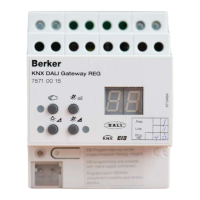


 General