Bluetooth switch LED indicators
DPI switch key and LED indicators
There are three available DPI settings: The blink on the key indicates the
DPI setting in use.
Note: The default setting is 1600 DPI.
Connecting your mouse to your computer
Connecting with Bluetooth
1 Turn on Bluetooth on your computer or plug in a Bluetooth dongle.
See your computer’s documentation for Bluetooth pairing instructions.
2 Slide the power switch on the bottom of your mouse to ON.
Note: If the power switch is already on, use a pin to press the Connect button
instead.
3 Select Bluetooth Mouse from your computer’s Bluetooth menu. When
paired, the LED indicator turns o.
Notes:
• When your mouse connects to your computer, the LED blinks three times, then
turns o. If your mouse cannot connect to your computer, the LED blinks for
10 minutes, then turns o.
• If pairing fails, repeat these steps.
Installing the mouse batteries
1 Take the battery cover o.
2 Insert the included AAA batteries into the battery compartment.
Make sure that the + and - signs match the symbols on the ribbon in
the compartment.
3 Replace the battery cover.
4 Slide the power switch on the bottom of your mouse to ON.
Mouse features
Package contents
• Bluetooth mouse
• AAA batteries (2)
• Quick Setup Guide
System requirements
• Compatible with Windows® 10, macOS and Chrome OS®
Before using your new product, please read these instructions to prevent any damage.
Bluetooth Mouse
Quick Setup Guide
BE-PMBT6B
Battery cover
Power switch
Connect button
Left button
Right
button
Scrolling wheel
DPI switch key LED indicator
Forward button
Back button
Pull
AAA batteries
FUNCTION
Power on
Low battery warning
Bluetooth pairing mode
DESCRIPTION
LED lights on for 10 seconds, then turns o.
LED blinks once per second for 10 seconds, then turns o.
LED is on after pressing the Connect button.
If pairing is successful, the LED blinks for three times, then
turns o.
If pairing is not successful, the LED blinks for 10 minutes, then
turns o.
DPI:
800 DPI
1300 DPI
1600 DPI
LED INDICATOR:
Turns o
Light dim
Lights bright

 Need help?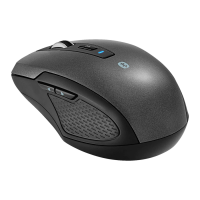

 To Next Page
 General