20
OPERATION - General
The appliance is intended only for domestic use, not for professional use.
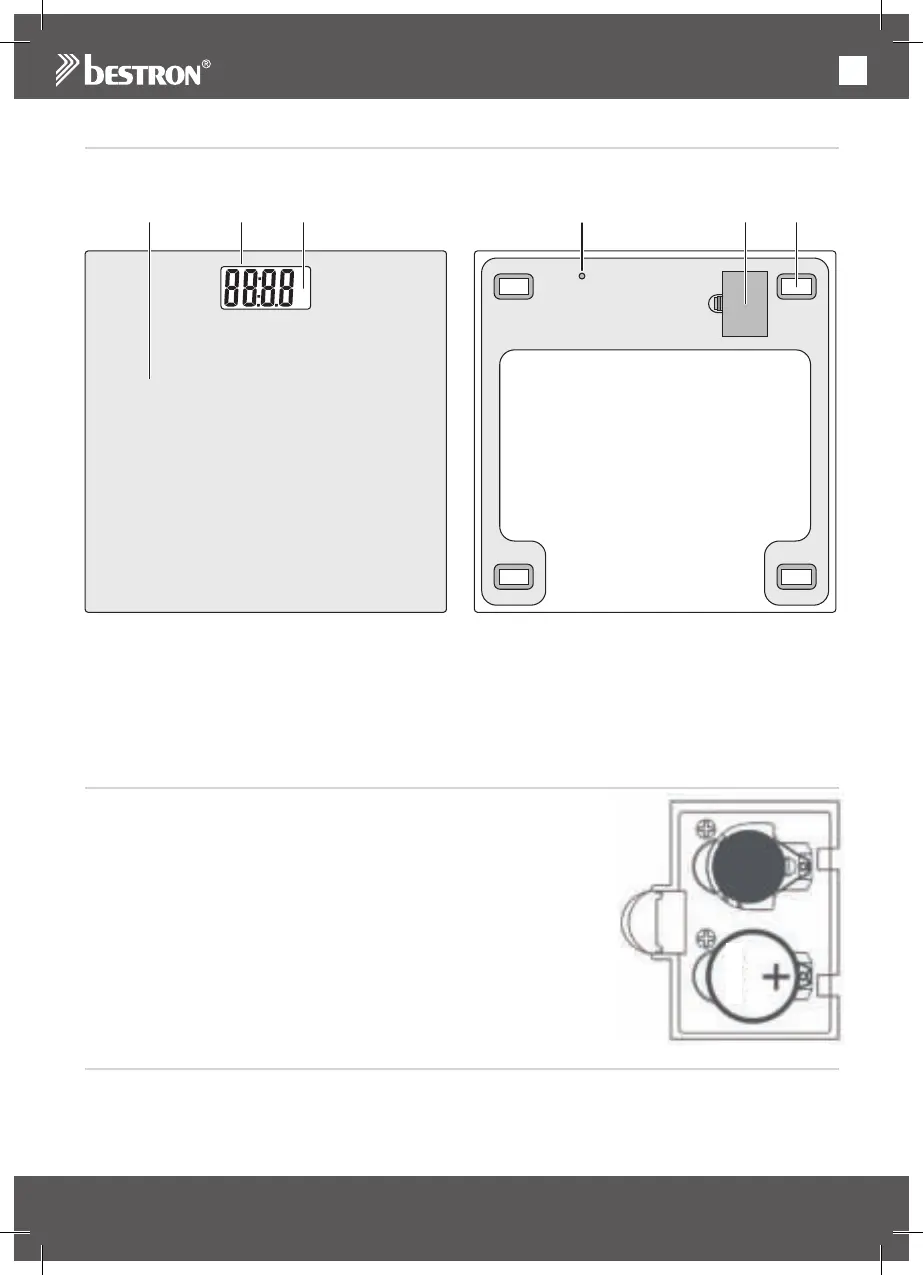
Figure 1
Top side:
1. Weighing platform
2. Weight indication on LCD display
3. Unit indication on LCD display
Bottom side:
4. Unit button
5. Battery compartment
6. Anti-slip feet
OPERATION - Before use
For your convenience, the factory has already placed a battery (type
CR2032) in the appliance.
1. Open the battery compartment (figure 1, no. 5) at the bottom of the ap-
pliance, by pulling back the cap (figure 2).
2. Remove the sticker from the battery before using the appliance.
3. Close the battery compartment.
Figure 2
OPERATION - Selecting the weighing system
Select the weighing system of your choice by pressing the Unit button (figure 1, no. 4) at the bottom of the
appliance. The display (3) alternately shows kg (kilograms) or st:lb (stone and pounds). Your system choice
will be remembered by the appliance after switch-off.
kg
st:lb
UNIT
1
32 4 5 6


 To Next Page