EasyManua.ls Logo

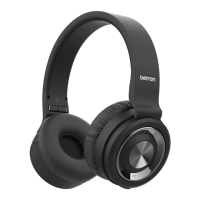
Betron BN15 - User Manual

Betron BN15
13 pages
Print Icon
To Next Page IconTo Next Page
Loading...
BN15
Bluetooth
Headphones
Question and Answer IconNeed help?

Do you have a question about the Betron BN15 and is the answer not in the manual?

Summary

Product Features

Wireless Performance

Features Bluetooth 4.1 for Headset, Handsfree, A2DP, AVRCP protocols, ensuring optimal connection.

Comfort and Design

Designed for long listening with soft, isolating earpads and an adjustable, cushioned headband.

Sound Quality

Equipped with 40mm drivers for punchy bass and crisp treble reproduction.

Durability and Build

Constructed with a metal headband and faux leather/cushions for durability and comfort.

Charging and Battery

Charging Procedure

Connect via USB cable. Full charge takes ~2 hours for 12 hours playback.

Charging Status Indicators

Red light indicates charging, blue light indicates fully charged battery.

Charging Notes and Safety

Power off during charging. Ensure correct cable connection. Max input 5V/2.4A.

Power Management

Turning Power On

Press and hold control button for ~3 seconds. LED lights red.

Turning Power Off

Press and hold control button for ~3 seconds. LED lights purple.

Standby Power Consumption

A small amount of power is consumed even when the device is off.

Bluetooth Connectivity

Device Pairing

Press and hold button for 6s (LED flashes red/blue) to enter pairing mode.

Connecting to Paired Devices

Select "BN15" on your device. LED turns blue upon successful connection.

PIN Code Entry

If prompted, enter "0000" as the PIN code.

Music Playback

Playback Control

Press control button once for play/pause. LED flashes blue during playback.

Track Navigation

Press and hold '+' for next track, '-' for previous track (approx. 1 sec).

Volume Adjustment

Press '+' to increase volume, '-' to decrease. Beep indicates max/min volume.

Phone Call Handling

Making and Receiving Calls

Dial on phone. Answer/end calls by pressing call button.

Call Management

Manage multiple calls, switch between active calls and hold functions.

Ignoring and Switching Calls

Ignore incoming calls or switch calls to the mobile phone.

Troubleshooting Guide

Power and Pairing Issues

Solutions for headphones not turning on or failing to pair Bluetooth devices.

Connectivity Problems

Troubleshooting steps for Bluetooth connection errors and sound output issues.

Audio and Call Issues

Resolving problems with not hearing caller's voice or incorrect Bluetooth connection profiles.

Usage Precautions

Device Compatibility

Ensure compatibility with Bluetooth devices and check volume settings in public.

Bluetooth Range and Profiles

Understand Bluetooth range limitations and required profiles for functionality.

Audio Latency

Note potential slight delay in audio playback compared to the transmitting device.

Disposal of Electrical Items

Environmental Disposal Guidelines

Do not discard with household waste; recycle responsibly to protect environment and health.

User Recycling Information

Contact retailer or local government for proper recycling procedures.

Product Specifications

Headphone Technical Details

Details on drive units, frequency response, impedance, and headphone type.

Bluetooth Technical Details

Lists compatible standards, profiles, codec support, playback time, and charging time.

General Product Information

Includes operating temperature range and power supply specifications.

Summary

Product Features

Wireless Performance

Features Bluetooth 4.1 for Headset, Handsfree, A2DP, AVRCP protocols, ensuring optimal connection.

Comfort and Design

Designed for long listening with soft, isolating earpads and an adjustable, cushioned headband.

Sound Quality

Equipped with 40mm drivers for punchy bass and crisp treble reproduction.

Durability and Build

Constructed with a metal headband and faux leather/cushions for durability and comfort.

Charging and Battery

Charging Procedure

Connect via USB cable. Full charge takes ~2 hours for 12 hours playback.

Charging Status Indicators

Red light indicates charging, blue light indicates fully charged battery.

Charging Notes and Safety

Power off during charging. Ensure correct cable connection. Max input 5V/2.4A.

Power Management

Turning Power On

Press and hold control button for ~3 seconds. LED lights red.

Turning Power Off

Press and hold control button for ~3 seconds. LED lights purple.

Standby Power Consumption

A small amount of power is consumed even when the device is off.

Bluetooth Connectivity

Device Pairing

Press and hold button for 6s (LED flashes red/blue) to enter pairing mode.

Connecting to Paired Devices

Select "BN15" on your device. LED turns blue upon successful connection.

PIN Code Entry

If prompted, enter "0000" as the PIN code.

Music Playback

Playback Control

Press control button once for play/pause. LED flashes blue during playback.

Track Navigation

Press and hold '+' for next track, '-' for previous track (approx. 1 sec).

Volume Adjustment

Press '+' to increase volume, '-' to decrease. Beep indicates max/min volume.

Phone Call Handling

Making and Receiving Calls

Dial on phone. Answer/end calls by pressing call button.

Call Management

Manage multiple calls, switch between active calls and hold functions.

Ignoring and Switching Calls

Ignore incoming calls or switch calls to the mobile phone.

Troubleshooting Guide

Power and Pairing Issues

Solutions for headphones not turning on or failing to pair Bluetooth devices.

Connectivity Problems

Troubleshooting steps for Bluetooth connection errors and sound output issues.

Audio and Call Issues

Resolving problems with not hearing caller's voice or incorrect Bluetooth connection profiles.

Usage Precautions

Device Compatibility

Ensure compatibility with Bluetooth devices and check volume settings in public.

Bluetooth Range and Profiles

Understand Bluetooth range limitations and required profiles for functionality.

Audio Latency

Note potential slight delay in audio playback compared to the transmitting device.

Disposal of Electrical Items

Environmental Disposal Guidelines

Do not discard with household waste; recycle responsibly to protect environment and health.

User Recycling Information

Contact retailer or local government for proper recycling procedures.

Product Specifications

Headphone Technical Details

Details on drive units, frequency response, impedance, and headphone type.

Bluetooth Technical Details

Lists compatible standards, profiles, codec support, playback time, and charging time.

General Product Information

Includes operating temperature range and power supply specifications.

Betron BN15 Specifications

General IconGeneral
TypeIn-ear
Driver Size10 mm
Frequency Response20 Hz - 20 kHz
Impedance16 ohms
Cable Length1.2 m
ConnectivityWired
Connector3.5 mm
Ear CouplingIntra-aural

Related product manuals