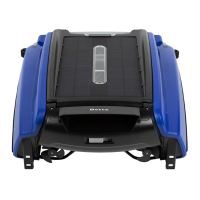
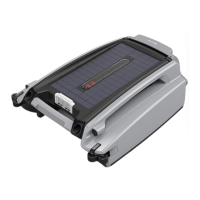
Parts List
1. Cover Lock
2. Distance Measure Sensor
3. LED Status Indictor
4. Guide Wheel
5. Propeller
6. Anti-stranding Bar
7. Solar Panel
8. Power Switch
9. Cover
10. Debris Collection Basket
11. Debris Intake Impeller
12. Handle
4.Using the Pool Cleaner
4.1 Using the unit for the first time
Note: Betta ONLY takes solar charge when power switch is ON
Be sure to watch your steps and maintain your balance when working by
the pool side.
Step 1. Slide the power switch to the position that you can see “ON” mark to turn on
the unit. LED status indicators at front will flash and then the propellers and
impeller will start running.
Step 2. Place Betta into your pool and it will start moving and cleaning the pool’s surface.
Betta runs in either Auto Mode or Remote Control Mode during operation.
Auto Mode
Betta is designed and programmed to be fully self-driving. It maneuvers and
guides itself by reading the sensors and managing operations and charging smartly on
its own. By default, the unit will be working in Auto Mode unless it’s operated by the
remote control.
Remote Control Mode
You can manually control Betta’s movement and travel path in the pool using
included remote control when needed. For example, if you want Betta to go left, just
press and hold the left button on the remote. Remote Mode gives you fast control to
move Betta wherever you want.


 To Next Page
 Loading...