44 45
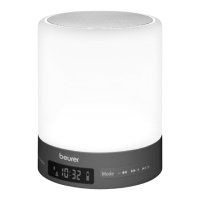
To switch on the “Sleep” function on the wake up light, proceed as follows:
1. Select the desired musical accompaniment to falling asleep with the Mode button. If you do
not wish to have any musical accompaniment, skip this step.
BLUE
= Music via Bluetooth
®
FM
= Radio
SLP
= Sleep melody (sounds of the sea)
▲
▲
button = sounds of the sea o
▲
▲
button = sounds of the sea on
Use the
OK
▲
button to confirm
.
AUX
= Music via an external audio source connected to the AUX input (
e.g. MP3 player,
smartphone or CD player
)
2. Press the Sleep button.
3.
The light will switch on and
15
will appear in the display. Set the desired sunset duration (15, 30
or 60 minutes) using the Sleep button. During the simulated sunset, the mood light first switches
from white to yellow, and finally to red. The sleep function symbol appears on the display.
4. The selected music is switched o automatically after the set sunset has elapsed.
5. To cancel the sleep function early, press and hold the Sleep button for 2 seconds.
The sleep
function symbol disappears from the display.


 To Next Page