english
DT 1770 PRO – Studio Headphone
6
DT 1770 PRO – Studio Headphone
7
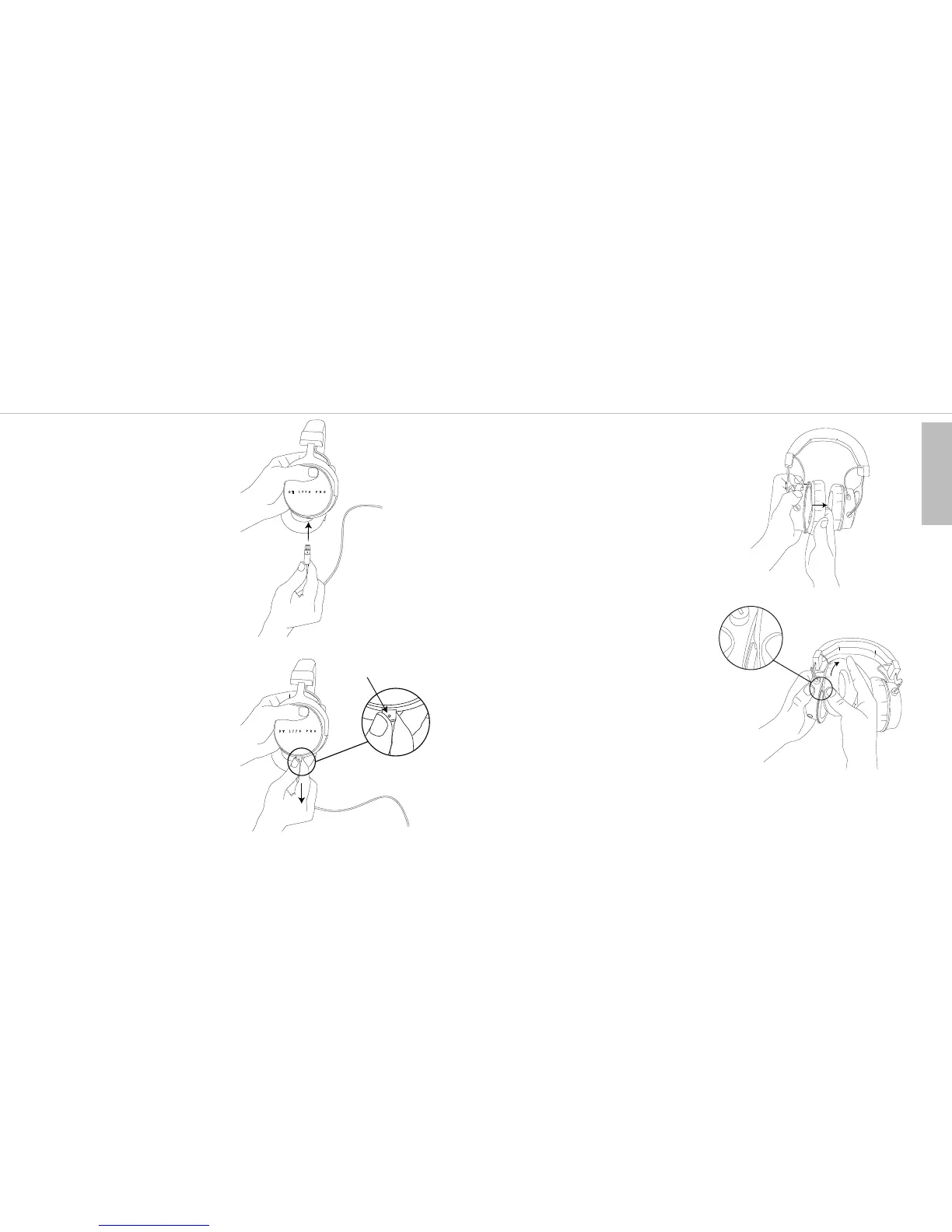
How to Connect the Cable
• At the end that connects to the head-
phone, the lockable connecting cable is
fitted with a 3-pin mini XLR cable
connector.
When connecting the cable, make sure
that the cable connector locks in place
of the ear cup.
• When you want to change the cable,
please press the small button for release
and simultaneously pull off the cable
connector from the headphone.
How to Change the Ear Pads
• Remove the ear pad carefully from the
mounting ring.
• Place the lip of the ear pad in the notch
at the top of the headphone casing. Then
turn the ear pad as indicated by the
arrow until the lip of the entire pad is
sitting over the mounting ring.
How to Change the Headband Pad
For information on how to change the
headband pad, please visit:
www.beyerdynamic.com
small button











 To Next Page