
 Need help?
Do you have a question about the BEZIOR XF001 and is the answer not in the manual?
Key details about the manual's purpose and the bike's usage.
Explains the function of each wire in the connector table for the LCD display.
Configuration of backlight, mileage unit, voltage, dormancy, wheel diameter, speed gauge, and speed limit.
Configuration of start modes, drive modes, sensitivity, magnetic steel types, controller limits, and protocols.
Guide on how to correctly install the pedals onto the bike.
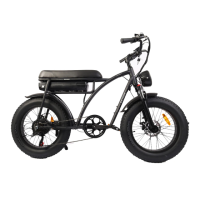
This document serves as a comprehensive user manual for the Bezior XF001 electric fat bike, designed to be your travel companion. It provides essential information for safe and optimal use, covering general information, safety precautions, electrical components, brakes, tires/wheels, suspension, battery, charger, LCD display operation, product parameters, assembly, and maintenance.
The manual introduces the correct use, functions, safety tips, features, and parameters of the electric bike. It emphasizes the importance of reading the manual carefully for your safety and the safety of others. Users are responsible for following all instructions and ensuring that anyone else using the scooter also understands them. Regular review of the instructions is recommended to check for any defects.
It is crucial to check local legislation regarding electric vehicles and consider appropriate insurance. First-time users are advised to practice in an open area free of obstacles and people to familiarize themselves with the bike's capabilities.
The package includes the electric bike, a manual, a charger, and a tool kit. Users should verify that all listed parts are present. The company disclaims liability for any direct or indirect damage or consequential damage resulting from the use of the scooter.
The company reserves the right to the final explanation of all clauses in this manual. While the manual cannot cover every possible situation that may arise from riding an electric bike, it strongly advises users to prioritize safety. Riders must obey all traffic laws and be aware of local regulations regarding electric bike usage. Proper protective gear, including a helmet, elbow, knee, and wrist protection, should always be worn. Failure to do so can lead to serious injury or death.
Strict adherence to the instructions in this manual is essential for proper assembly, maintenance, and operation. Improper handling can result in product damage, serious injury, or death. If you encounter difficulties, refer to the "Contact Us!" section for support. If you are not confident in your ability to assemble or maintain the bike, it is recommended to seek assistance from a certified professional.
The electric bike's electrical system, including the motor wheel, controller, battery, and display, is pre-installed. Before use, ensure the battery is sufficiently charged. The LCD display provides real-time information such as current speed, odometer (ODM), speed gear, and battery level.
Brakes must be in good working condition before riding. If adjustments are needed, contact the company or consult a professional. Tires should have sufficient tension, with a recommended pressure of 4 bar for both front and rear tires. Low tire pressure negatively impacts driving characteristics, increases tire wear, and reduces range.
All bicycles are equipped with front suspension and suspension locks, allowing users to choose whether suspension is needed based on the road conditions.
The bike offers various battery capacities, with larger capacities providing a longer range. Users should select a battery capacity appropriate for their needs. Regular charging and discharging every two weeks can extend battery life. Always use the original charger, as other chargers may damage the battery.
Charging the battery involves connecting the charger plug to a 110-220V socket. The charger light will be red during charging and turn green when nearly complete. It is recommended to continue charging for 1 to 1.5 hours after the light turns green for a full charge. After charging, remove the plug from the socket and disconnect it from the charging port, then close the charging port cover.
The LCD-M5 Hand Control Panel provides various functions. It displays speed, power level, power indicator, failure warnings, total mileage, single mileage, headlight status, and single driving time. Control functions include power switch control, headlight switch control, 6Km/h point control, wheel diameter setting, maximum speed setting, idle automatic hibernation time setting, backlight brightness setting, and voltage level setting. The communication protocol is UART, and all display screen contents are shown for 1 second upon boot-up.
The display includes an energy bar, speed (MAX/AVG) in mph/km/h, and indicators for Walk, Cruise, Auto, Manual, and PAS modes. It also shows ODO, TRIP A/B, VOL, CUR, and RMTM. The headlight can be manually turned on or automatically activated based on ambient light (if light sensitivity support is available).
The multifunctional display area shows total mileage (ODO), single mileage (TRIP A, TRIP B), battery current voltage (VOL), current operating current (CUR), remaining mileage (RM), and instrument boot time (TM). Vehicle modes include walk boost mode, constant speed cruise mode, and PAS (Power Assist System) with adjustable power file positions from 0 to 9. The speed display area shows maximum speed (MAX) and average speed (AVG) in MPH or KM/H, calculated based on wheel diameter and signal data. The vehicle status display area shows various error codes and their meanings, such as brakes, power sensor fault, motor failure, controller failure, communication failures, and headlight failure.
Installation settings (P01-P20) allow customization of backlight brightness, mileage unit (KM/MILE), voltage level, dormancy time, help file bit (gear mode), wheel diameter, speed gauge magnetic steel number, and speed limit. These settings are crucial for accurate display readings and optimal performance. For example, P08 sets the speed limit, where 100 means no speed limit for Protocol 2, and 0-41km/h for 5S protocol. The input data for speed limit represents the maximum operating speed of the vehicle.
Further settings include zero start/non-zero start, drive mode (Power Drive, Electric Drive, or Coexistence), help sensitivity, help start intensity, power magnetic steel disk type, controller limit value, controller undervoltage, ODO zero setting, cruising enablement, display speed ratio adjustment, and power bit settings.
Basic maintenance for an e-bike is similar to that of a regular bicycle, including oiling chains and regular washing to promote longevity. However, due to the motor's torque and velocity, individual parts work harder, amplifying the need for diligent maintenance. It is important to replace parts upon wear rather than waiting for them to fail.
Electrical components such as the LCD display, motor, battery, and circuit wiring are not suitable for prolonged water contact. The e-bike should not be submerged in any body of water. If the wiring causes the e-bike to spark, immediately stop riding, kill the electrical current, and contact the company for electrical system replacement. This applies if the system is faulty or becomes faulty without outside tampering.
For assembly, separate instructions are provided for each model. The general operation involves checking the stand, switching on the electric step, checking battery level, sitting on the saddle, pressing the accelerator button, and placing the other foot on the pedal once the scooter starts moving. To stop, release the accelerator button and use both front and rear brakes. When turning, lean your body in the direction of the bend. The bike offers 6 speeds for selection. If the battery is powered off, the bike can be ridden as a common bicycle.
The manual also provides detailed installation instructions for pedals, the front wheel, the front mudguard, the front lamp, and the handlebar. These steps involve identifying left and right pedals, fixing them with a wrench, installing the front wheel with a quick-release stem, attaching the mudguard with screws, installing the front lamp with screws and connecting wires, and finally, installing and adjusting the handlebar.
 General
| Frame Material | Aluminum Alloy |
|---|---|
| Brakes | Disc Brakes |
| Tire Size | 26 x 4.0 inches |
| Gears | 7-speed |
| Suspension | Front suspension fork |
| Type | Electric Bicycle |

 To Next Page