- EN 9 -
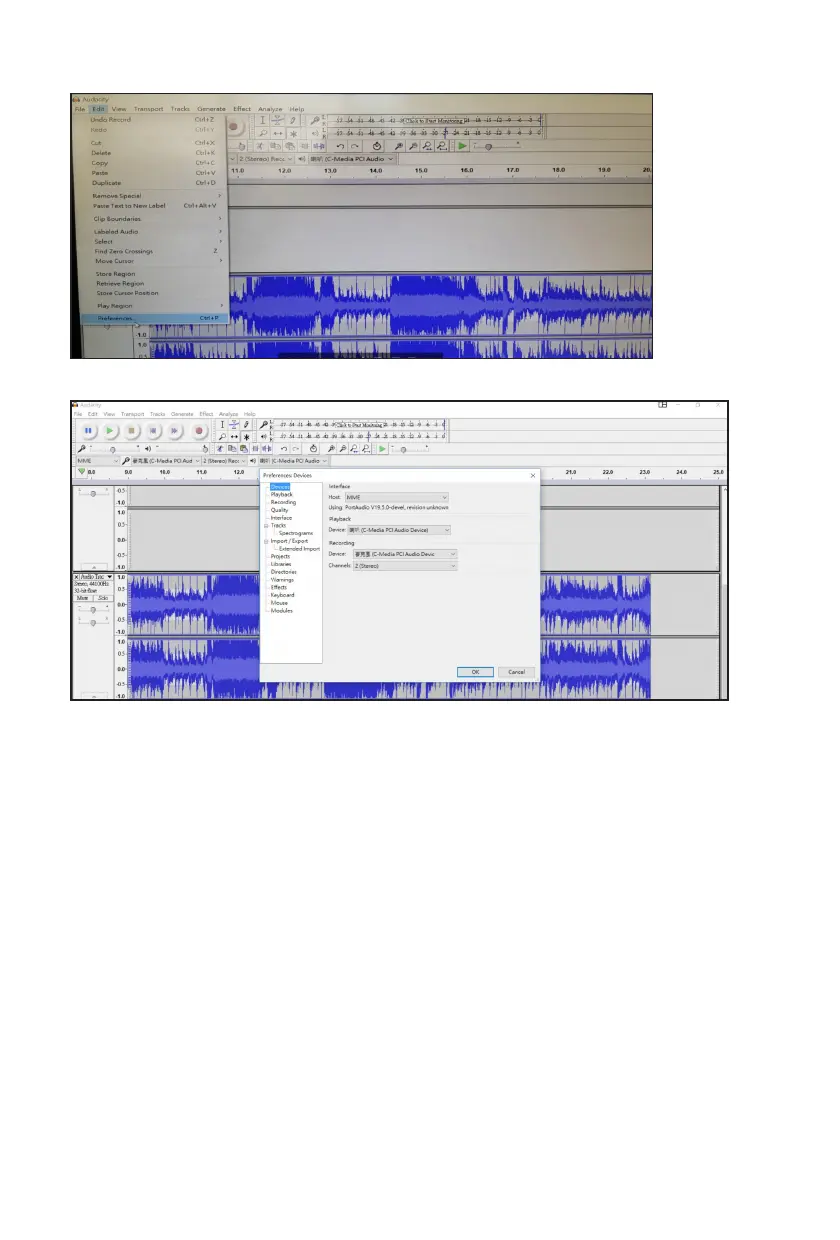
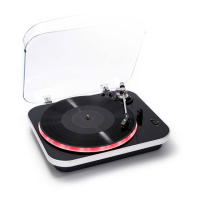
7. The user can also change the settings
8. The option menu opens, enabling the user to set the preferences.
Important: Do not disconnect the cable while transferring music from the turntable to the computer.
This could result in data loss or corrupted les.
REMARK: Audacity is a free open-source program. Bigben has no afliation with the creators of
Audacity and cannot offer any support regarding the software nor be responsible for any effects that it
may have on the user’s computers. For software-related enquiries, please go to the Audacity website
for assistance.
Line Out (R, L): Connection to Amplier only
The user can connect the unit to an external audio amplier (cable provided).
Connect the “L” & “R” line out jacks to the Aux In jack of the external audio amplier.
Turn on the turntable & the external amplier. Sound will be produced by the external amplier.
External Speaker Connection Jacks
The user can connect the unit to external speakers (4 ohms) via the speaker output L, R sockets (next
to the original TD115 speakers).
REMARK: In order to save energy when the unit has no sound output for 30 minutes, the unit will be
switched to stand-by automatically. It can be switched ON by using the function selector again.
SPECIFICATIONS:
Power supply: AC 230V ~ 50Hz
Power consumption: 13W


 To Next Page