Automatic start/stop
To save the battery the device switches itself off after
5 – 6 minutes if no impulse is received by the sensor. To
switch the device on again, press one of the buttons.
Setting the wheel sizes
Press and hold the left button and the right
button for 2 seconds (or af ter replacing the
batter y) to switch the device to the wheel
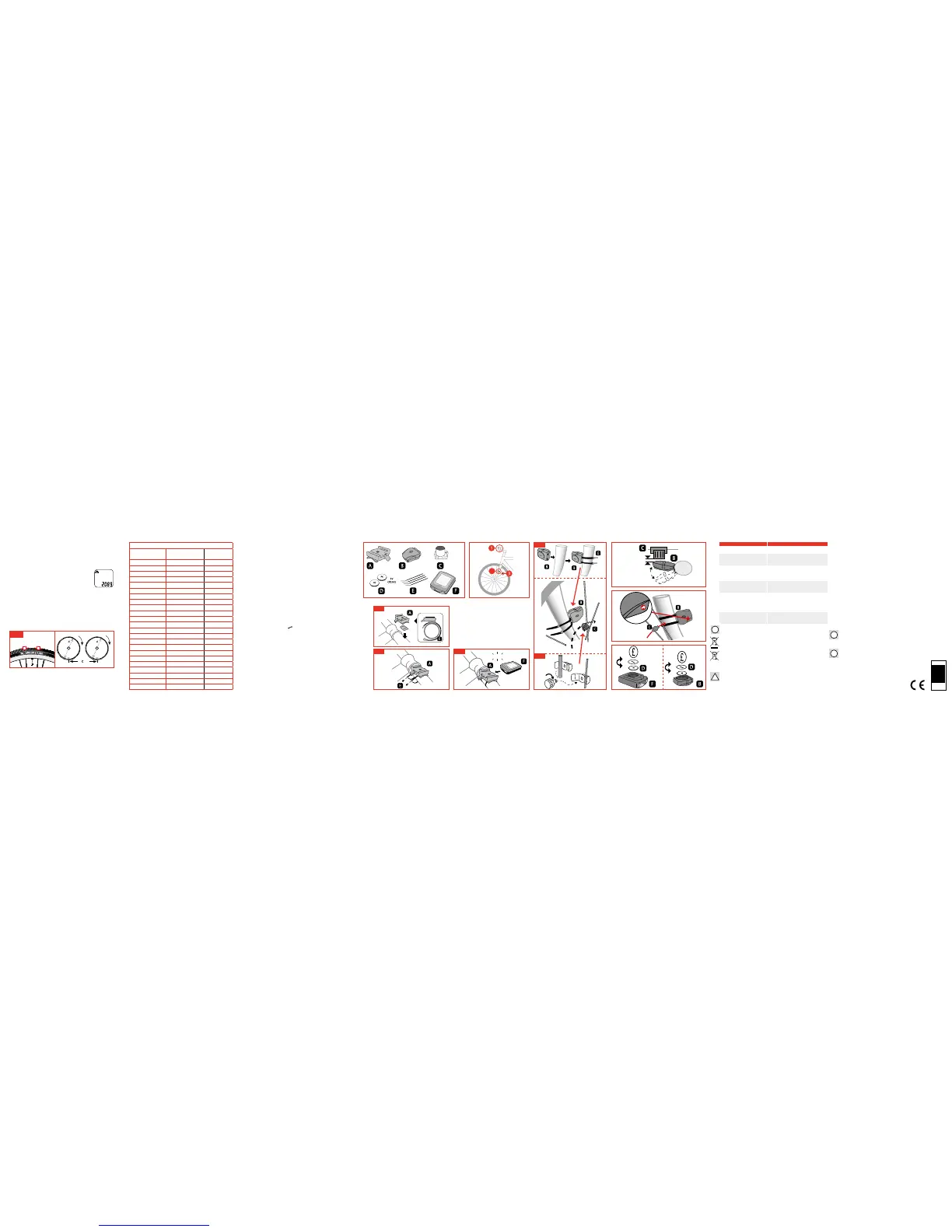
size entry mode. Multiply the wheel diameter, d (figure
2), in mm by 3.1416 in order to establish the wheel coef-
ficient, c. Press the left button to select the position that
needs to be en tered and then the right b utton to enter the
required number (for fast forward keep pressed down).
Press the left button again to select km/mile. (Please
note that removing the battery deletes the wheel size
information).
- Distance in mm per revolution -
Please use this table for assistance in calculating the
wheel diameter and wheel circumference.
Choice between miles and kilometres
After setting the wheel size the symbol “KM” will blink
above the wheel size entr y. If you would like the com-
puter to show the speed in km/h press the left button.
If the computer should calculate in mph press the right
button first and then the left button.
Calorie counter
On the display the prompt km/h will then blink. At this
point you have to set your age. By pressing the right but-
ton you can change the value and go for ward to the next
figure using the left button. In the bottom line you can
set your body weight in kg. By pressing the right button
you can change this value and go for ward to the next fig-
ure using the left button.
Service indicator
After setting the wheel diameter the indicator 600 km
flashes. In the bottom left corner you will see a spanner.
This function enables you to set the number of kilome-
tres until the next ser vice of your bike. By pressing the
right button you can choose to set a number between
200 and 800 km as a reminder to ser vice your bike. By
pressing the left button the value is saved. On reaching
the pre-set number of kilometres a spanner appears in
the display. By pressing the left button you can switch
off the reminde
r.
BATTERY DISPOSAL:
Batteries must not be placed in household rubbish contai-
ners. You are obligated by law to return used batteries and
rechargeable batteries. They can be dropped off at our shop
or at other loc ations near you (e.g., o ther businesse s or muni
-
cipal collection points). Batteries and rechargeable batteries
are marked w ith a crossed-o ut dustbin and with the c hemical
symbol of the toxic subs tance, i.e. „Cd“ for cadmium, „Hg“ for
mercury and „Pb“ for lead.
BATTERY SAFETY
Always follow warnings and manufacturers instrtuctions for
both the batteries and the batter y-operated product. Use only
1
2
3
2
Fig. 2
WHEEL SIZES
Wheel size in
inches
ETRTO
Nr.
Wheel
coefficient
16 x 1.75 47 – 305 1216
20 x 1.75 47 – 406 1623
24 x 1.75 47 – 507 1940
26 x 1.6 44 - 559 2051
26 x 1.75 x 2 47 - 559 2070
26 x 1.9 50 - 559 2089
26 x 2.00 54 - 559 2114
26 x 2.125 57 - 559 2133
26 x 1 3/8 37 - 590 2105
26 x 1 3/8 x 1 1/2 37 - 584 2086
26 x 3/4 20 - 571 19 54
27 x 1 1/4 32 - 630 2199
28 x 1.5 40 - 622 2224
28 x 1.75 47 - 622 2268
28 x 1 3/8 x 1 5/8 37 - 622 2205
700 x 18C 18 - 622 2102
700 x 20C 20 - 622 2114
700 x 23C 23 - 622 213 3
700 x 25C 25 - 622 2146
700 x 28C 28 - 622 2149
700 x 32C 32 - 622 2174
700 x 35C 37 - 622 2205
700 x 40C 40 - 622 2224
1a
1b
2 mm Max
2
3
SENSOR
Fault Problems
No tachometer display Incorrect magnet/sensor alignment
Delay ed display of re quest The temp erature ran ge lies outsi de of
the spec ified minimum v alue (0-55 ⁰C)
Black s creen The tempera ture is too high or t he
displ ay was expose d to direct sunl ight
for too long
Failing s creen displ ay Empty b attery or th e power supply i s
too weak
Incorr ect set-up for d istant Check th e sensor and ma gnet reading
positi ons, that the ba ttery is cor rectly
fitte d and the fittin g is in accordanc e
with the instructions
The disp lay shows blu rred / Remove an d reinsert t he battery
irregular symbols
click
1c
the correct type and size battery indicated. Check the contacts
of both the bat tery and the battery-operated product for cleanli
-
ness. A lways insert t he batteries cor rectly with rega rd to polari-
ty (-/+), matching the positive and negative symbols of both bat-
tery and product. Putting them in backwards, the product will
sometimes still operate, but may inadvertently charge the bat
-
teries re sulting in venling or lea king. Remove and safely d ispose
or exhaus ted batteries imm ediately. Replace all batteries in ba t
-
tery-operated products at the same time and with the batteries
of the same t ype and manufac ture. Do not shor t circuit batter ies.
When the positive (+) and negative (-) terminals of a battery are
in contact with each other, the battery can become short circui
-
ted. For example, loose batteries in a pocket with keys or coins
can be shor t circuited possibly resulting in venting or explosi
-
on. Do not heat batteries. Do not crush, puncture, dismantle or
otherwise damage batteries. Do not charge non-rechargeable
batteries. Keep batteries out of reach of small children. If you
suspec t that a battery ha s been swallowe d, seek immediate me
-
dical advice. Please retain for future reference.
PACKING DISPOSAL
The packaging is made of 100% environmentally friendly ma-
terials which can be disposed of at local recycling points.
COMPUTER DISPOSAL
For disposing of the computer and radio sensor,
please obtain advice from your local authority or
town council.
Wheel size
in inches
ETR TO
Nr.
!
!
!
CHECK LOCAL
COUNCIL
RECYCLING
CENTER
COMPUTER
recyclenow.com
!



 To Previous Page
 Loading...