Page 7 of 10
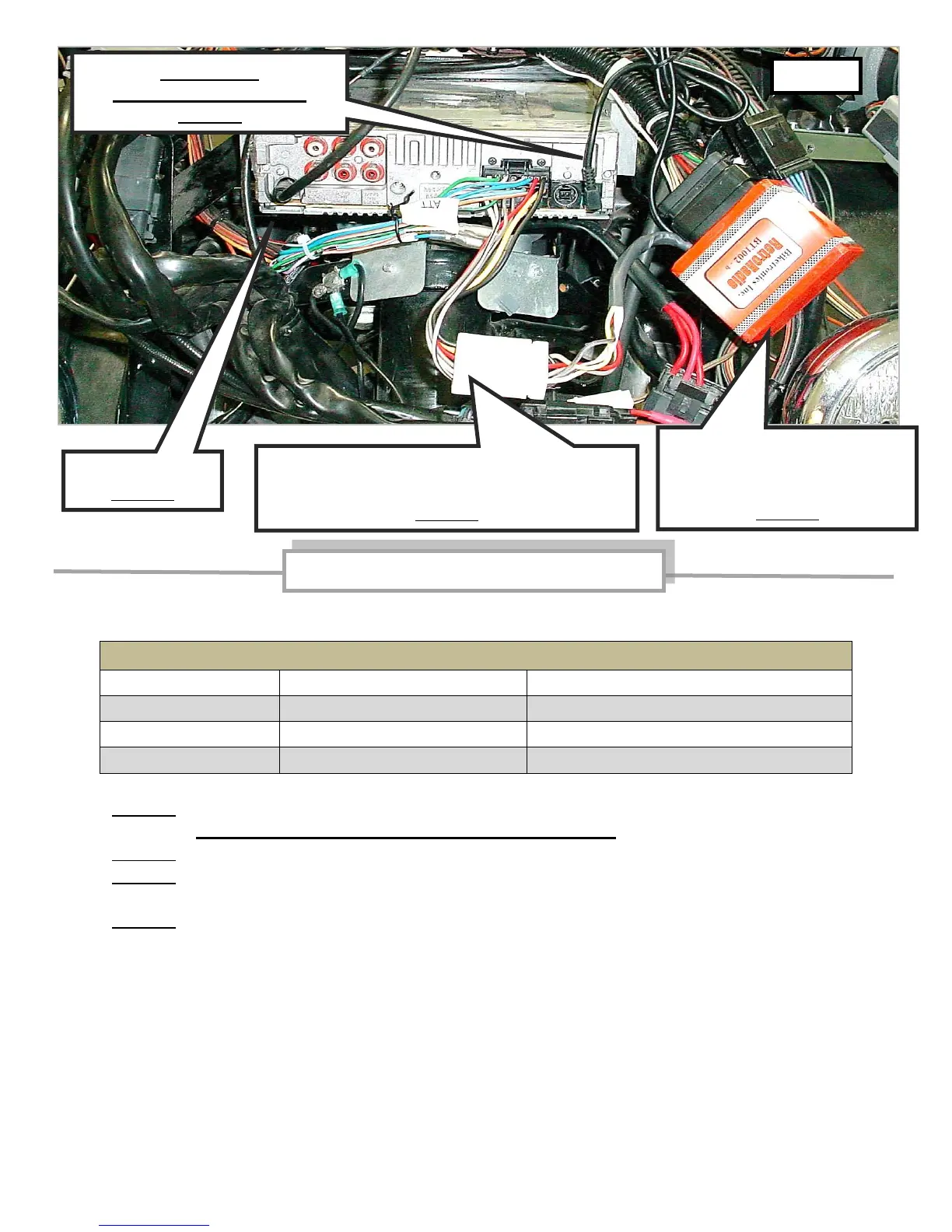
Final Connections - see photo #5
Connect speakers using wire leads in Harley OEM wire harness:
Harley wire colors for fairing speaker connections
Speaker positive (red dot or "+")
Speaker positive (red dot or "+")
Item #1 - Plug Black cable from Biketronics (Orange) module into jack in rear of radio.
Cable must point straight up toward windscreen.
Item #2 - Plug antenna lead in rear of radio.
Item #3 - Plug radio wire harness Black connector into rear of radio and White connector into
harness from Biketronics (Orange) module.
Item #4 – Depending on model year, make connection between Biketronics (orange module)
and Harley wire harness:
(1998-2011) - plug Harley (Black) 23 pin connector into Biketronics (Orange) module.
(1996-1997) - plug Harley 8 pin and 12 pin connectors into Biketronics (Orange) module.
Use included zip ties to secure module and harness.
Reconnect battery cables to Harley battery – positive cable first.
Install radio face onto radio.
Check radio functions with handle-bar radio control buttons. Refer to pages 8 & 9 for
Automatic Volume Control (AVC) programming and handle-bar radio control functions.
Reinstall fairing and go riding.
Black cable
must point straight up
Item #1
Radio wire harness -
Black connector & White connector
Item #3
Biketronics (Orange)
module with Harley (Black)
23 pin connector attached
Item #4



 To Next Page