9
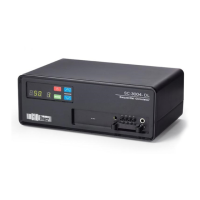
• Within 5 seconds, press and hold MODE button
• Mode will appear (“1Hr” for timed operation, “COn” for continuous, or “PrE” for pre-
therapy)
• Press MODE button to change between modes
• While mode says “1Hr” use UP or DOWN button to adjust treatment time
• While mode says “Pre” use UP or DOWN button to turn on or off (“1” for on, “0” for off)
• Press “Power On/Off” button to begin cycle
To change pressure
• Begin with device turned off
• Press “Power On/Off” button
• Within 5 seconds, press and hold UP and DOWN buttons
• Pressure and chamber number will appear
• Use UP or DOWN button to adjust pressure and use MODE button to change chamber
number
• Press “Power On/Off” button to begin cycle
Reading the Usage Meter
When the pump is turned on, hours of use will appear for 5 seconds. The letter in the
Chamber Number LED represents the first digit – A is 0, B is 1, C is 2, D is 3, E is 4,
and F is 5. The remaining digits appear in the LED Readout. For example, if the
Chamber Number LED is D and the LED Readout is 013 that represents 3013 hours of
use.
Cleaning
The pump, garment, and tubing can be wiped down using a damp (not wet) soft cloth
while unplugged – if more thorough pump cleaning or garment disinfection is desired,
use the following directions.
Pump and tubing cleaning
• Unplug and wipe down using a damp (not wet) soft cloth with mild antibacterial soap
as needed
• Do not use bleach
Garment Disinfection
• Disconnect from pump and open to expose all sides
• Prepare a solution of 1/3 cup of laundry detergent per 1 gallon of warm water (20 mL
laundry detergent per 1 L water) in a sink or container large enough to hold the garment
• Place garment in solution but do not submerge or place connectors in water as this will
damage the device



 To Next Page