100%
Charge Out
Charge In
BaseLantern’s internal li-ion battery may be used for both lighting
and external charging to other devices via USB.
There are 4 LED lights on the side of your BaseLantern to
represent the power reserves of the internal battery. When your
battery is below 10% the first LED on the left will begin flashing;
your BaseLantern will enter Low Power Mode and will stop
offering charge-out to external devices.
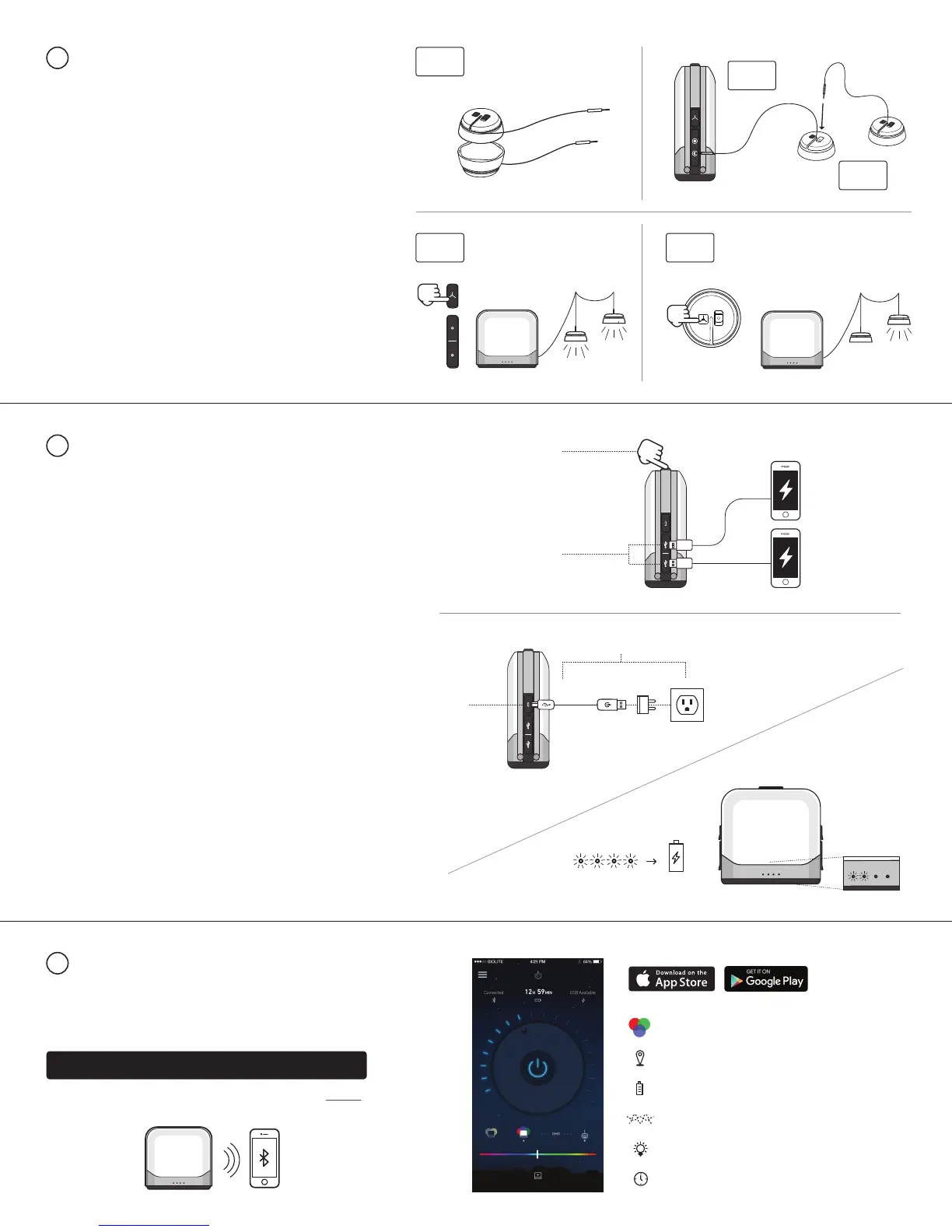
1.
Uncouple SiteLights and extend SiteLight cord to desired
length. (3.1)
Note: BioLite SiteLights are sold separately from BaseLantern
To expand your outdoor lighting system with overhead lights,
connect BioLite daisy-chainable SiteLights to your
BaseLantern which features 2 SiteLite ports, allowing you set
up string lighting in two directions at once:
2.
Plug SiteLight into BaseLantern SiteLight Port. (3.2)
3.
Daisy-chain desired network of SiteLights together by
plugging subsequent SiteLight jacks into preceding
SiteLight port. (3.3)
4.
To turn on and dim SiteLights manually, press SiteLight
button located next to SiteLight Ports on BaseLantern.
(3.4) You may control each SiteLight individually via their
manual buttons located on top of each light. (3.5)
5.
To turn on and dim SiteLights remotely, please refer to
the BaseLantern mobile app.
BASELANTERN + SITELIGHTS
3
3.4
3.5
3.2
3.3
1.
To charge devices, plug charging cord into USB charge-out
port located on side of BaseLantern. (4.1)
2.
If BaseLantern is in OFF setting, press power button once to
activate charging. (4.2) You may then turn light panels off to
conserve battery while keeping devices charging.
3.
BaseLantern features [2] USB charge-out ports allowing you to
charge two devices at once. Note: When charging two devices,
one port will charge at 2.1A while the second will charge at 1A.
1.
Plug the included micro-USB cord into BaseLantern input
port. (4.3)
2.
Connect to USB power source such as wall or car charger. (4.4)
4.
When battery is fully charged, all 4 LEDs will be lit.
3.
LED battery indicator lights will flash sequentially from left to
right to indicate battery is charging. (4.5)
CHARGING
4
The BaseLantern features a free mobile app for iOS and Android.
This app enables you to activate sleep timers, proximity activation,
color settings, battery life feedback, remote dimming and several
other functions all from your smartphone.
Or visit the Apple or GooglePlay app store and search “BioLite”.
BIOLITE BASELANTERN MOBILE APP
5
4.1
4.2
4.3
4.4
4.5
3.1
BioliteEnergy.com/baselantern-app
Download at:
Full Color & Warmth Control
Automatic On/Off When In Range
Real Time Power Usage Stats
Lantern Effects
Turn On, Off & Dim
Alarm & Timers


 To Next Page
 Loading...