EasyManua.ls Logo

bionicbird Metabird - Page 13

Default Icon
30 pages
Print Icon
To Next Page IconTo Next Page
To Previous Page IconTo Previous Page
Loading...
MetaBird-v1-03/15/20 Page 13 on 30
stopping the bird so ensure the bird has adequate
space, free from risks.
Attention: Not touching the screen for extended
periods can activate your smartphone’s standby screen
during the flight if the power saving controls haven’t
been changed.
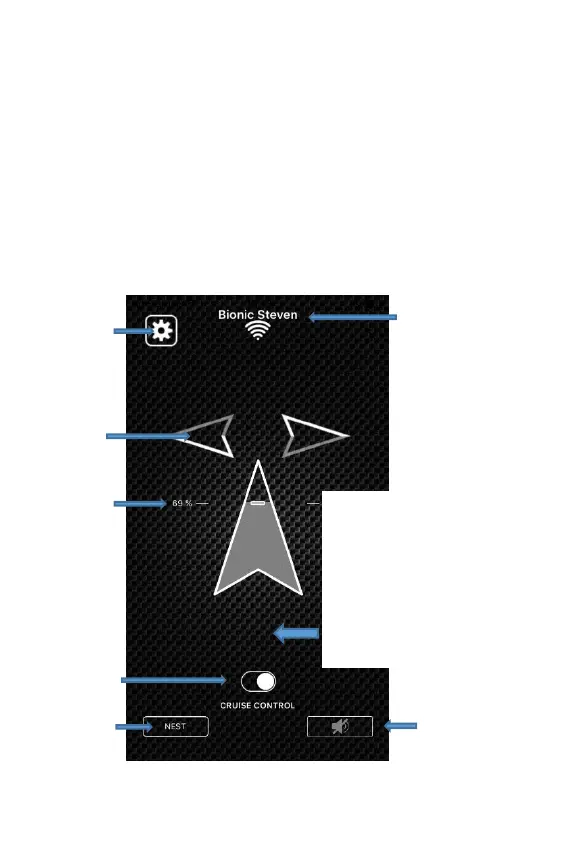
“One Finger” interface (“Joystick” mode): For this
mode, hold the device in one hand, and control the
throttle and the steering with the index finger of your
other hand.
t t

Advanced
settings
Throttle
level
indicator
Choix du
mode de
vol
Cruise
control
On/Off
Activate
speakerphone
Back to
« NEST »
Name of the bird
Indicates
the
direction of
the turn
Touch slider combining
throttle and steering:
Touch anywhere on the
screen and then glide
your finger towards the
top to accelerate and
left and right to turn.

Related product manuals