Need help?
Do you have a question about the BIOPAC Systems NIBP100E and is the answer not in the manual?
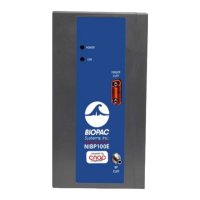
The BIOPAC Systems, Inc. NIBP100E/NIBP100E-HD is a noninvasive BP amplifier and AcqKnowledge system designed for physiological data acquisition, particularly for measuring blood pressure. This system is suitable for research and educational purposes, offering a comprehensive solution for recording and analyzing physiological signals.
The NIBP100E/NIBP100E-HD system functions as a noninvasive blood pressure amplifier, allowing for continuous and accurate measurement of blood pressure without the need for invasive procedures. It integrates with BIOPAC's AcqKnowledge software, which serves as the central platform for data acquisition, visualization, and analysis. The system is capable of recording various physiological signals, including blood pressure, and can be expanded to include other signals such as ECG, respiration, and skin conductance, depending on the specific modules connected. The NIBP100E module is designed for standard and -HD systems, while the NIBP100E-HD module offers a separate license to access hemodynamic calculations.
The core components of the NIBP100E/NIBP100E-HD system include the NIBP100E KEY20 flash drive or NIBP100E-HD KEY22 flash drive for software licensing. The system utilizes double-cuff finger sensors, available in small, medium, and large sizes (RXNIBPEFINGER-S, -M, -L), as well as arm cuffs, also in small, medium, and large sizes (RXNIBPDCUFF12-19, 17-25, 23-33, 31-40). These cuffs are crucial for accurate blood pressure measurement. The system includes a CNAP Controller with Holder (RXNIBPECONTROL), a NBP Cuff Hose Extension, a TPC Forearm Controller Strap, a TPC Cable, and a USB Cable (CBLUSB) for connectivity.
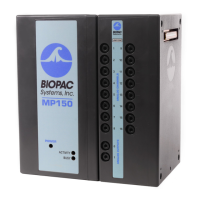
The NIBP100E module is compatible with standard and -HD systems, while the NIBP100E-HD module specifically enables hemodynamic calculations. The system requires a computer running Windows (macOS not supported) for operation. The MP160 data acquisition and analysis system is referenced for integration, with the NIBP100E module working with both the MP160 and the older MP150. AcqKnowledge 5.0.7 or later is required for full functionality.
For data acquisition, the MP160 device connects to the computer via a USB cable. The NIBP100E module connects to the MP160 data acquisition system via a USB cable. The finger sensor cable connects to the outlet labeled "Finger Cuff" on the front of the NIBP100E module. The AC150A power cord connects to the back of the module and then to a properly grounded AC Mains socket.
The system supports various finger sensor sizes (e.g., small, medium, large) and arm cuff sizes to accommodate different subjects. The NIBP100E-HD system offers additional data channels for HD cardiac signals (channels 7, 8, 9, and 10) and non-HD cardiac signals (channels 1, 2, 3, 4, 5, and 6).
The system is designed for ease of use, with a straightforward setup process. Users connect the MP160 device to their computer, then connect the NIBP100E module to the MP160. The finger sensor cable is attached to the NIBP100E module, and the power cord is connected.
To select the correct double-cuff sensor size, users choose between two cuff sizes (e.g., small, large) based on the subject's finger size. If a partial double-cuff finger size is between two cuff sizes, the larger cuff should be chosen. For arm cuffs, the appropriate size is selected based on the subject's arm circumference.
The AcqKnowledge software is central to the system's operation. Users initiate a new experiment or open an existing one, create a new record, and then create an empty graph. The software allows for data acquisition setup, including selecting the MP160 as the device. Users can select specific channels for recording, such as "NIBP100E" for blood pressure. The "Analog tab" in AcqKnowledge allows users to add new modules and select the type of modules to be added, such as "NIBP100E."
The system supports both double-cuff finger sensors and arm cuffs. When using double-cuff finger sensors, the proximal joint of the index and middle fingers are placed into the double-cuff finger sensor. The cuff cables run along the outside of the participant's arm. The participant's forearm is placed into the velcro strap, ensuring proper tension. When using arm cuffs, the cuff is placed around the upper arm, preferably contra-laterally, at heart level. The marker arrow on the NBP cuff should be directly above the brachial artery.
The software includes features for managing licenses. The NIBP100E or NIBP100E-HD license file ships on a flash drive included with the NIBP100E system. Users can view and assign licenses through the "Credentials" window in AcqKnowledge. The "About" button in the Configuration window allows users to open the Credentials window.
The system also offers advanced measurement settings, including finger cuff alternation interval, upper arm cuff pressure calibration, and manual calibration values for systolic and diastolic blood pressure. Users can select non-HD cardiac signals (systolic blood pressure, diastolic blood pressure, mean blood pressure, heart rate) and HD cardiac signals (cardiac output, stroke volume, systemic vascular resistance, cardiac index, stroke index, systemic vascular resistance index, heart rate).
The system's maintenance primarily involves software updates and ensuring proper connectivity of hardware components. The license management feature helps ensure the software remains active and up-to-date. Users are prompted to load the license file from the flash drive upon initial setup.
The AcqKnowledge software includes a "Help Menu" that provides access to user guides and support documents. This includes guides for AcqKnowledge software, B-Alert software, MP hardware, and troubleshooting. These resources are crucial for resolving issues and understanding the system's functionalities.
Regular checks of the hardware connections, such as USB cables and sensor cables, are recommended to ensure stable data acquisition. The system's design with durable components aims to minimize physical maintenance requirements. Software updates, when available, should be applied to ensure optimal performance and access to the latest features and bug fixes. The system relies on the integrity of its license files (KEY20 for NIBP100E and KEY22 for NIBP100E-HD) for continued operation.
 General
| Brand | BIOPAC Systems |
|---|---|
| Model | NIBP100E |
| Category | Medical Equipment |
| Language | English |

 To Next Page