The Finch Robot 2.0 is an educational robot designed to introduce users of all ages to computer science and programming through interactive, real-world applications. Developed by BirdBrain Technologies LLC, under license from Carnegie Mellon University, this robot allows users to see their algorithms expressed through movement, light, sound, and sensing. It is intended for use by anyone 5 years of age and older, with adult supervision recommended for children 13 and younger.
Function Description:
The Finch Robot 2.0 serves as a versatile tool for computer science learning and engagement. Users can write computer programs to control the robot's various inputs and outputs, bringing their code to life. It supports a range of programming languages, including icon-based (FinchBlox), block-based (SNAP!, MakeCode), and text-based (Python) options, making it accessible to a wide spectrum of learners from kindergarten to college. The robot's design allows for exploration of fundamental computer science concepts such as algorithms, conditional statements (if-then, if-then-else), control structures (loops), and debugging.
The robot's outputs enable it to interact with its environment and provide feedback based on programmed instructions. These outputs include:
- Wheels: Allow the robot to move forward, backward, and turn, enabling programs that involve navigation, drawing shapes, or following lines.
- Beak LED: A single LED located at the front of the robot, programmable to display various colors.
- Tail LEDs: Multiple LEDs at the rear of the robot, also programmable for color display, often used for status indication or creative light patterns.
- LED Array: A grid of LEDs, typically on a connected micro:bit, offering a visual display for characters, simple animations, or data representation.
- Buzzer: Produces sounds, allowing for auditory feedback, musical programs, or alert signals.
- Marker Holder: A designated slot for holding a marker, enabling the robot to draw on surfaces based on its movement.
- Plastic Brick Adapter: Allows for attachment of compatible plastic bricks (e.g., LEGO® bricks), expanding the robot's physical capabilities and customization options.
The robot's inputs allow it to sense its environment and gather data, which can then be used in programs to create responsive behaviors. These inputs include:
- Wheel Encoders: Provide feedback on wheel rotation, allowing for precise control of distance and speed.
- Line Tracking Sensors: Detect lines on a surface, enabling the robot to follow paths or navigate mazes.
- Distance Sensor: Measures the distance to objects in front of the robot, useful for obstacle avoidance or interactive programs.
- Light Sensors: Detect ambient light levels, allowing the robot to react to light changes or follow light sources.
- Compass: Provides directional information, enabling programs that involve orientation and navigation.
- Accelerometer: Measures acceleration and tilt, allowing the robot to detect movement, shakes, or changes in its orientation.
- Buttons: Physical buttons on the robot (or connected micro:bit) that can be pressed by the user to trigger programmed actions.
Important Technical Specifications:
- Battery Life: The Finch Robot 2.0 contains a rechargeable battery with a 7+ hour battery life.
- Charging Time: A full charge from an empty state takes approximately 7 hours.
- Charging Port: The battery charging port is located at the rear of the robot and can be charged via any USB port using the provided USB cable.
- Operating/Charging Temperature: The robot should only be operated or charged when the temperature is between 0° C and 40° C (32° F to 104° F).
- Connectivity: The manual implies USB connectivity for charging and potentially for programming, though specific wireless connectivity (e.g., Bluetooth) is not explicitly detailed but is common for educational robots of this type (often via the micro:bit).
- Compliance: The device complies with part 15 of the FCC Rules and Canadian ICES-003, ensuring it meets regulatory standards for electromagnetic compatibility.
Usage Features:
- Educational Focus: Designed to teach computer science concepts through hands-on programming.
- Multi-Language Support: Compatible with FinchBlox (icon-based), SNAP! (block-based), MakeCode (block-based), and Python (text-based), catering to different skill levels and learning preferences.
- Interactive Learning: Encourages students to program the robot to perform various tasks such as dancing, drawing shapes, following lines, and creating interactive games (e.g., Simon Says).
- Quick Start Guide: A straightforward process to get started:
- Visit birdbraintechnologies.com and click "GET STARTED."
- Select "Finch Robot 2.0," choose the programming device, and desired programming language.
- Access step-by-step setup and programming tutorials under "Program."
- Explore "Program," "Activities," and "Resources" pages for additional learning materials and challenges.
- Battery Status Indicator: When turned on, the tail lights flash for 2 seconds to indicate battery status:
- 4 green lights: 75% or more full
- 3 green lights: 40-75% full
- 2 yellow lights: 10-40% full
- 1 red light: 0-10% full
- A low battery level is also indicated by the tail lights flashing red once per minute during operation.
- Curriculum Resources: BirdBrain Technologies provides extensive online resources, including printable tools, activities, and tutorials, to integrate the Finch Robot into various curricula.
Maintenance Features & Safety Instructions:
- Rechargeable Battery: The robot contains an internal rechargeable battery that should not be swapped or removed.
- Indoor Use Only: The Finch is designed for indoor use. Using it on outdoor surfaces will wear out the wheels prematurely.
- Temperature Guidelines: Operate and charge within the specified temperature range (0° C to 40° C).
- Liquid Avoidance: Keep the Finch away from water or other liquids.
- Adult Supervision: Recommended for children 13 and younger.
- Power Management: Always turn off the Finch when not in use; do not leave it powered and unattended.
- Physical Safety:
- Do not insert fingers or other body parts into the marker mounting hole.
- Keep fingers, hair, and other body parts away from the Finch's wheels.
- Choking Hazard: The Finch contains small parts and may present a choking hazard; keep away from children 0 to 36 months of age.
- Servicing: Do not attempt to service the Finch yourself. All non-routine servicing should be referred to BirdBrain Technologies.

 Need help?
 General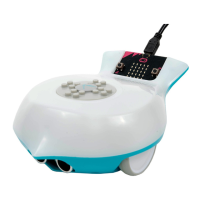

 To Next Page