10
9
3-WayAutomaticShutoff
The automatic shutoff feature in your iron works as follows:
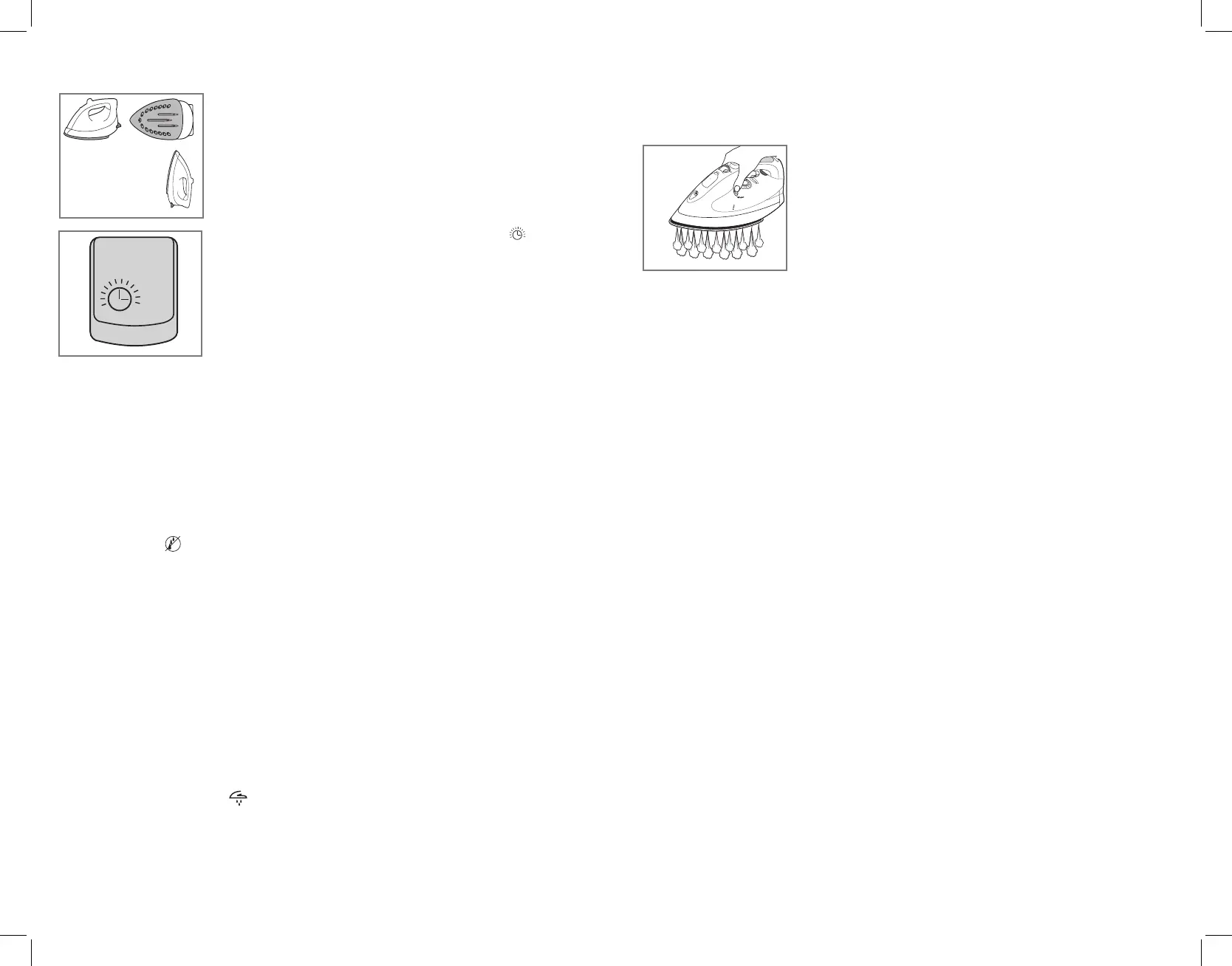
• The iron will shut off after 30 seconds of inactivity if left on its
soleplate or tipped over on its side. If left vertically on its heel
rest, it will shut off after 8 minutes of inactivity (Q).
• The unit beeps once and the AUTO OFF symbol flashes on
the digital display to let you know the iron has stoppedheating
(R).
• After a few seconds, the digital display light goes off.
• If you pick up the iron, an internal motion-sensitive detector is
activated and the iron starts heating again.
Tip: You might have to move the iron or shake it gently.
• The unit beeps once, the digital display light comes on and the
set temperature is displayed again.
Note: Wait for iron to reheat completely before resuming operation.
ManualShutoff
To manually turn off your iron:
1. Press and hold the (+) button for 2 seconds.
• The power goes off.
• The digital display light goes out.
• The unit beeps.
2. To resume operation, press the (+) button. The digital display illuminates and fabric
setting 1 (ACRYL) displays on the window.
Anti-DripSystem
The anti-drip system prevents water spotting at low temperatures.
CareandCleaning
This product contains no user-serviceable parts. Refer service to qualified service personnel.
CleaningOutsideSurfaces
1. Make sure iron is unplugged and has cooled completely. Wipe the soleplate and outer
surfaces with a soft cloth dampened with water. Add mild household detergent.
Never use abrasives, heavy-duty cleansers, vinegar or scouring pads that may scratch
or discolor the iron.
2. After cleaning, steam iron over an old cloth to remove any residue from the
steam vents.
AUTOCLEAN
®
System
After using the Steam function for over 5 hours, the soleplate might need cleaning.
The digital display will show . Press and hold the (+) button to turn off the iron and
perform the following procedure.
1. Fill the water tank well below the MAX line. Plug in the iron.
2. Select fabric temperature setting 6 and stand the iron on its heel rest.
3. Wait for the iron to beep and display temperature number with corresponding
fabric.
4. Unplug the iron and hold over a sink with the soleplate facing down.
5. Press and hold the AUTO CLEAN
®
button. Be careful, as after
several seconds, hot water and steam will come out of the
steam vents (S). Continue to hold the AUTO CLEAN
®
button
until all the water has emptied. If necessary, rock iron side to
side and front to back.
6. When finished, release the button, stand the iron on its heel
rest and plug it in. Heat for about 2 minutes to dry out any
remaining water.
StoringyourIron
1. Unplug the iron and allow it to cool.
2. Store vertically on its heel to prevent water leaking from the soleplate.
R
S
Q
30seconds
8minutes



 To Next Page