724-746-5500 | blackbox.com724-746-5500 | blackbox.com 724-746-5500 | blackbox.com
LGH1006A Quick Start Guide
Table 3. Power DIP switches
for PWR-1 and PWR-2.
Power DIP Switch
Settings
Description
PWR 1 PWR 2
OFF OFF Power failure relay alarm disabled
ON OFF PWR-1 failure, relay alarm enabled
OFF ON PWR-2 failure, relay alarm enabled
ON ON PWR-1 or PWR-2 failure, relay alarm
enabled
Installation
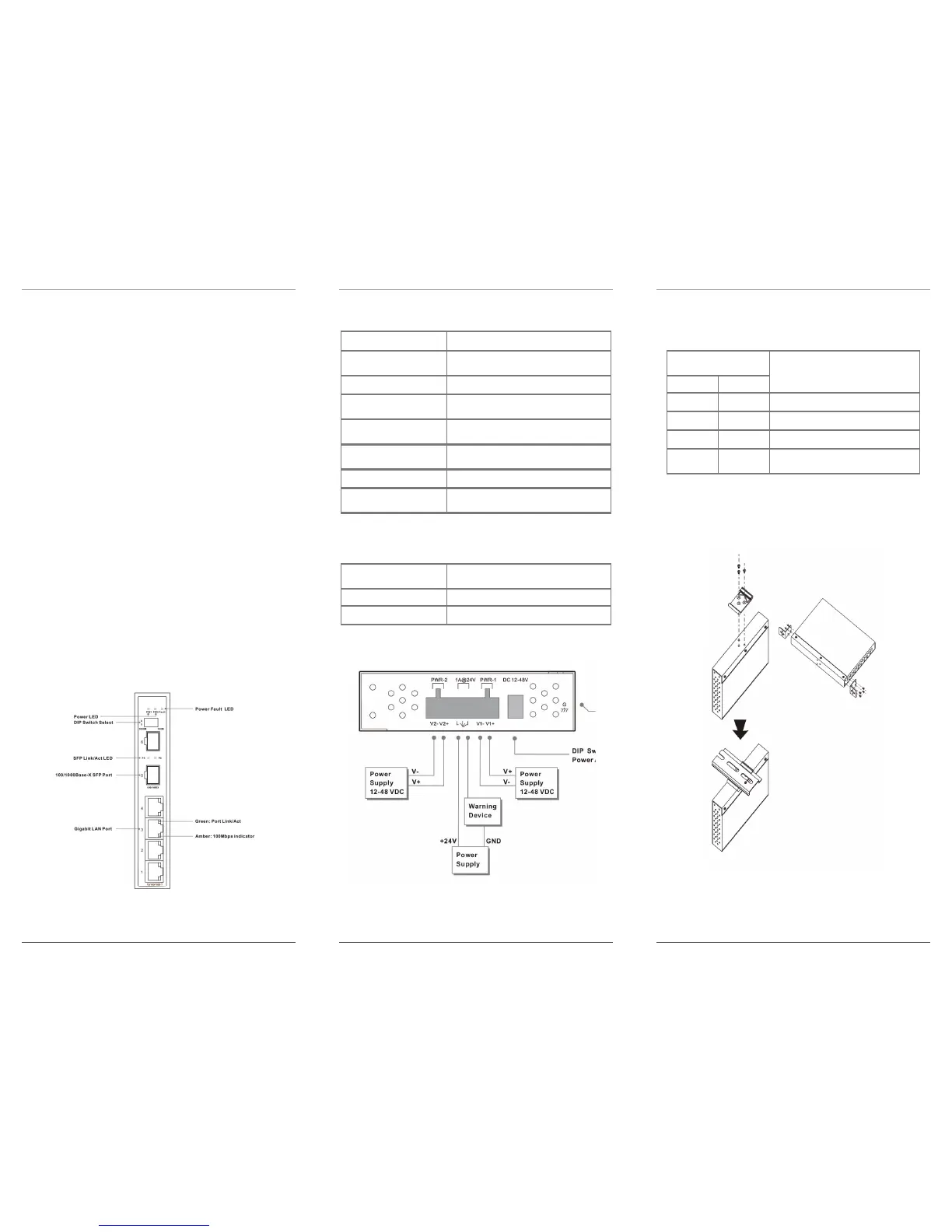
Install the DIN rail or wallmount brackets on the switch
as shown below.
Figure 3. DIN Rail or Wallmount brackets installation.
LGH1006A Quick Start Guide
Page 3Page 2 Page 4
Overview
The LGH1006A Industrial Ethernet Switch is an
unmanaged Ethernet switch, with four 10/100/
1000BASE-T(X) ports and two 100/1000BASE-X SFP
ports. To set the optical network speed SFP port,
change the settings of the DIP switch as described in
Table 3-1. The operating temperature ranges from
-40 to +158° F (-40 to +70° C).
Features
• Provides four 10/100/1000BASE-T(X) ports.
• SFP port supports 100BASE-FX and 1000BASE-X
dual speed.
• Switch supports auto-negotiation and auto-MDI/
MDI-X.
• Uses store-and-forward transmission and flow
control.
• Has IP-30 housing.
• Mounts on a DIN rail or on a wall.
Hardware Description
Figure 1. Front panel.
Table 1. Front panel components.
Component Description
(2) LEDs: PWR1, PWR2 Lights when corresponding power port is
adtive
(1) Power Fault LED Lights when the power fails
(2) SFP Link/Act LEDs Lights when there is actibiy on the
corresponding port
(2) 100/1000BASE-T(X) SFP
port
Lights when the port is operating at 1000
Mbps
(4) Gigabit LAN ports Lights when the port is operating at 1000
Mbps
(4) Port Link/Act. LEDs Lights green when there is activity on the port
(4) 100-Mbps LEDs Lights amber when the corresponding port is
operating at 100 Mbps
Table 2. SFP speed selection DIP switches
(for Ports 5 and 6.
SFP Speed Selection DIP
Switch Positions 1 and 2
Description
Both OFF 1000 Mbps
Both ON 100 Mbps
Power Connection Guide
Figure 2. Power connections.
LGH1006A Quick Start Guide
Attaching the
DIN rail brackets
Attaching the
wallmount brackets



 To Previous Page
 Loading...




