*If “(Optional) Configure the cooler” is not performed, the cooler will be the default mode.
*When the cooler is working, the temperature of the device decreases. Then the warm and humid air will
condense into water droplets and attach to the surface of the cooler. This is normal.
1. Download and install the app.
Configuring the cooler
Specifications
*The USB type-C cable does not support fast charge for mobile phone.
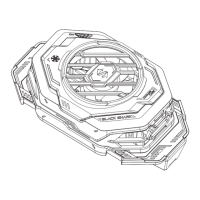
Product Name: Black Shark FunCooler 3 Pro
Model: BR31
Connection method: Bluetooth 4.2
Support OS: Android 6.0 or above, iOS 12 or above
Power port: Type-C
Compatibility: phones of width between 67mm and 88mm
Contents: Cooler x 1, USB type-C cable* x 1, User manual x 1, QR code card x 1
2. Switch on the cooler.
1) Attach the cooler to the back of your phone and keep it as close as possible to your phone.
When installing, watch out the buttons on the side of the phone.
2) Connect the adapter to the cooler through the USB-C cable. Make sure the output power of
the adapter is no less than 20W.
3) Switch on the cooler.
Once the power is on, the cooler enters Bluetooth pairing mode. If no phone connect to the
cooler, the green light will flash for 30 seconds, and then the lighting effect will be restored to
the user settings or factory default mode. Bluetooth pairing mode will always be on.
3. (Optional)* Configure the cooler.
1) Turn on Bluetooth on the phone, and connect the cooler in the Shark Space or app.
2) Set the lighting effect and cooling mode. Also, you can view the temperature data of the
cooler in Shark Space or the app.
Black Shark phone support performing configuration in the Shark Space. There is no need to
download the app. And please make sure the OS version of the phone is the latest.


 To Next Page
 Loading...