PLEASE READ, UNDERSTAND AND FOLLOW BEFORE USING
SAVE THESE INSTRUCTIONS | FOR HOUSEHOLD USE ONLY
MODEL # TFH-2020
This fan/heater combo includes a one (1) year warranty, which covers manufacturer defects and workmanship under
normal use. Warranty is oered only to the original purchaser. Proof of purchase is required to utilize the warranty.
Proof of purchase constitutes a dated sales receipt. This warranty is void if the unit(s) have been resold and/or
subjected to abuse, including, without limitation, being dropped (which could result in damage to the fan cabinets,
motors, fan controls, etc.), immersion in or exposure to water, exposure to excessive heat, outdoor usage, any use
other than normal household use for which this fan/heater combo was intended, disassembly, repair or alteration by
anyone other than an authorized service provider, use on improper voltage or current, or any use contrary to the
user instructions. Batteries and battery life are not covered in this warranty. No other warranties are expressed or
implied. To receive coverage under this warranty, contact customer service for consultation and/or replacement. DO
NOT attempt to repair any electrical or mechanical functions of this product; doing so will void this warranty and
could lead to injury. Please do not return to store unless you have been unable to successfully resolve any potential
warranty or trouble shooting issues.
WARRANTY ACTIVATION: To activate the warranty for this product please visit:
https://www.blackstoneinternational.ltd/product-registration
WARRANTY
This remote controller complies with Part 15 of the FCC Rules. Operation is subject to the following two conditions:
(1) This device may not cause harmful interference, and (2) this device must accept any interference received,
including interference that may cause undesired operation. NOTE: This remote controller has been tested and found
to comply with the limits for a Class B digital device, pursuant to Part 15 of the FCC Rules. These limits are designed
to provide reasonable protection against harmful interference in a residential installation. This equipment generates,
uses and can radiate radio frequency energy and, if not installed and used in accordance with the instructions, may
cause harmful interference to radio communications. However, there is no guarantee that interference will not occur
in a particular installation. If this equipment does cause harmful interference to radio or television reception, which
can be determined by turning the equipment o and on, the user is encouraged to try to correct the interference by
one or more of the following measures:
• Reorient or relocate the receiving antenna.
• Increase the separation between the equipment and receiver.
• Connect the equipment into an outlet on a circuit dierent from that to which the receiver is connected.
• Consult the dealer or an experienced radio/TV technician for help.
Step 1. Turn base pieces A
and B upside down. Firmly
snap base part B into part A
to join the base pieces
together.
Step 2. Turn the Cascade Pro
Tower Fan/Ceramic Heater
Combo upside down. Thread
the unit’s power cord
through the top of the joined
base pieces. Align the base
on the bottom of the unit
using the 2 guideposts
located on the unit’s body.
The base will only fit on way.
Once the base has been
aligned on the bottom of the
unit, use the two wing nuts
to secure the base onto the
unit. There are preset holes
for each wingnut.
Step 3. Run the power cord
through the 3 tabs on the
bottom of the base by
tucking the cord under the
tabs. Set fan upright on the
base and it is ready for use.
REMOTE STATEMENT
CHANGING REMOTE BATTERIES
HAVE A PROBLEM? DO NOT RETURN TO PLACE OF PURCHASE. PLEASE CONTACT CUSTOMER SERVICE.
Should you have any questions or comments please contact us at: customerservice@blackstoneltd.com
1-888-525-7969
Distributed by: Blackstone International, Ltd. 2018 Lord Baltimore Dr. Windsor Mill, MD 21244
customerservice@blackstoneltd.com | 1-888-525-7969 | www.blackstoneinternational.ltd
CUSTOMER SERVICE
Ceramic Heater Output:
H3: 4265 btu
H2: 3583 btu
H1: 2388 btu
ELECTRICAL SPECS
BASE ASSEMBLY
Part A
Part B
Step 1. Flip the remote over so that the bottom
is facing up.
Step 2. Push the tab at the top of the battery
compartment door backwards and lift to
remove to expose the remote’s battery
compartment.
Step 3. Replace batteries with 2 new AAA
batteries.
Step 4. Replace battery compartment door by
aligning the two prongs on the bottom of the
battery compartment door with the guides on
the bottom of the remote and press the battery
compartment door down so that it clicks back
into place. The remote is now ready for use.
Unit:
120V, 60Hz, 10.5a
For best results, use type AAA Alkaline batteries.
Install only new batteries of the same type in your
product.
Failure to insert batteries in the correct polarity, as
indicated in the battery compartment, may shorten
the life of the batteries or cause batteries to leak.
Do not mix old and new batteries.
Do not mix Alkaline, Standard (Carbon-Zinc) or
Rechargeable (Nickel Cadmium) or (Nickel Metal
Hydride) batteries.
Danger of explosion if battery is incorrectly replaced.
Batteries should be recycled or disposed of as per
state and local guidelines.
FAN & CERAMIC HEATER COMBO

 Need help?
 General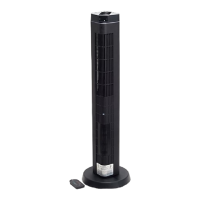

 To Next Page