5
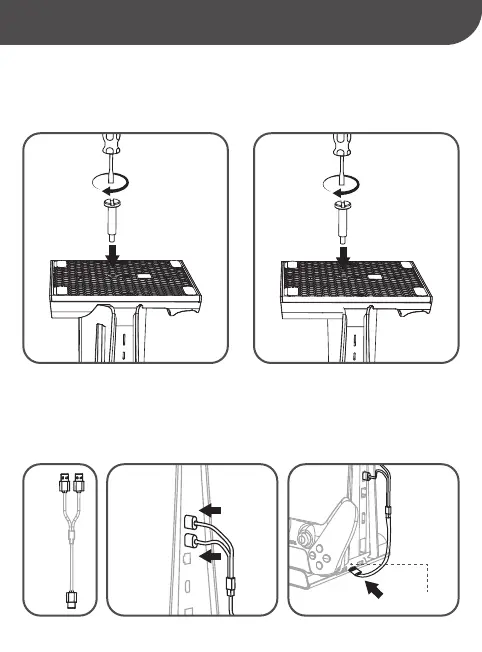
USB TYPE-C (IN)
2x
USB-A
1x
USB-C
4.2. CONECTAR EL CABLE DE CARGA EN LA CONSOLA Y EN LA BASE/CONECTE O CABO DE CARREGAMENTO À CONSOLA E À
BASE/CONNECT THE CHARGING CABLE INTO THE CONSOLE AND THE STAND
• Conecte los 2 cables USB-A, cada uno en un puerto USB trasero de la consola, y el cable USB-C en el puerto USB
marcado como “USB TYPE-C (IN)” de la parte trasera de la Base.
• Conecte os 2 cabos USB-A, cada um em uma porta USB traseira no consola, e o cabo USB-C na porta USB marcada
“USB-C (IN)” na parte traseira da Base.
• Connect the 2 USB-A plugs, each one into one of the rear USB ports of the console, and the USB-C plug into the USB
port labelled as “USB TYPE-C (IN)” at the back side of the Stand.
PARA/FOR PS5™ DIGITAL EDITION
PARA/FOR PS5™ DISC EDITION
4.1. COLOCAR LA CONSOLA EN LA BASE/COLOQUE A CONSOLA NA BASE/PLACING THE CONSOLE ON THE BASE
• NOTA: POR FAVOR, USE EL TORNILLO INCLUIDO EN ESTE PACK (NO OTRO). Para fijar la base a la consola, utilice un
destornillador plano (no incluido) y asegúrese que está bien apretado.
• NOTA: POR FAVOR, USE O PARAFUSO INCLUÍDO NESTE PACOTE (NÃO OUTRO). Para prender a base no console, use uma
chave de fenda (não incluída) e certifique-se de que esteja bem apertada.
• NOTE: PLEASE, USE THE SCREW INCLUDED (NOT ANY OTHER). Then, in order to fix the console to the base, use a flat
screwdriver (not included) and make sure the screw is tight.
4. GUÍA DE INSTALACIÓN/GUIA DE INSTALAÇÃO/INSTALL GUIDE


 To Next Page
 Loading...