80mm
USER MANUAL
TOUCH GESTURES
64x80mm
64 mm
///>BLX
TRUE WIRELESS BLUETOOTH" EARBUDS
This with is the
be in with
THANK YOU
For choosing BLXBuds!
Listen to music and take calls without getting tied up in a
bunch of wires.
BLXBuds are true wireless earbuds that use Bluetooth@ 5.1
to seam esslyconnect with your phone or other
compatible devices. Enjoyhours of music,hands-free
calls, and crysta -clear audio thanks to BLXBuds'
advanced audio engineering.
Please read this user manual before using your new
wireless earbuds. Make sure to keep this document for
future reference.
AUTO ON/ OFF
o
WHAT'S INCLUDED QUICK USE GUIDE
Pleaseremember to fully charge the earbuds and case
before first use. Full charge in approximately 72 minutes.
IMPORTANT: Pleaseremove the charging pin protective
fi m before use!
How to wear
Insert the earbuds into your ears and adjust them for a
snug and secure fit.
How to pair
1' Onceyouopenthechargingcaseandremovethe
earbuds, the eft and right earbuds wil automatical y
pair with each other.
SPECIFICATIONS
Model: 30888/30889
BT Version: V5.l
nput Voltage: DC5V
Battery Capacity: 35*2mAh/250mAh
BT Frequency Range: 2.402-2.480GHz
Audio Frequency: 20Hz-20KHz
Drivers Size: 01 Omm
Transmission Range: 10m
Sensitivity: 103dB±3dB
PlaybackTime: About 6 hours
Charging Time: About 72 minutes
GET IN TOUCH
Thank you for choosing BLXBuds!
Have any questions about our products?
You can contact our helpfu customer
service team by going to
https://support.blxbuds.com
or by scanning the QR code on the right.
We're a ways happy to help!
Activate your warranty at
https://www.blaux.com/warranty-registration.html
2. Turn on Bluetooth and select OBLXBUDS" from the I'st
Of Bluetooth devices.
< Setting Bluetooth
Bluetooth
Now discoverable as"iPhone"
BLXBUDS
Auto pairing
O)
< 1m
Earbuds:
O) Eartip
@Touch contro
@ LED indicator
user Manual
Charging Cable
Charging case:
@Type-C charging port
CS)EDdig 'ta display
Ear Tips (S/M/L)
2.
WARNING
x3$ x15Sl« x2sa
Play/Pause/Answer
Hang up x2
Voice assistant (Siri) x3
Long press 1.5s: Previous song
Long press 2s: Reject
CHARGING
Charging the case:
X15S»l
Right:
Play/Pause/Answer
Hang up x2
Voice assistant (Siri) x3
Long press 1.5s: Next song
Long press 2s: Reject
2.
3.
4.
5.
6.
l. Remove the earbuds from the case and they'
automatically power on.
2. Place the earbuds back into the case and they'll
automatically power Off.
MANUALLY ON/OFF
l. Press and hold the touch contro
for 3 seconds to power on.
2. Pressand hold the touch contro
for 5 seconds to power Off.
To prevent injury to hearing, do not listen for
extended periods of time at high volume.
For traffic safety, do not use earbuds while driving Or
cycling.
The earbuds can only be charged with a 5V charger.
Do not expose the earbuds to high temperatures or
sunlight for ong periods of time.
The storage temperature Of the earbuds is -200C to
400C.
Pleaseful y charge the earbuds for long-term storage,
and ensure they are charged every 3 months.
Before using the earbuds, please remove the
protective film, place them into the charging case,
and charge until full.
Flashing LEDdigital display - charging
Solid LED digita display and displayed 100 fully charged
Charging the earbuds:
Solid red light - charging
O Solid blue light for 15secondsthen turnsoff fu ycharged
Full charge in approximate y 72 minutes
o
o
Removethe earbuds from the case,and they will
automatically connect back to the last Bluetooth
device used.
When the earbuds are out Of range and disconnected
from the device, they will automatical y reconnect after
they return to range within 1 minute.
FCCID: 2AX4F-30888
'C: 27073-30888
HVIN: 30888
WEEE Reg.-Nr. DE25739568
not ar«l(21this •«lLKling
that of the
'his
This with Canada limi•z
life,this product
Yau
(hemunicipaladminisFMionthe facilityis
Thi d
this m
not the
'o, the
Not. has
o the 8digital
to pan IS of are vosonaO
hvmful ina ip
u generates
and if in
which
equipmeMoff s
the receiving
the the equipment and
on a circuit to which is
into
RF radiation
ngi
is aregistered SIG.Inc.and use
Other belongto their


 To Next Page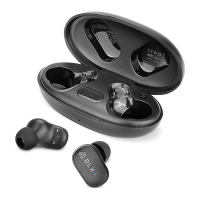


 General