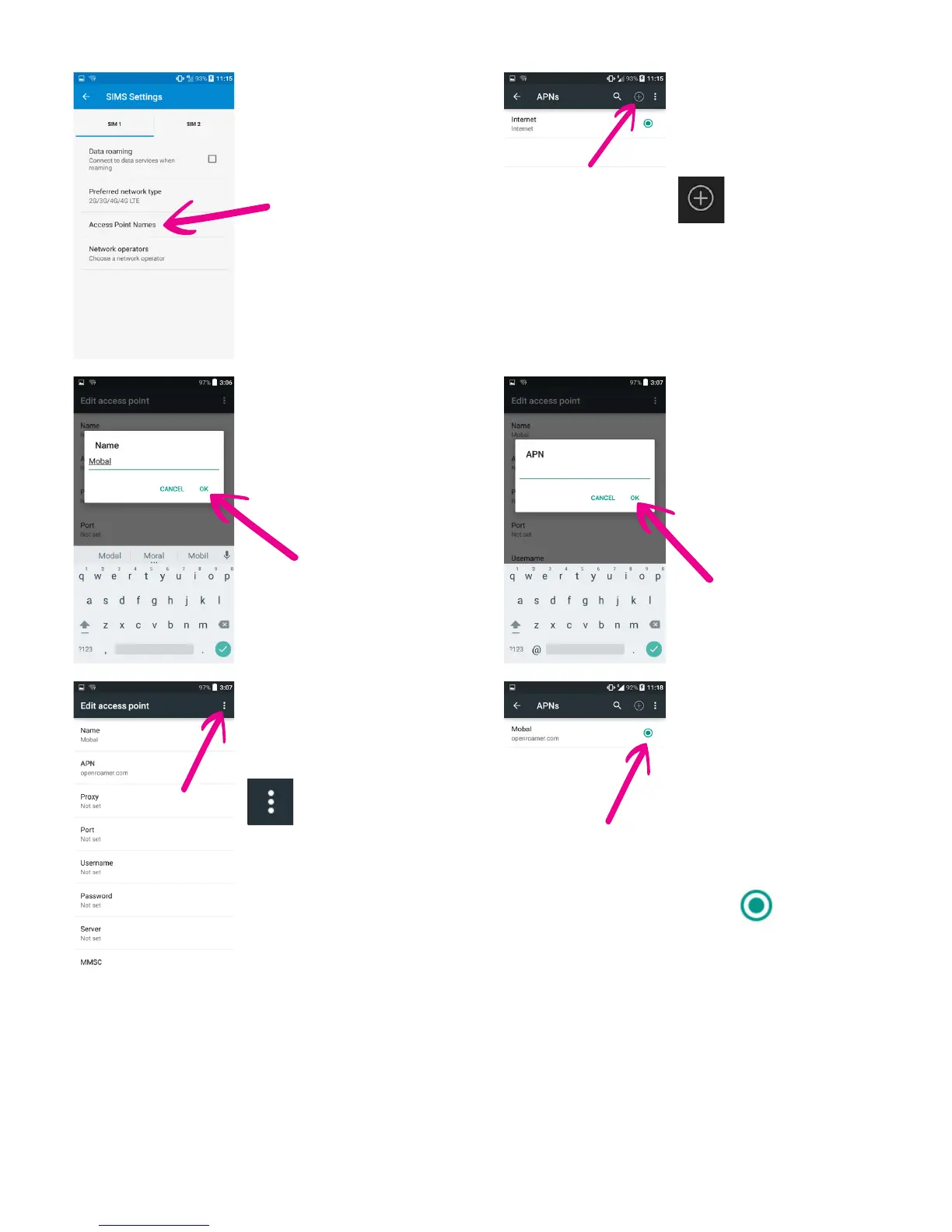
13 Please now restart your phone for the changes to take eect. You are now ready to use the
internet - at home or as you travel!
Please note: These data settings may reset as you travel from country to country.
Please keep this guide safe as you may need to repeat the above steps in order to enjoy your
Mobal Data Service as you travel.
7 On the same screen,
tap “Access Point Names“
9 Tap on “Name“ (which
is rst in the list at the top),
when the new window
opens type in “Mobal“
then, press “OK“
11 Press the option
button (located on the top
right corner of the screen),
and choose “Save“
8 Press the “plus symbol“
located in the top right
section of the screen next
to “APNs“
10 Then tap on “APN“
and when the new
window opens type in
“internet” or
“wap.vodafone.co.uk“
then, press “OK“
12 You should now see
your cellular data settings
on the screen under the
name “Mobal“.
Locate the circle on the
right next to your Mobal
Data settings and tap on it.
Make sure that circle turns
blue.
internet



 To Previous Page