EasyManua.ls Logo

Blueant TalkX - Page 7

Blueant TalkX
18 pages
Print Icon
To Next Page IconTo Next Page
To Previous Page IconTo Previous Page
Loading...
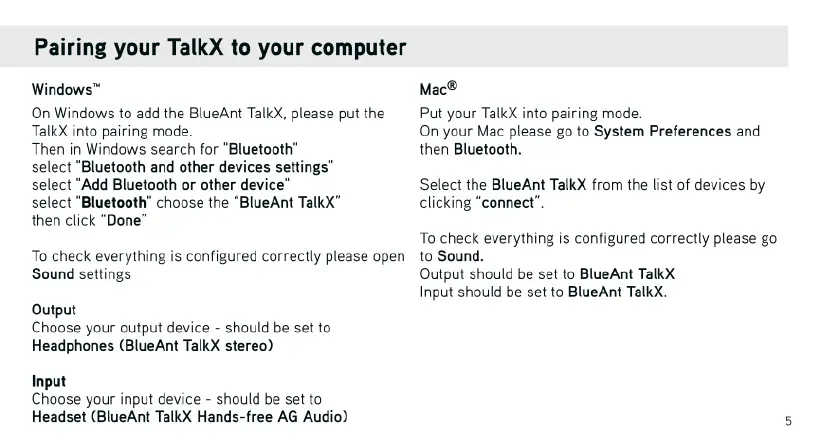
Pairing
your
TalkX
to
your
computer
Windows™
Mac®
On
Windows
to
add
the
BlueAnt
TalkX,
please
putthe
Put
your
TalkX
into
pairing
mode.
TalkX
into
pairing
mode.
On
your
Mac
please
go
to
System
Preferences
and
Then
in
Windows
search
for
"Bluetooth”
then
Bluetooth.
select
"Bluetooth
and other
devices
settings”
select
"Add
Bluetooth
or
other
device”
Select
the
BlueAnt
TalkX
from
the
list
of
devices
by
select
“Bluetooth”
choose
the
“BlueAnt
TalkX"
clicking
“connect”
then
click
“Done”
To
check
everything
is
configured
correctly
please
go
To
check
everything
is
configured
correctly
please
open
to
Sound.
Sound
settings
Output
should
be
set
to
BlueAnt
TalkX
Input
should
be
set
to
BlueAnt
TalkX.
Output
Choose
your
output
device
-
should
be set
to
Headphones
(BlueAnt
TalkX
stereo)
Input
Choose
your
input
device
-
should
be
set
to
Headset
(BlueAnt
TalkX
Hands-free
AG
Audio)

Related product manuals