EasyManua.ls Logo

Blueant TalkX - Page 9

Blueant TalkX
18 pages
Print Icon
To Next Page IconTo Next Page
To Previous Page IconTo Previous Page
Loading...
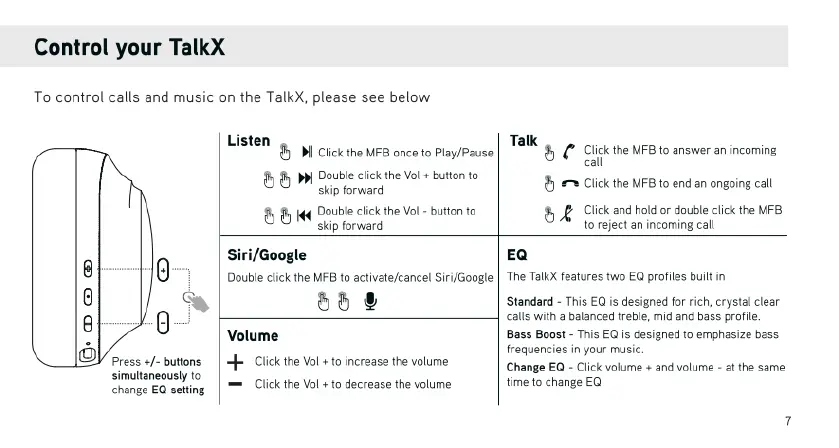
Control
your
TalkX
To
control
calls
and
music
on
the
TalkX,
please
see
below
8
]
8
Gy
0
Press
+/-
buttons
simultaneously
to
change
EQ
setting,
LISten
& )
ke
B
ance
o
PlylPouse
|
T2
8
("
Clckthe
MFB
1
snswer
an
incoming
B
W
oo
dckbetalebutonto
|
g
o
iy
st
endsnngo
ca
BB
o
B
Creecamncommgedt
Siri/Google
EQ
Double
click the
MFB
to
activate/cancel
Siri/Google
58
&
Volume
<
Click
the
Vol
+
to
increase
the
volume
=
Click
the
Vol
+
to
decrease
the
volume
‘The
TalkX
features
two
EQ
profiles
built
in
‘Standard
-
This
EQ
is
designed
for
rich,
crystal
clear
calls
with
a
balanced
treble,
mid
and
bass
profile.
Bass Boost
-
This
EQ
is
designed
to
emphasize
bass.
frequencies
in
your
music.
Change
EQ
-
Click
volume
+
and
volume
-
at
the
same
time
to
change
EQ

Related product manuals