Need help?
Do you have a question about the Bluesound PULSE M and is the answer not in the manual?
Describes the 360-degree sound, Omni-Hybrid design, and amplifier.
Details the elliptical cabinet, placement flexibility, and aesthetic options.
Explains stereo pairing, rear surround use, and multi-room capabilities.
Guidance on positioning the PULSE M for optimal sound in a room environment.
Discusses how room shape and dimensions affect sound quality and placement.
Instructions for wall-mounting or stand-mounting the PULSE M using accessories.
Explains the need for a network connection and how to connect via Ethernet or Wi-Fi.
Details the process to reset the PULSE M to factory settings, warning about data loss.
The Bluesound PULSE M is a wireless streaming speaker designed to deliver high-resolution audio in various home environments. It can function as a standalone music player, filling a room with sound, or be integrated into a multi-room setup with other Bluesound players for a synchronized listening experience throughout the home. For full functionality, the PULSE M requires either a wired or wireless connection to your home network.
The speaker features an Omni-Hybrid™ design, which includes an upfiring, omnidirectional woofer and two tweeters positioned at a 45-degree offset. These components are driven by a DSP-enabled 80-watt smart amplifier, working in concert to produce a rich, room-filling sound that is enjoyable from nearly any listening angle. This design allows for a 360-degree sound experience, making it suitable for various placements within a room.
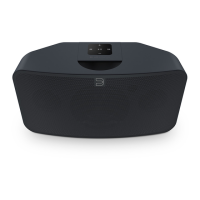
Aesthetically, the PULSE M is housed in an elliptical cabinet, a space-saving design that allows it to fit easily into different areas of your home. It offers placement flexibility, with optional accessories such as the WM230 wall mount and FS230 floor stands available separately. The speaker is finished with an acoustically transparent fabric grille and comes in either black or white, contributing to its overall design and sound quality.
Beyond standalone use, the PULSE M offers versatile configuration options. Two PULSE M units can be stereo-paired to create a true two-channel listening experience, providing an ultra-wide soundstage even when listening off-axis. For home theater enthusiasts, PULSE Ms can be used as rear surrounds in a Bluesound home theater group, enhancing the immersive experience for TV, movies, and gaming. The PULSE M can also seamlessly integrate with other players in a Bluesound ecosystem, enabling multi-room audio delivery of high-resolution content to multiple rooms simultaneously.
The PULSE M features a top-mounted control panel with several interactive elements. It includes five programmable preset buttons, which can be configured using the presets menu in the BluOS App. A volume slider/tap allows for precise volume control; tapping the ends adjusts volume in 1dB intervals, while tapping the slider in the desired direction adjusts it in 3dB intervals. Dedicated buttons for "Previous Track" and "Next Track" enable navigation through your current play queue.
A multi-functional PLAY/PAUSE button serves as both a visual indicator of player status and a control for playback. For an ungrouped player, pressing this button will play or pause the stream. If listening to an internet radio stream, the pause function works for 30 seconds before the stream stops. When grouped with other players, pressing the PLAY/PAUSE button will mute that specific player while others continue the stream, indicated by the player's LED flashing blue. This button is also integral to the factory reset process.
The PULSE M's status indicator, an LED, communicates various operational states through different blink codes. For example, a short blue flash followed by red indicates powering up or rebooting. Solid green signifies Hotspot Mode, while flashing green means it's connecting to the network. A white pulse indicates a software update is available, and solid red denotes Upgrade Mode. Flashing blue indicates Mute Mode, and solid white signifies indexing. Solid blue indicates connection to the network and readiness for use with the BluOS App. A flashing red light indicates a factory reset is in process, and solid purple means Hotspot Mode has timed out.
Connectivity options on the PULSE M include an OPTICAL/ANALOG IN port, which can be used with a 3.5mm stereo audio cable (not provided) to connect to an analog source device. With the included 3.5mm Mini Jack to Toslink adapter, a digital optical source can also be connected. A 3.5mm headphone jack is also present, which automatically mutes the speaker output when headphones are connected.
For local media playback, a USB (Type A) port is available for connecting USB mass storage devices, such as portable flash memory or external hard drives (FAT32 formatted). This port can also be used for manual software upgrades, though this is typically done under the guidance of Bluesound Support.
Network connectivity is crucial for the PULSE M. A LAN PORT is provided for a wired Ethernet connection, which is recommended for optimal network performance. An Ethernet cable (provided) connects the PULSE M to your wired broadband router. The device also supports Wi-Fi connectivity.
Power is supplied via an AC MAINS INPUT, and the PULSE M comes with two separate AC power cords to accommodate different regional requirements. It's important to firmly connect the appropriate AC power cord to the input socket before plugging it into a wall outlet.
Placement considerations are important for optimizing the PULSE M's sound. Common placements include countertops or sideboards. The distance from the player to an AC power source should be considered, as the device comes with a 2m/6ft power cable. Room acoustics significantly influence the sonic characteristics. Experimentation with speaker placement can help achieve the desired frequency response.
The size and shape of the listening room affect sound propagation. In smaller rooms, wall reflections reinforce sound, while in larger spaces, sound travels further, requiring higher output levels. Room shape can lead to standing waves at low frequencies, which can be minimized by careful positioning of the PULSE M relative to the listening area. Generally, corner placement reinforces low-frequency output and deep bass, while placement along a wall provides less deep bass reinforcement but still emphasizes male vocals. In-room placement tends to offer a more neutral response with less deep bass emphasis.
For mounting, the PULSE M has a built-in mechanism at the bottom. It can be wall-mounted using the Bluesound WM230 or stand-mounted using the Bluesound FS230 (accessories sold separately). This involves removing a rubber insert and an assembly screw/plate from the bottom of the unit and following the instructions provided with the mounting accessory. When wall-mounting with the WM230, it's important to mark pilot hole locations carefully, ensuring no electrical wiring or plumbing is concealed, and leaving enough space for cable connections. Pre-drilling holes and using appropriate fasteners for the surface material are necessary.
Network setup is critical for the PULSE M, as it relies on a well-implemented local area network. Internet access is required for software updates and to utilize cloud-based music streaming features. After connecting to power, the front panel LED will turn solid green, indicating it's ready for network connection in 'Hotspot' mode. The player can be added to the network via wired Ethernet (plugging an Ethernet cable into the LAN Port, which will turn the LED solid blue) or wirelessly via Wi-Fi (using the BluOS App's 'Add A Player' wizard). Finalizing setup involves initializing the PULSE M within the BluOS App.
Maintenance includes a factory reset option, which should be used with caution as it erases all customization, including Wi-Fi network configuration, file shares, and saved playlists. This process is recommended only if the player is not functioning or if an internet firmware upgrade has failed. To perform a factory reset: disconnect power, wait 30 seconds, reconnect power, then press and hold the PLAY/PAUSE button when the LED turns red. The LED will turn green, then back to red; continue holding for 30 seconds until the LED begins to blink red, then release. All customization will be removed, and factory settings restored. Releasing the button prematurely will cancel the reset and put the PULSE M in Upgrade Mode. A successful factory reset is indicated by the PULSE M returning to Hotspot mode (solid green LED for wireless) or connecting as a new player (solid blue LED for wired Ethernet).
 General
| Type | Wireless Streaming Speaker |
|---|---|
| Connectivity | Wi-Fi, Ethernet, Bluetooth |
| Color Options | Black, White |
| Audio Codecs | MP3, FLAC, ALAC, WAV, AIFF, MQA, AAC |
| Streaming Services | Spotify, Tidal, Qobuz, Amazon Music, Deezer |
| Voice Control | Amazon Alexa; Google Assistant |
| Inputs | 3.5mm Analog |
| Outputs | 3.5mm Analog |
| Supported Audio Formats | MP3, FLAC, ALAC, AIFF, AAC, MQA, WAV |
| Wireless Technology | Wi-Fi 5 (802.11ac, dual-band) |

 To Next Page