EasyManua.ls Logo

Bluestone 80-5101 - Page 11

Bluestone 80-5101
17 pages
Print Icon
To Next Page IconTo Next Page
To Previous Page IconTo Previous Page
Loading...
---
Unit
Operation
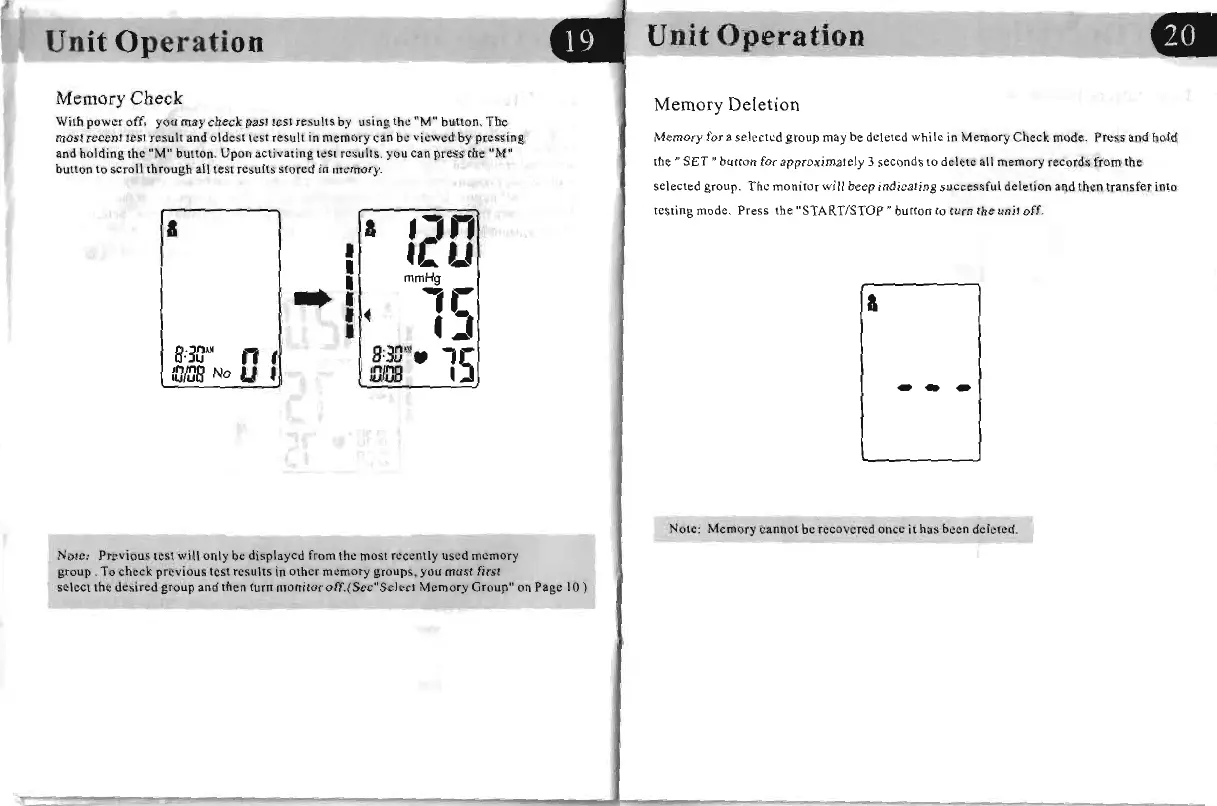
Memory
Check
With
power
off,
you
may
cbeck
past
test
results
by
using
the
"M"
button.
The
most
recent
test
resull
and
oldest
lest
result
in
memory
can
be-
viewed
by
pressing
and
holding
[he
"M"
button.
Upon
activating
leSt
resullS
.
you
can
press
the
"M"
bulton
to
scroll
through
all
test
results
stored
in
memory.
a &
'2"
mmHg
_I
~
,
U
...
.)
B:
311"
n,
'5
B:311".
:'JIDB
No U ,
IDm
,
Note: Previous
lest
will only be displayed from the rnost recently used memory
group.
To
check
pn:vjous test results
in
other memory groups, you must first
select
the
desired
group
and
then
turn
monitor
otT.(Sec"Selcct
Memory
Group"
on
Page
10)
Unit
Operation
Memory
Deletion
Memory
for a
selected
group
may
be
deleted
while
in
Memory
Check
mode
.
Press
and
bold
the"
SET"
button
for
approximately
3
seconds
to
delete
all
memory
records
from
the
selected
group.
Th
e
monitor
will beep
indicating
successful
deletion
and
then
transfer
inro
resting
mode.
Press
the
"START/STOP"
button
to
turn
the
unit off.
a
Note:
Memory
cannot
be
recovered
once
it
has
been
deleted.

Related product manuals