For efficient driving style, activate adaptive re-
cuperation
Display inefficient driving style
When driving above the efficient range,
an arrow will be displayed.
For example, the display occurs in the
following situations:
▷ Excessive acceleration.
▷ Excessive speed.
▷ Special route section, for example round-
about, ahead.
In addition, a deceleration notification is dis-
played.
Route-ahead Assistant
Principle
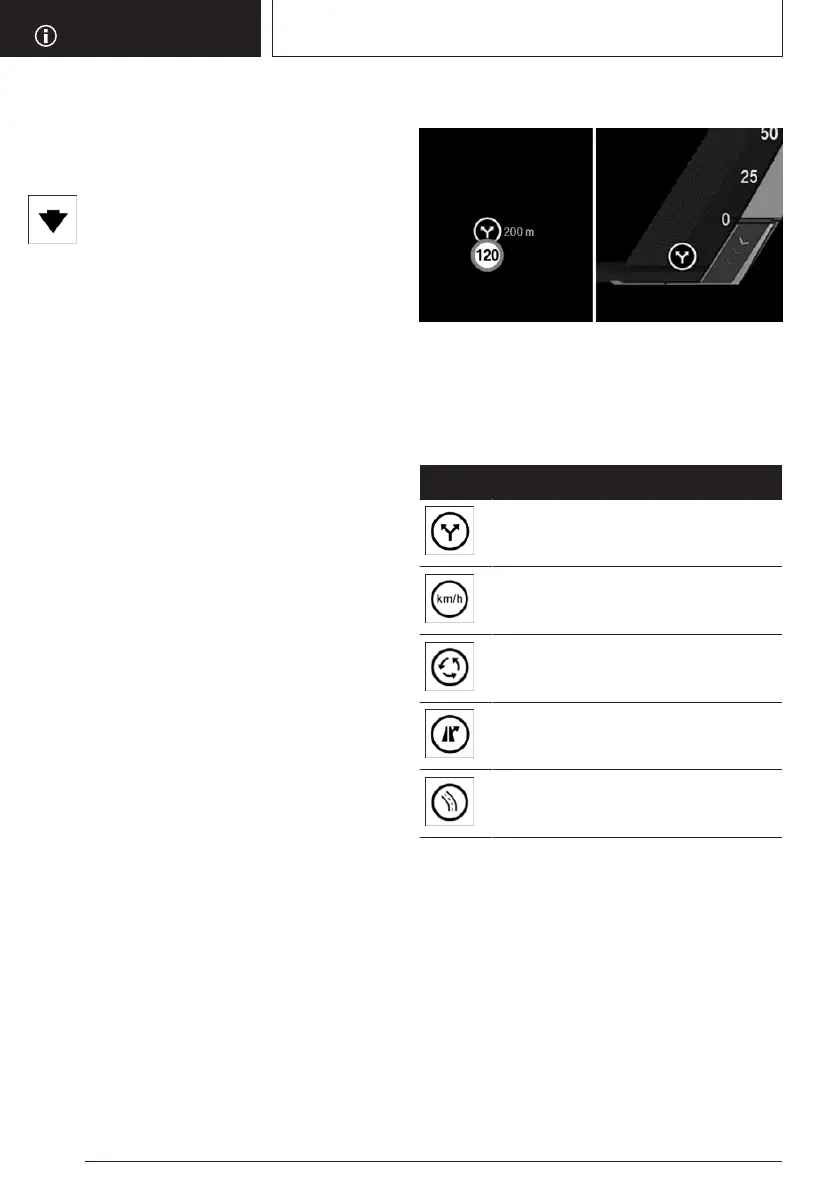
The display informs the driver about deceler-
ations ahead, for example, speed limit reduc-
tions or roundabouts, even when they are not
yet visible. The situation-specific information
and distance to the route section ahead is
shown above the current speed limit in the in-
strument cluster. If there is a notice, the speed
can be reduced in an energy-saving way by
coasting using the corresponding accelerator
pedal position until the section of road is
reached.
Display in the instrument cluster
A note regarding a section of the route ahead
is given as a recommendation to allow the ve-
hicle to roll.
An icon, for example a turn, indicates the de-
tected section of the route:
Icon Section of the road in front
Turning.
Speed limit or town entrance.
Roundabout.
Departure.
Corner.
System limits
For example, the display of the upcoming route
sections is not available in the following situa-
tions:
▷
With temporary and variable speed limits,
for example, at road works.
▷ In the case of navigation data that is inva-
lid, outdated or not available.
▷ If there are country-dependent restrictions
on map-based route sections.
Seite 280
DRIVING HINTS
Saving fuel
280
Online Edition for Part no. 01405A5E758 - VI/22









 To Next Page