Destination entry
134
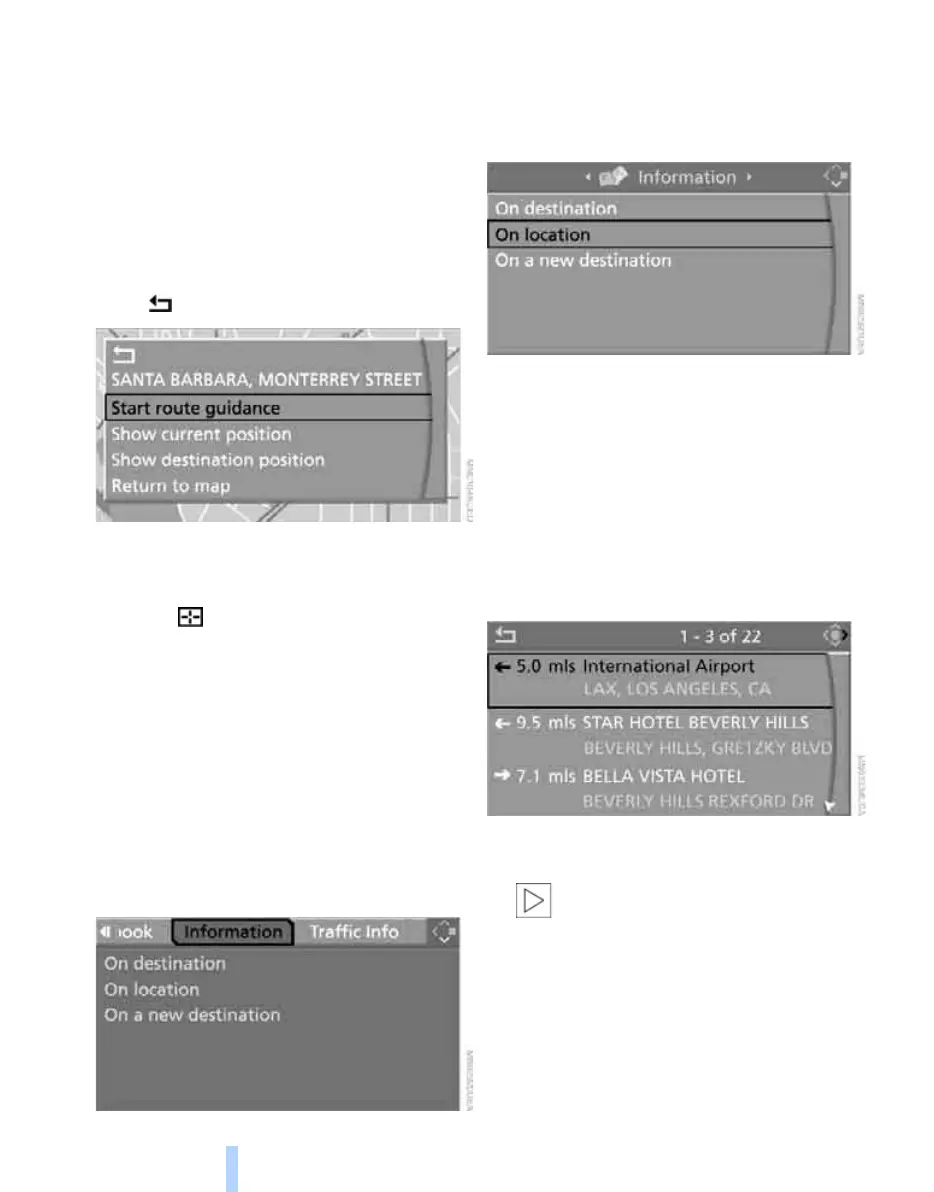
6. Select the desired menu item:
> "Start route guidance" starts destination
guidance.
> "Show current position" places your
current position at the center of the map.
> "Show destination position" places the
current destination at the center of the
map.
> "Return to map" changes back to the
"Input map".
> Exit the menu.
7. Press the controller.
The map for the destination entry can also be
displayed in the map display:
Select the symbol and press the controller.
Selecting destination using
information
You can obtain a display of selected destina-
tions, e.g. hotels, sights or hospitals, and adopt
them into the destination guidance.
1. Select "Navigation" and press the control-
ler.
2. Select "Information" and press the control-
ler.
3. Select location:
> "On destination"
> "On location"
> "On a new destination"
4. Press the controller.
5. Make your selection, e.g. "Hotels and res-
taurants", and press the controller.
6. Enter search criteria if necessary, e.g. the
maximum distance from the current loca-
tion.
7. Select "<Start search>" and press the con-
troller.
These destinations are displayed on the
Control Display.
8. Select a destination and press the control-
ler.
The scope of the information and
symbols is dependent on the respec-
tive navigation DVD.<
9. Select the desired menu item:
> To adopt the address in the destination
list and start the destination guidance:
Online Edition for Part no. 01 41 2 600 775 - © 08/08 BMW AG



 To Next Page