4. "Driving"
5. "Speed Assistant"
6. "Info on speed limits"
7. "Show current limit"
Display
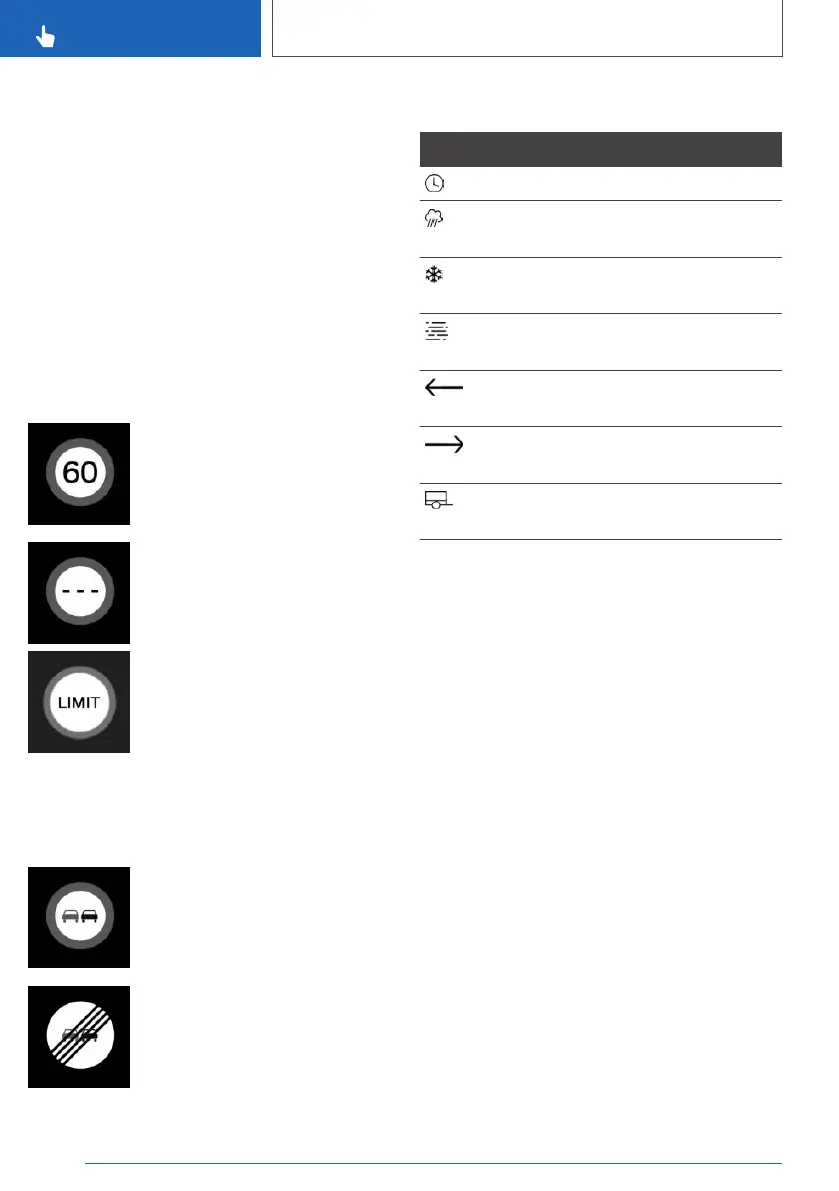
General
Depending on the national equipment, additional
signs and overtaking restrictions are displayed
together with Speed Limit Info.
Speed Limit Info
Present speed limit.
Depending on the vehicle equip‐
ment, Speed Limit Info may not
be available.
The display flashes if the detected speed limit
has been exceeded.
Overtaking restriction display
No overtaking.
End of overtaking restriction.
Additional signs
Symbols Description
Speed limit with time limit.
Speed limit only applies in wet
conditions.
Speed limit only applies in
snowy conditions.
Speed limit only applies in foggy
conditions.
Speed limit applies to exit on
left.
Speed limit applies to exit on
right.
Speed limit only applies when
towing a trailer.
Speed Limit Info with preview
Depending on the equipment version, an addi‐
tional symbol with distance information may also
be displayed to indicate that a change in speed
limit is ahead. Depending on the equipment,
temporary speed limits may also be displayed;
for example, speed limits at roadworks or traffic
management systems.
Temporary speed limits can only be displayed if
the following services are selected in the data
protection menu, see page 73, for the navigation
system:
▷ "Learning map"
▷ "Map update"
Settings
Via iDrive:
1.
"CAR"
2. "Settings"
3. "Driver assistance"
4. "Driving"
Seite 170
CONTROLS
Displays
170
Online Edition for Part no. xxx - VI/19



 To Next Page