Switch off parking lights:
Press the button on the light switch ele‐
ment or switch on the drive-ready state.
Welcome lights
General
Depending on the equipment version, the exte‐
rior lights of the vehicle can be individually adjus‐
ted.
Activating/deactivating
Via iDrive:
1.
"CAR"
2. "Settings"
3. "Exterior lighting"
4. Select the desired setting:
▷ "Welcome and goodbye"
When the vehicle is unlocked, individual
light functions are switched on for a limi‐
ted time.
▷ "Door handle lights"
The door handles and the ground in front
of the doors are illuminated for a limited
time.
▷ "Welcome Light Carpet"
The area adjacent to the vehicle is illumi‐
nated for a limited time.
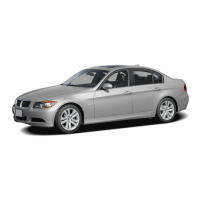
Welcome Light Carpet
The light source is located in the position indica‐
ted.
Keep the light source clean and unobstructed.
Headlight courtesy delay
feature
General
If the high-beam headlights are activated with
standby state switched on, the low-beam head‐
lights remain on for a of time.
Setting the duration
Via iDrive:
1.
"CAR"
2. "Settings"
3. "Exterior lighting"
4. "Home lights"
5. Select the desired setting.
Daytime driving lights
General
The daytime driving lights illuminate if drive-
ready state is switched on.
Seite 179
Lights
CONTROLS
179
Online Edition for Part no. xxx - VI/19



 To Next Page