Camera
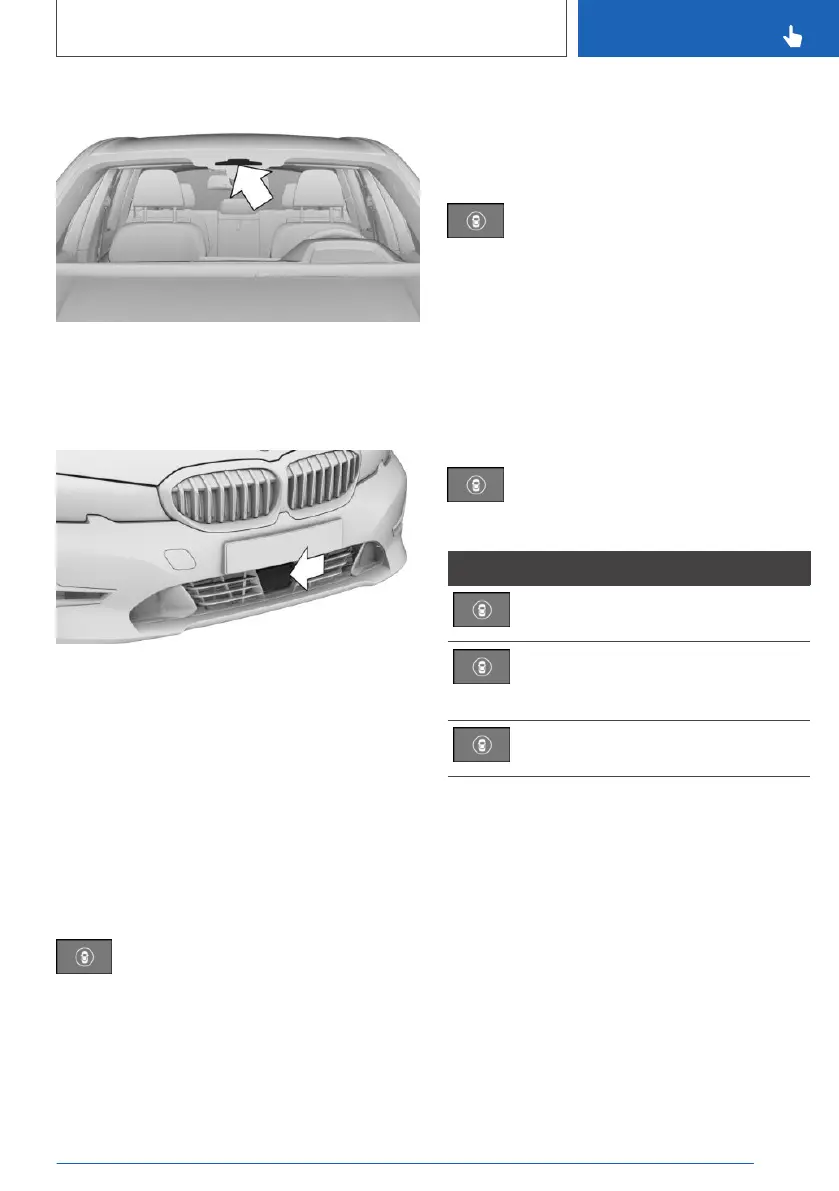
The camera is located near the rear-view mirror.
Keep the windscreen clean and clear in this area.
With radar sensor
The radar sensor is in the lower area of the front
bumper.
Keep the radar sensor clean and unobstructed.
Switching on/off
Automatic activation
The system is automatically activated at the start
of each journey.
Switching on/off manually
Press the button.
The menu for the Intelligent Safety Sys‐
tems is shown.
If all Intelligent Safety Systems were switched
off, all systems are now switched on.
"Configure INDIVIDUAL": depending on the
equipment, the Intelligent Safety Systems can be
configured individually. The individual settings
are activated and saved for the current driver
profile. As soon as a setting is changed in the
menu, all settings in the menu are activated.
Press the button repeatedly.
The setting switches between the
following:
"ALL ON": all Intelligent Safety Systems are
switched on. Basic settings are activated for the
sub-functions.
"INDIVIDUAL": the Intelligent Safety Systems are
switched on according to the individual settings.
Some Intelligent Safety Systems cannot be
switched off individually.
Press and hold the button.
All Intelligent Safety Systems are
switched off.
Button Status
Button illuminates green: all Intelligent
Safety Systems are switched on.
Button illuminates orange: some Intel‐
ligent Safety Systems are switched
off or are currently not available.
Button does not illuminate: all Intelli‐
gent Safety Systems are switched off.
Setting the warning time
Via iDrive:
1.
"CAR"
2. "Settings"
3. "Driver assistance"
4. "Safety and warnings"
5. "Front-collision warning"
6. Select the desired setting:
▷ "Early"
▷ "Medium"
▷ "Late": only acute warnings are displayed.
Seite 193
Safety
CONTROLS
193
Online Edition for Part no. xxx - VI/19



 To Next Page