Electric forward/back adjustment:
original position
1. Moving the seat to its original position:
▷ Press and hold this button until the
seat has returned to its original po‐
sition. Releasing the button stops window/
roof movement.
▷ Press the button briefly. The seat
moves to its original position. Press‐
ing again stops the motion.
2. Fold the rear seat backrest back.
Infotainment
Radio
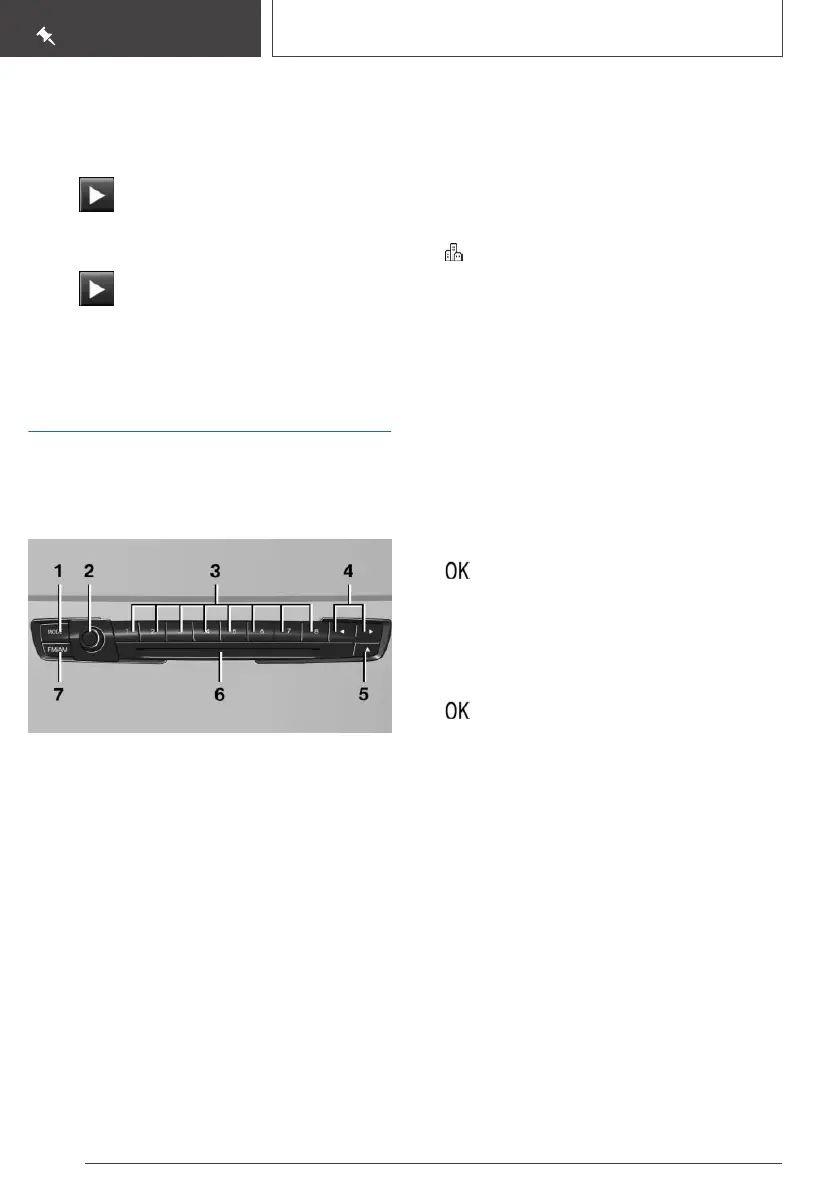
Control elements
1 Changing the entertainment source
2 Sound output on/off, volume
3 Programmable memory buttons
4 Changing the station/track
5 Eject CD/DVD
6 CD/DVD drive
7 Changing the waveband
Navigation destination entry
Entering a destination via address
State/province
1. "Navigation"
2. "Enter address"
3. "State/Province?"
4. Move the Controller to the right to select the
state from the list.
Entering the address
The address can be entered in any order.
Example: entering the address via the town/city
1.
"City/Postal code?"
2. Enter the town/city.
The list is narrowed down further with each
entry.
3. Select the symbol.
4. Select a town/city from the list.
5. If necessary, enter the street.
6. Select the street as you would the town/city.
7. If necessary, enter a house number.
8. Select the symbol.
9. Select a house number or range of house
numbers from the list.
Starting destination guidance
"Start guidance"
If only the town/city was entered: destination
guidance is started to the town/city center.
Connecting a mobile phone
After the mobile phone is connected once to the
vehicle, the mobile phone can be operated using
iDrive, the steering wheel buttons and spoken in‐
structions.
1.
"My Vehicle"
2. "iDrive settings"
Seite 24
QUICK REFERENCE
Set-up and use
24
Online Edition for Part no. 01402720665 - II/19



 To Next Page