▷ Height of the Head-up Display.
Storing
1. Switch on the ignition.
2. Set the desired position.
3.
Press the button. The LED in the
button lights up.
4. Press the desired button 1 or 2 while the
LED is lit. The LED goes out.
Calling up settings
Press the desired button 1 or 2.
The stored position is called up automatically.
The procedure stops when a seat setting switch
or one of the memory buttons is pressed.
Once underway, adjustment of the seat position
on the driver's side is disabled after a short while.
Infotainment
Radio
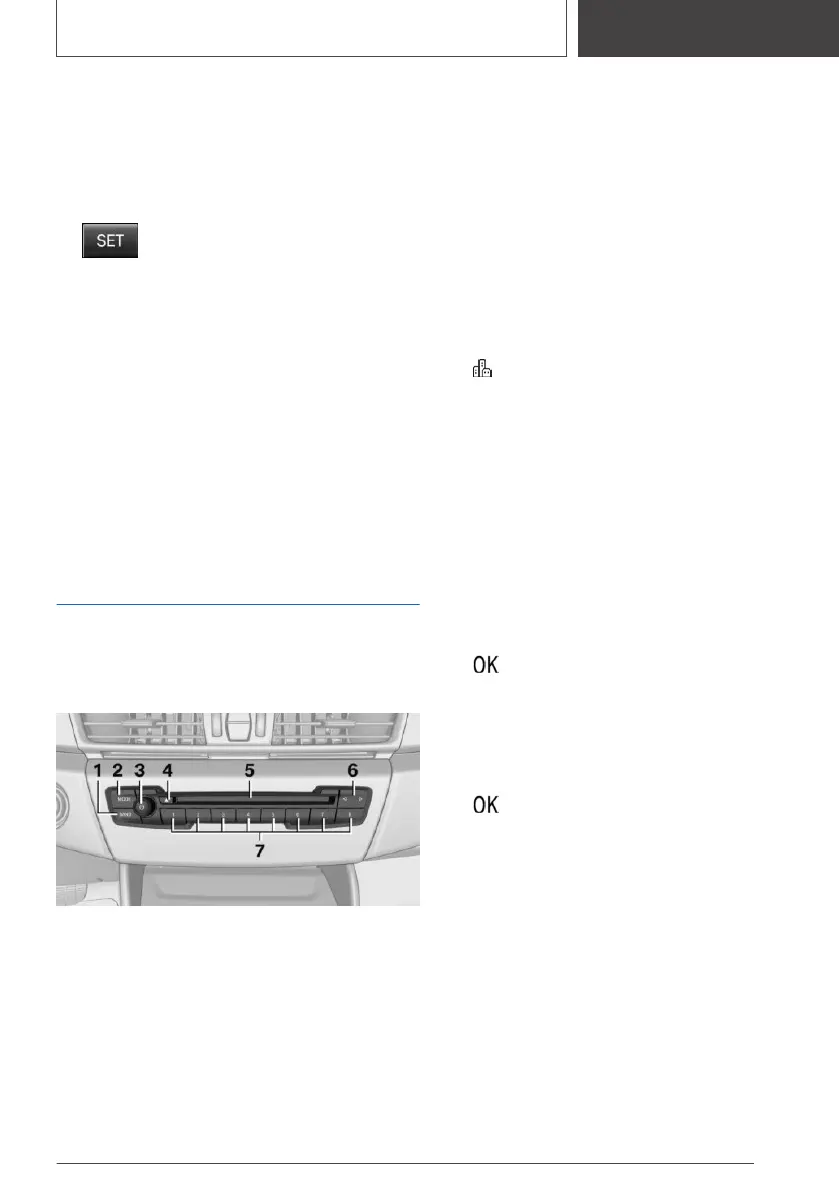
Control elements
1 Waveband/satellite radio
2 Changing the entertainment source
3 Sound output on/off, volume
4 Depending on the vehicle equipment: eject‐
ing a CD/DVD
5 Depending on the vehicle equipment:
CD/DVD drive
6 Changing the station/track
7 Programmable memory buttons
Navigation destination input
Entering a destination via address
Via iDrive:
State/province
1. "Navigation"
2. "Enter address"
3. "State/Province?"
4. Select the country from the list.
Entering the address
The address can be entered in any order.
Example: entering the address via the town/city
1.
"City/Postal code?"
2. Enter the town/city.
The list is narrowed down further with each
entry.
3. Select the icon.
4. Select a town/city from the list.
5. If necessary, enter the street.
6. Select the street as you would the town/city.
7. If necessary, enter a house number.
8. Select the icon.
9. Select a house number or range of house
numbers from the list.
Starting destination guidance
"Start guidance"
Destination guidance is started to the town/city
center if no street is entered.
Connecting a mobile phone
After the mobile phone is connected once to the
vehicle, the mobile phone can be operated using
Seite 19
Set-up and use
QUICK REFERENCE
19
Online Edition for Part no. 01405A2CF16 - II/21









 To Next Page