phones. Do not force the mobile phone into the
tray.
Overview
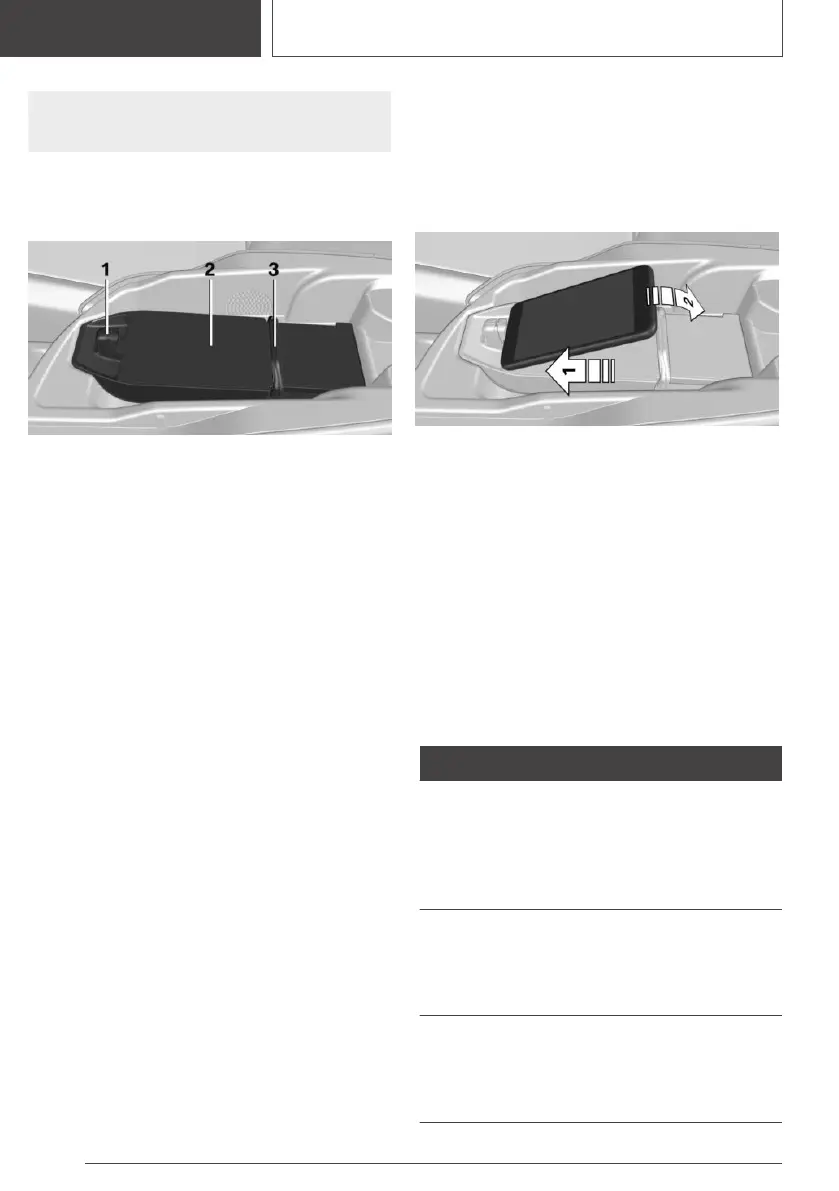
Tray in the center console:
1 Front holder with LED
2 Storage area
3 Movable clamp
Functional requirements
▷ The mobile phone must compatibly support
the required Qi standard.
If the mobile phone does not support the Qi
standard, the mobile phone can be charged
using a special Qi-compatible charging case.
▷ The ignition is switched on.
▷ Observe the maximum dimensions of the
mobile phone.
▷ Use only protective jackets and covers up to
a maximum thickness of 0.07 in/2 mm. Oth‐
erwise, the charging function may be im‐
paired.
▷ The mobile phone to be charged is located in
the center of the tray.
Operation
Inserting the mobile phone
The mobile phone must not exceed the maxi‐
mum size of approximately 5.9 x 3.07 x
0.62 in/150 x 78 x 16 mm.
1.
Open the center armrest.
2. Push back the clamp.
3. Insert the mobile phone with the display fac‐
ing upward in the direction of the front holder,
arrow 1.
4. Place the mobile phone in the storage area,
arrow 2.
5. Push the clamp forward and clamp the mo‐
bile phone in the tray.
6. Close the center armrest.
Removing the mobile phone
1.
Open the center armrest.
2. Push the clamp back and remove the mobile
phone.
LED displays
Color Meaning
Blue The mobile phone is charging.
Depending on the model and the ve‐
hicle, the blue LED is no longer illumi‐
nated once the inserted mobile phone
with Qi capability is fully charged.
Orange The mobile phone is not charging.
Temperature on the mobile phone
possibly too high or foreign object in
the charging tray.
Red The mobile phone is not charging.
Contact a dealer’s service center or
another qualified service center or re‐
pair shop.
Seite 206
CONTROLS
Interior equipment
206
Online Edition for Part no. 01405A2CF16 - II/21









 To Next Page