3. "General settings"
4. "Gesture control"
5. "Gesture control"
Settings
1. "CAR"
2. "Settings"
3. "General settings"
4. "Gesture control"
5. Select the desired setting.
Carrying out gestures
▷ Perform gestures underneath the interior mir‐
ror and next to the steering wheel.
▷ Execute gestures clearly.
▷ The gestures can also be executed from the
front-passenger side.
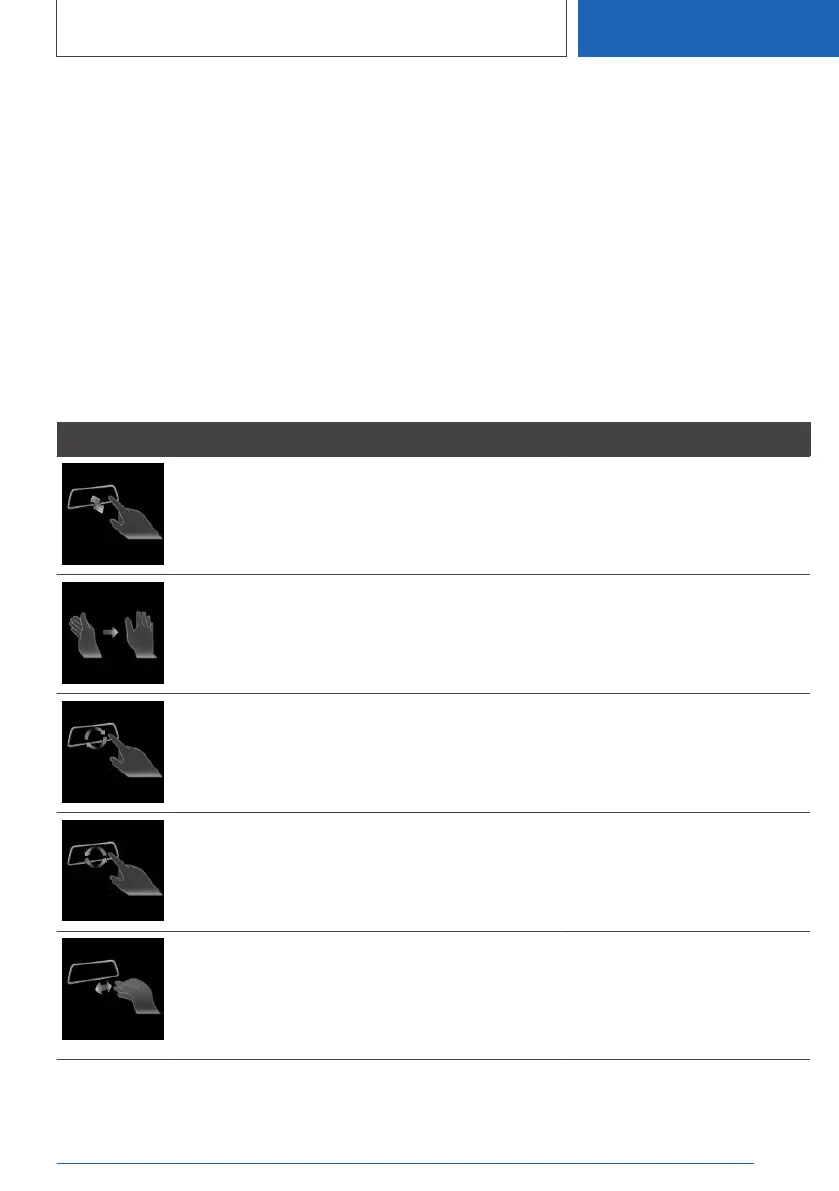
Possible gestures
Gesture Operation Function
Move index finger forward and backward in the di‐
rection of the screen.
Accept call.
Select a highlighted entry in a
list during voice control.
Confirm pop-up.
Move hand across the width of the Control Display
in the direction of the front-passenger side.
Reject call.
Close pop-up.
End voice control.
Slowly move hand clockwise in a circular pattern
with the index finger stretched out forward.
Gesture is detected after one circular motion.
Increase the volume.
Slowly move forearm counterclockwise in a circular
pattern with the index finger stretched out forward.
Gesture is detected after one circular motion.
Reduce the volume.
Pinch with thumb and index finger and move hand
horizontally to the right or left.
Surround View: turn camera
view.
This gesture can only be exe‐
cuted while the vehicle is sta‐
tionary.
Seite 57
iDrive
CONTROLS
57
Online Edition for Part no. 01405A385B6 - VI/21



 To Next Page