Display in the instrument cluster
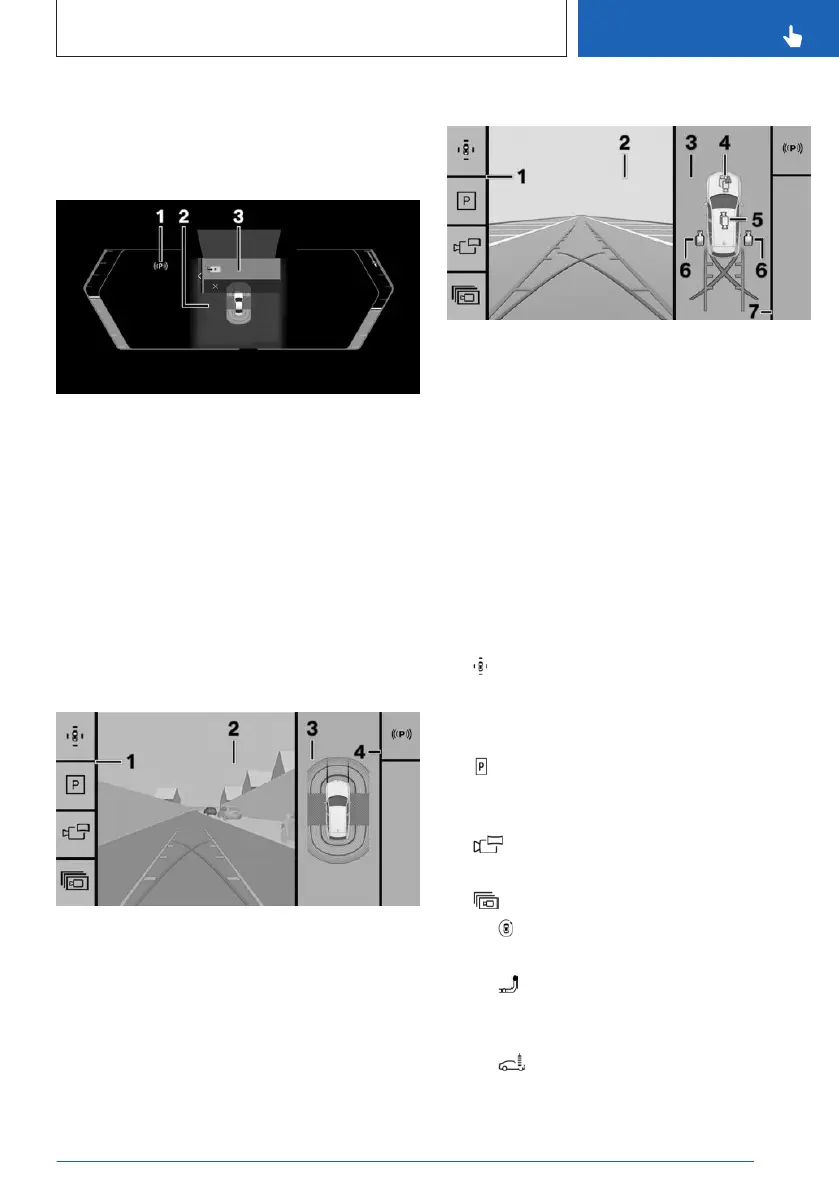
The instrument cluster shows displays of some
parking assistance systems such as Park Dis-
tance Control or Automatic Parking Assistant.
1 Status of parking assistance systems
2 Assisted View
3 Selection menu
Display on the control display
General information
Depending on vehicle equipment and on the
activated parking assistance system, the con-
trol display will vary.
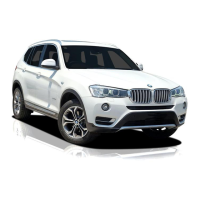
Assistance view
1
Toolbar, left
2 Camera image
3 Vehicle top view
4 Toolbar, right
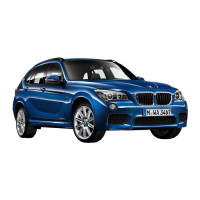
Parking view
1 Toolbar, left
2 Camera image
3 Selection window
4 Automatic camera perspective
5 Semi-automatic camera perspective
6 Side view
7 Toolbar, right
Toolbar, left
Different views and settings can be selected
via the left toolbar depending on the equip-
ment:
▷
"Parking view"
Depending on vehicle equipment, camera
views or the Park Distance Control view are
displayed.
▷ "Assist view"
A stylized top view of the vehicle is dis-
played.
▷ "Panorama view"
The cross traffic view is displayed.
▷ "More"
▷ "3D view"
A three-dimensional view is displayed.
▷ "Trailer coupling view"
The zoom for the trailer hitch can be
turned on.
▷ "Car wash view"
Seite 251
Parking
CONTROLS
251
Online Edition for Part no. 01405A8A608 - VI/23


 To Next Page