Overview
Buttons in the vehicle
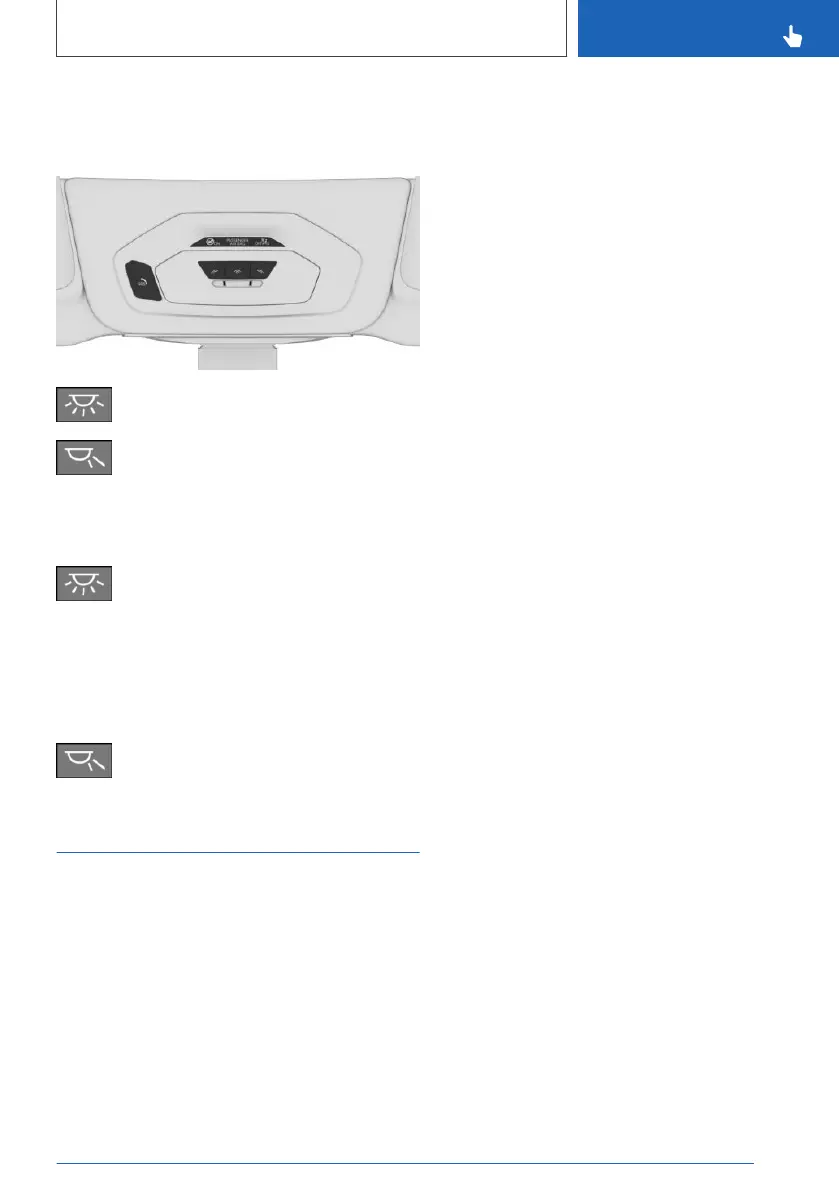
Interior lights
Reading lights
Switching the interior lights
on/off
Press the button.
To switch off permanently: press the button and
hold for approx. 3 seconds.
Switching the reading lights
on/off
Press the button.
Ambient light
General information
Depending on the equipment version, lighting
can be adjusted for some lights in the car's inte‐
rior.
Switching on/off
The ambient light is switched on when the vehi‐
cle is unlocked, and switched off when the vehi‐
cle is locked.
If the ambient light was deactivated via iDrive, it
will not be switched on when the vehicle is un‐
locked.
Via iDrive:
1. "CAR"
2. "Settings"
3. "Interior lighting"
4. "Ambient lighting"
The selected setting is stored for the driver pro‐
file currently used.
Selecting the color scheme
Via iDrive:
1.
"CAR"
2. "Settings"
3. "Interior lighting"
4. "Color"
5. Select the desired setting.
Setting the brightness
Via iDrive:
1.
"CAR"
2. "Settings"
3. "Interior lighting"
4. "Brightness"
5. Select the desired setting.
Dimmed while driving
Via iDrive:
1.
"CAR"
2. "Settings"
3. "Interior lighting"
4. "Dimmed for night driving"
Some lights of the interior lighting are dimmed
when the vehicle is driven in the dark.
The selected setting is stored for the driver pro‐
file currently used.
Seite 151
Lights
CONTROLS
151
Online Edition for Part no. 01402779113 - II/19



 To Next Page