General information
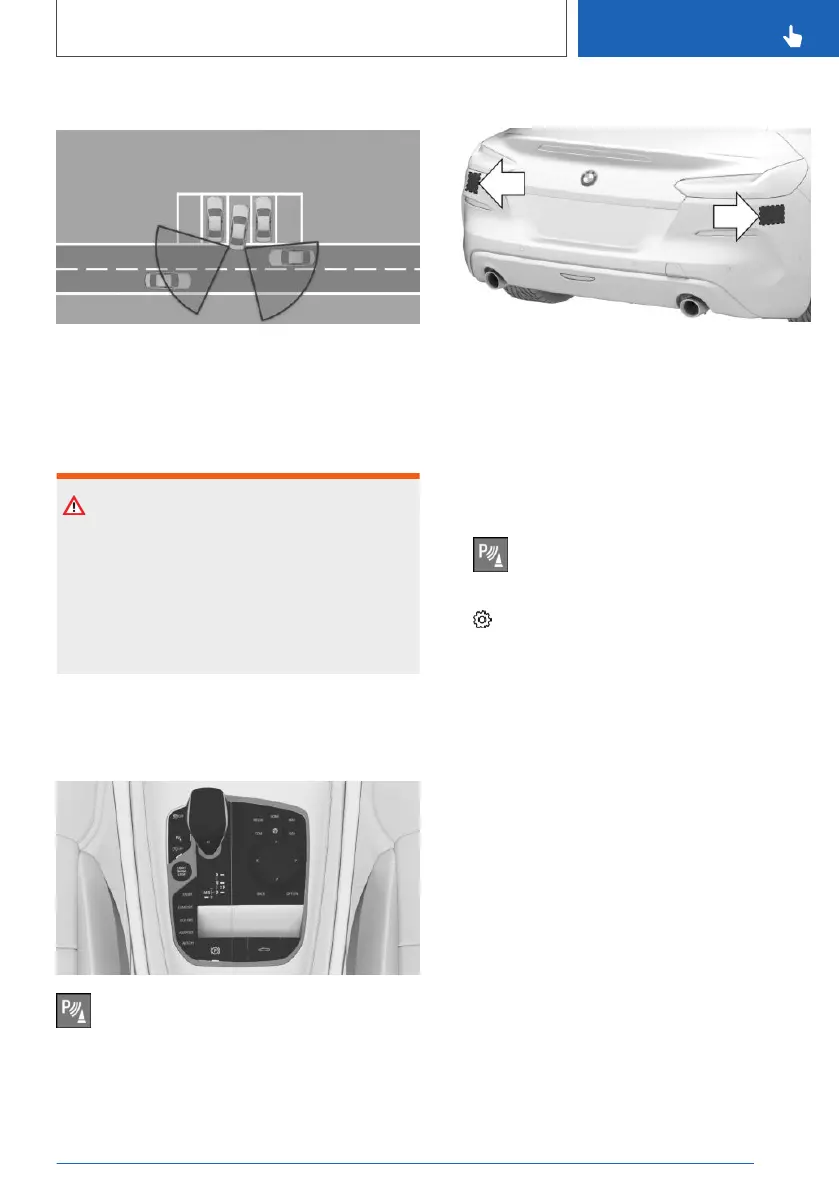
Two radar sensors in the rear bumper monitor
the area behind the vehicle.
The system indicates approaching traffic.
Safety information
Warning
The system cannot serve as a substitute for the
driver’s personal judgment in assessing visibility
and traffic situation. There is a risk of accident.
Adjust driving style to traffic conditions. Watch
traffic closely and actively intervene where ap‐
propriate.
Overview
Button in the vehicle
Park assistance button
Radar sensors
The radar sensors are located in the rear
bumper.
Always keep the bumper in the area of the radar
sensors clean and unobstructed.
Switching on/off
Activating/deactivating the system
1. Press the park assistance button.
2. Move the Controller to the right.
3. "Settings"
4. "Cross traffic warning"
5. "Cross traffic warning"
Or via iDrive:
1.
"CAR"
2. "Settings"
3. "Driver Assistance"
4. "Parking and Maneuvering"
5. "Cross traffic warning"
6. "Cross traffic warning"
Switching on automatically
If the system was activated on the Control Dis‐
play, it is automatically switched on as soon as
PDC Park Distance Control or Panorama View is
active and a gear is engaged.
If reverse gear is engaged, the rear system is
switched on.
Seite 203
Driver assistance systems
CONTROLS
203
Online Edition for Part no. 01402779113 - II/19



 To Next Page