82 S450 Operation & Maintenance Manual
LIFT AND TILT COMPENSATION (CONT’D)
Operation (ACS)
This procedure is described using hand controls. The
procedure can be performed using foot pedals on ACS
equipped loaders.
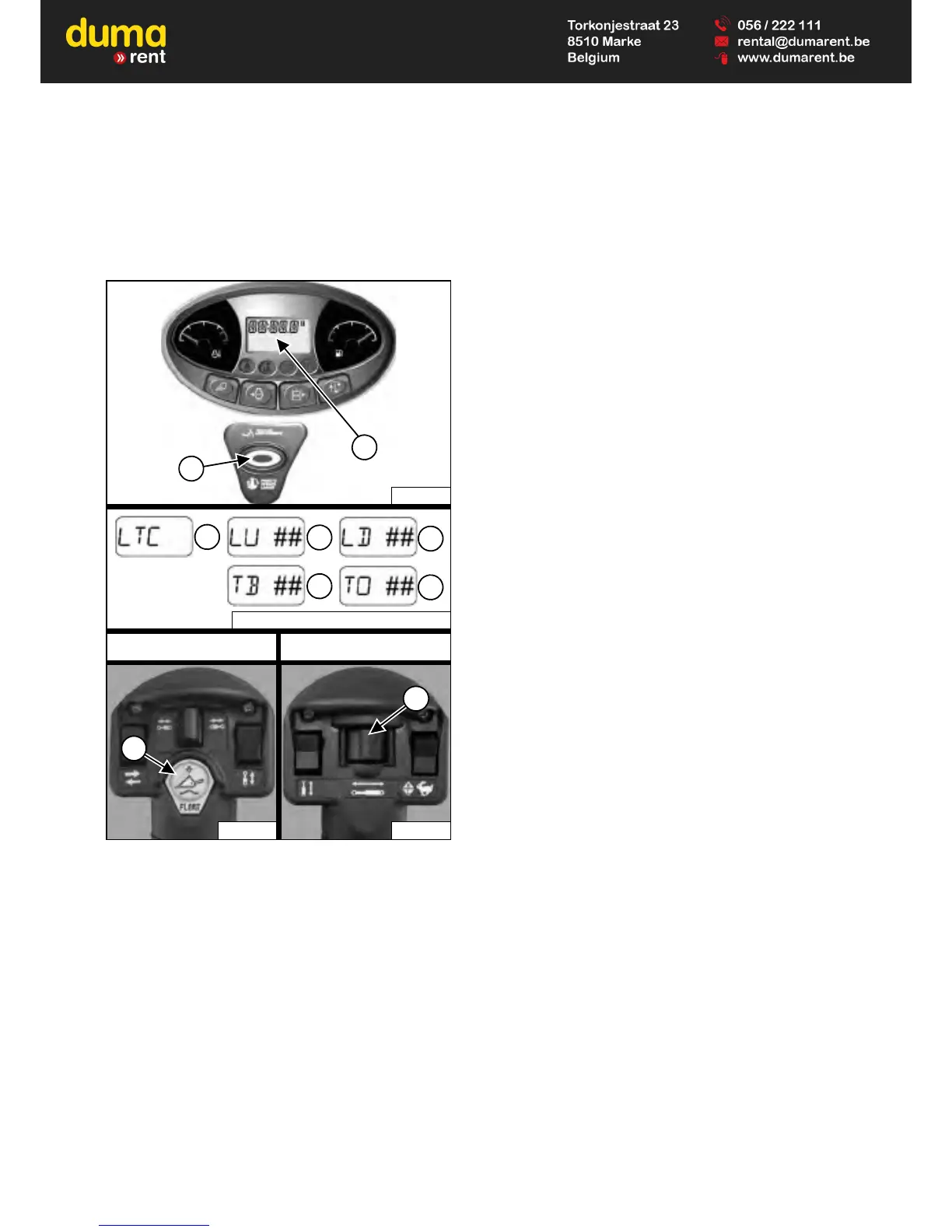
Figure 71
LTC – Lift and Tilt Compensation
LU – Lift Up
LD – Lift Down
TB – Tilt Back
TO – Tilt Out
1. Press and hold the float button (Item 8). Press the
PRESS TO OPERATE LOADER button (Item 1).
Release both buttons. This will open the lift and tilt
compensation menu. [LTC] (Item 3) will appear in the
data display (Item 2) [Figure 71].
2. Move the left handle outward and hold. [LU ##] (Item
4) will appear in the data display. (## will indicate the
current setting.) Move the switch (Item 9) [Figure 71]
to the right repeatedly until a slight upward movement
of the lift arms is noticed. The setting will increase by
one each time the switch is moved. The available
range of adjustment is -25 to 35.
NOTE: If the lift arms begin to move immediately,
move the switch (Item 9) [Figure 71] to the left
repeatedly until lift arm movement stops, then
move the switch to the right repeatedly until a
slight upward movement of the lift arms is
noticed. (This procedure also applies to the
next three steps.)
3. Move the left handle inward and hold. [LD ##] (Item
5) will appear in the data display. Move the switch
(Item 9) [Figure 71] to the right repeatedly until a
slight downward movement of the lift arms is noticed.
4. Move the right handle inward and hold. [TB ##] (Item
6) will appear in the data display. Move the switch
(Item 9) [Figure 71] to the right repeatedly until a
slight backward tilt movement of the Bob-Tach frame
is noticed.
5. Move the right handle outward and hold. [TO ##]
(Item 7) will appear in the data display. Move the
switch (Item 9) [Figure 71] to the right repeatedly until
a slight forward tilt movement of the Bob-Tach frame
is noticed.
Exiting The Lift And Tilt Compensation Menu:
The current lift and tilt compensation setting can be
saved by pressing the PRESS TO OPERATE LOADER
button (Item 1) [Figure 71]. The machine will exit from
the lift and tilt compensation menu.
OR
Raise and lower the seat bar to exit from the lift and tilt
compensation menu without saving. This will cancel all
changes made. Press the PRESS TO OPERATE
LOADER button (Item 1) [Figure 71] to continue
machine operation.
Perform several lift and tilt functions to determine if the
settings match your preferences. Repeat procedure if
desired.


 To Next Page
 Loading...