85 S450 Operation & Maintenance Manual
HYDRAULIC CONTROLS (CONT’D)
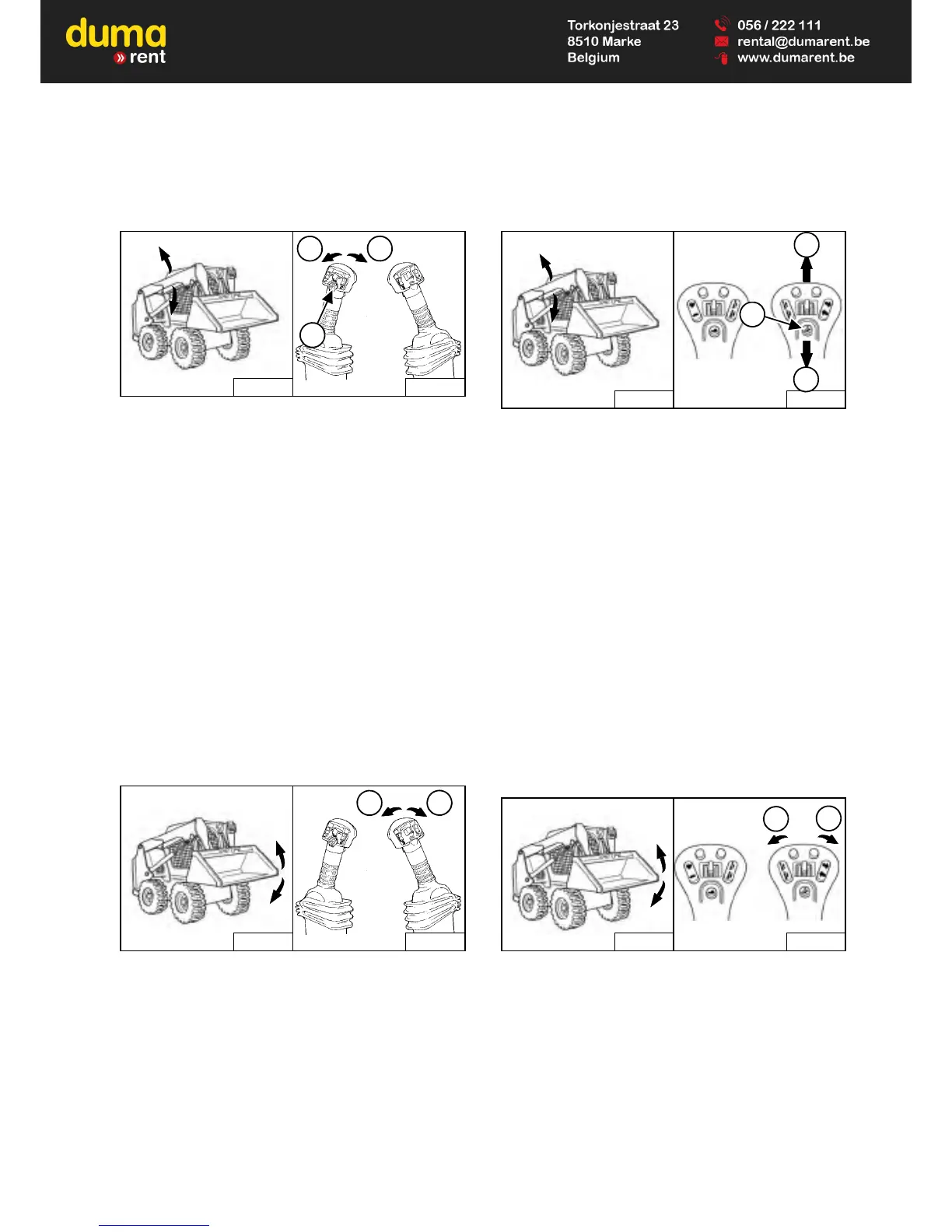
Advanced Control System (ACS) In HAND Control
Mode
Figure 75
Lift Arm Operation – (Left Handle)
Move the handle outward (Item 1) [Figure 75] to raise
the lift arms.
Move the handle inward (Item 2) [Figure 75] to lower
the lift arms.
Lift Arm Float Position – (Left Handle)
Press and hold the Float button (Item 3) while the
handle is in neutral. Move the handle to lift arm down
position (Item 2) [Figure 75], then release the button.
Press Float button (Item 3) again or move the handle
to lift arm up position (Item 1) [Figure 75] to
disengage.
Use the float position of the lift arms to level loose
material while driving backward.
Figure 76
Tilt Operation – (Right Handle)
Move the handle inward (Item 1) [Figure 76] to tilt the
bucket backward.
Move the handle outward (Item 2) [Figure 76] to tilt
the bucket forward.
Selectable Joystick Controls (SJC) In ‘ISO’ Control
Pattern
Figure 77
Lift Arm Operation – (Right Hand Joystick)
Move the joystick backward (Item 1) [Figure 77] to
raise the lift arms.
Move the joystick forward (Item 2) [Figure 77] to
lower the lift arms.
Lift Arm Float Position – (Right Hand Joystick)
Press and hold the Float button (Item 3) while the
joystick is in neutral. Move the joystick to lift arm down
position (Item 2) [Figure 77], then release the button.
Press Float button (Item 3) again or move the joystick
to lift arm up position (Item 1) [Figure 77] to
disengage.
Use the float position of the lift arms to level loose
material while driving backward.
Figure 78
Tilt Operation – (Right Hand Joystick)
Move the joystick inward (Item 1) [Figure 78] to tilt
the bucket backward.
Move the joystick outward (Item 2) [Figure 78] to tilt
the bucket forward.


 To Next Page
 Loading...