The P15S-0540 is a Digital Night Vision Monocular designed for observing objects in low light or complete darkness. It features 5X optical zoom and 8X digital zoom, enhancing visual senses for various applications.
Function Description:
This monocular is an optical instrument that captures images of objects in low light conditions. It is equipped with an Infrared Illuminator for use in full dark environments. The infrared illuminator can automatically activate in dark settings and its brightness can be adjusted based on object distance. A low-level illuminance transducer COMS is integrated, which automatically turns off the infrared illuminator if sufficient light sources (like streetlights or moonlight) are present, relying solely on the objective lens's focal length. The device supports photo shooting, video taking, and playback functions, making it versatile for day or night use.
Important Technical Specifications:
- Model: P15S-0540
- Magnification: 5X
- Dimension of Objectives: φ40mm
- FOV (Field of View): 5°x3.75°
- Ocular Adjustable Range: ±0.6
- Observing Distance (Low Light Environment): 2m~∞
- Observing Distance (Dark Environment): ~200m
- Operating Voltage: 3.7V DC
- Replaceable Battery: Lithium-ion rechargeable battery
- Battery Type: Large capacity rechargeable battery, 750mAh, 3.7V
- Runtime: Up to 2.5 hours without infrared illuminator; 1.5 hours with IR illuminator on.
- Measurement (LWH): 200×86×56 mm
- Weight: 400g
- Interfaces: USB 2.0 socket (for charging and PC connection), AV OUT sockets.
- Storage: TF card slot (no built-in storage; photo and video taking require a TF card).
Usage Features:
Power On/Off:
- Power On: Remove the objective cover and eyepiece cap. Long press the power button and look through Eyecup#11. The monocular is on if the screen lights up and icons are displayed.
- Icons: Battery charge indicator, image capacity remaining, current mode (photo shooting), TF card in.
- Power Off: In any mode, long press the power button to turn the monocular off.
Scenery Observation:
- Remove the objective cover. In photo shooting mode, aim at the desired objects and view through Eyecup#11.
- Adjust Diopter Ring#10 for sharp images.
- Adjust Objective Focus Wheel#2 for the sharpest image.
- Automatic fine-tuning control adjusts brightness based on scenery.
- Digital zoom (1X to 8X) is available by pressing the left and right buttons.
- If light is sufficient, the monocular operates without auxiliary light. Otherwise, auxiliary light automatically turns on to brightness default 5 (NL5 displayed).
- Announcement: Do not block the auxiliary light.
Brightness Adjustment:
- In photo shooting mode, press the IR button to enter the brightness adjustment menu.
- The displayed "Bright:" number indicates current screen brightness.
- Use the IR button to position the cursor (*) before "Bright:".
- Adjust brightness from 1 (dimmest) to 9 (brightest) using the left and right buttons.
Adjustment for Illumination:
- In photo shooting or videoing mode, press the IR button to enter the auxiliary light adjustment menu.
- The number after "Lamp:" indicates auxiliary light brightness. Use the IR button to position the cursor (*) before "Lamp".
- Adjust infrared illuminator brightness from 0 (off) to 9 (brightest) using the left and right buttons.
- When the illuminator is on, "NLX" (X being the IR brightness index) will flicker upon exiting the menu.
- The auxiliary lighting has automatic and manual states. Default is automatic. Manual state is entered when auxiliary lighting is set via the IR button. If NL is set to 0, automatic mode is off; for dark environments, NL must be manually set to 1 or above.
- Announcement: Menus disappear and return to photo mode if no operation occurs within 5 seconds.
Photo Mode:
- The monocular automatically enters observing mode after startup.
- Press the shutter button (OM) to take a photo. Each press captures one photo, saved automatically to the TF card.
- Image capacity remaining is calculated based on TF card storage; errors may occur.
- Announcement: No built-in storage; TF card required for photo and video taking.
Playback Mode:
- In observing mode, press the 'S' button twice to enter playback function.
- Icons: Battery life, number of photos, current mode (playback), TF card in.
- Menu: Battery life, shooting date, shooting time, current photo number, playback, video playback, VGA video format, TF card in.
- In playback mode, use the left and right buttons to view photos and videos.
- Playback order is based on shooting order.
- Press OM to play a video; press again to stop.
- Press 'S' to exit playback status.
Video Mode:
- In observing mode, press the 'S' button to enter video recording mode.
- Menu: Battery life, timekeeping, current mode, TF card in.
- Press OM to start recording. Icon 2 (timekeeping) activates, and the monocular records video automatically.
- Press OM again to stop recording.
- Video clips are automatically saved to the TF card.
- Available recording time is based on TF card storage; errors may occur.
- Press 'S' twice to return to observe status.
Time Setting:
- Press the IR button to enter the menu, then press it again to select "time sett".
- Use the left and right buttons to select the setting.
- Use the left and right buttons to change the index (year, month, day, hour, minute).
- Press OM to switch between year, month, day, hour, and minute.
- Press OM again to exit the menu.
Deletion:
- In playback mode, press the IR button to show the deletion menu.
- Switch between "YES" and "NO" using the left and right buttons.
- Press OM to confirm the selection.
- Press 'S' to exit the deletion mode.
Monitor Connection:
- Connect an external monitor to video output interface #6 to display the monocular's screen. The internal display will shut down.
PC Connection:
- The viewer has a USB 2.0 interface for connecting to a computer via a USB cable.
- The PC will automatically identify the monocular and read the content of the TF card.
- For data transmission, the viewer must have a battery inserted and be powered on.
Power Management:
- Auto Power Off: The monocular will turn off if no operation occurs within 3 or 10 minutes (configurable). Auto power off is disabled during video shooting and playback modes.
- External Power: The monocular operates continuously and will not turn off automatically when connected to an external power source. The battery will charge when connected to an external power source.
- Announcements: Standard mobile charging sources (1A or 2A recommended) can be used. The monocular charges when connected to computers.
Maintenance Features:
Operating Environment and Announcements:
- Store the monocular in its soft pouch when not in use.
- Operating temperature range: -5°C to 40°C. Relative humidity: 80%.
- To prevent wetness and mildew, store in a clear and dry environment. Avoid great pressure and solar radiation.
- If the image jitters or the LCD doesn't light up, charge the battery promptly.
- Blow away dusts before wiping optical surfaces.
- If the monocular is not used for a long time, charge the battery occasionally to prevent loss of effectiveness.
Configuration Standard:
- AV Video Cable: 1
- USB Cable: 1
- Pouch: 1
- Operating Instructions: 1
- Hand Grip Strap: 1
- Battery: 1
- Cloths: 1

 Need help?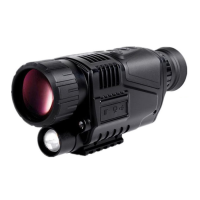

 To Next Page
 General